What to check before buying
Start with the room, then check light, streaming and sound. A large claimed image matters only if the projector can create it from the position you can actually use.
| Priority |
What to check |
Your needs |
| Room fit and placement |
Measure the usable projector-to-wall distance, wall area and furniture position. Check the exact model’s throw calculation for the image size you want. Consider short-throw or ultra-short-throw designs when the projector cannot sit far from the wall. |
I need a big image without blocking a walkway or moving furniture for every viewing session. If there is no workable throw distance or wall position, a television is likely to be the simpler everyday route. |
| Room light and image surface |
Assess daylight and whether curtains or blinds can darken the room. Compare brightness figures only when they use a compatible measurement basis. Check whether the wall is smooth and neutral, or whether a screen is needed. |
I want films and matches to remain comfortable to watch in the room I already have. A coloured wall can affect projected colour, according to BenQ UK’s product guidance. |
| Streaming and connections |
Confirm the exact apps and UK account support before relying on a smart platform. Check HDMI inputs for a streaming stick, set-top box or console, and check software support where stated. |
I want to use the services my household already watches without awkward workarounds. An HDMI input gives me a fallback if the built-in platform does not offer the app I need. |
| Sound for shared viewing |
Check the listed speaker configuration and whether the projector has eARC, ARC or another suitable audio output. Match any soundbar or speakers to the available connection. |
I need dialogue, commentary and crowd noise to carry during group viewing. Which? reports material differences in projector sound quality, so integrated speakers should not be assumed to suit every room. |
Joybuy product options
Joybuy product options for portable film nights, flexible projection setups and a dedicated projection screen. Check room light, throw distance, streaming services and sound connections against your own setup before buying.
 No image available
Magcubic HY350Max Smart Projector, Native 1080P
A portable option for controlled-light film nights or sport viewing where flexible placement is useful.
Listed with Native 1080P, a 900 ANSI-lumen claim, 1:1 throw ratio, Android 14, HDMI, Wi‑Fi 6, Bluetooth, auto focus and auto keystone.
Confirm that your required streaming services are available on its Android platform. Its brightness claim does not establish television-like daytime performance, and wired soundbar compatibility is not stated.
Joybuy
 No image available
Magcubic HY300 Pro Mini Projector, Native 720P
Designed for portable, occasional viewing where a compact position and a rotating stand are useful.
Listed with Native 720P, 0.8:1 throw ratio, a 0.6–2.5 m throw-distance range, Android 14, HDMI, Wi‑Fi 6, Bluetooth 5.4 and auto vertical keystone.
Its stated 290 ANSI lumens are below Epson’s stated portable controlled-light range, so it is not suited to a regularly bright living room. Check app availability before relying on the Android system.
Joybuy
 No image available
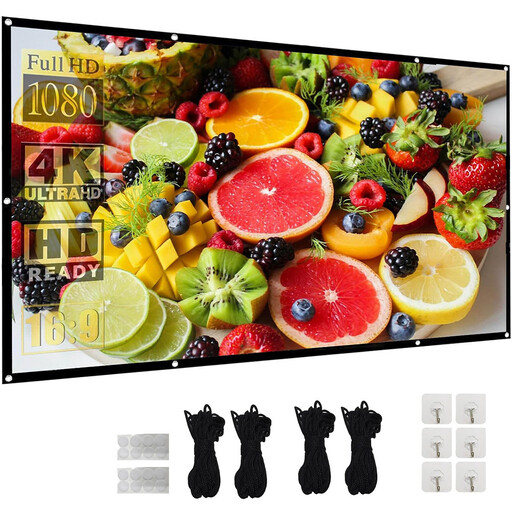
XBJ 120 Inch 16:9 Foldable Projector Screen
A dedicated surface for shared film nights or match viewing when projecting onto a coloured wall is not ideal.
Listed as a 120-inch, 16:9, foldable, anti-crease, double-sided screen with a stated 160-degree viewing angle, ropes and hooks.
Measure wall area, seating distance and the selected projector’s throw range first. This screen needs a suitable fixing location and is not described as freestanding.
Joybuy
 No image available
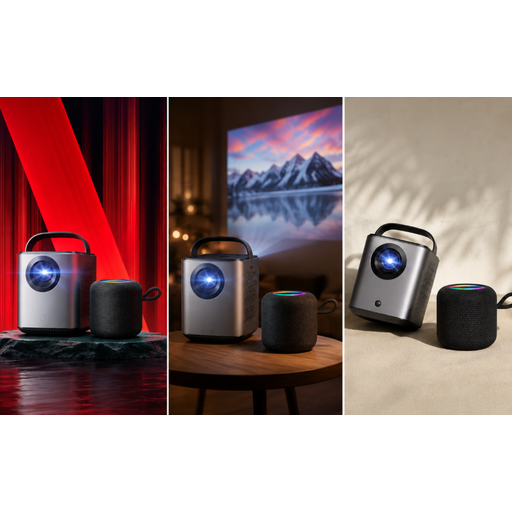
soundcore Nebula Mars 3 Air Bundle
A portable projector-and-audio bundle for room-to-room movie sessions or occasional outdoor use with a suitable viewing setup.
The listing states 1080P support, 2.1-channel audio with a 30W racetrack subwoofer, a carry case, Bluetooth speaker and a 5.5-hour video-playback claim.
Brightness, throw ratio and projection-distance information are not stated, so confirm room-light suitability and image size before buying. An IPX5 claim does not establish that the complete powered setup is weather-safe.
Joybuy
 No image available
XBJ 360° Portable Projector, Full HD 1080P
A flexible option for ceiling, wall or table projection during casual home or camping sessions.
Listed with Full HD 1080P, 360-degree rotation, auto focus, auto keystone, Wi‑Fi, Bluetooth, HDMI, USB and a stated 5W speaker.
Brightness claims conflict between the title and description, so obtain the exact measurement basis before judging room-light suitability. Check UK streaming support and whether Bluetooth audio meets your sound needs.
Joybuy
Frequently asked questions
Do I need a TV Licence to watch live sport on a projector in the UK?
Yes, if you watch or record programmes as they are broadcast on any channel or service, including live sport, or use BBC iPlayer. GOV.UK states that the rule applies regardless of whether you watch on a television, computer or another device. Watching on-demand Netflix or Disney+ alone does not itself require a TV Licence.
How do I know whether a projector will fit my room?
Measure the maximum realistic distance between the projector and wall or screen, then use the exact model’s throw-distance tool or specification for your intended image size. In smaller rooms, a short-throw design can create a large image closer to the wall, while ultra-short-throw models can sit very close to it.
Can I use a portable projector in a living room during the day?
Do not assume so. Epson’s UK buying guide places 500–1,500 lumens in a portable indoor or controlled-light range and 2,500–3,500 lumens in the range it describes for living rooms with some ambient light. Close curtains or blinds where possible and assess the exact model’s claimed brightness using its stated measurement basis.
Do I need a separate streaming stick?
Not always. Some models include Google TV and list supported services, but app availability can change by platform and region. Confirm the exact services you use before purchase; an HDMI input provides a route for a compatible external streamer when needed.
What electrical-compliance information should I check for a projector bought for Great Britain?
For England, Scotland and Wales, check that the seller provides the model’s required safety information, documentation and UK-market suitability under the applicable Electrical Equipment (Safety) Regulations requirements. GOV.UK states that Northern Ireland has different provisions under the Windsor Framework, so check current Northern Ireland requirements separately.


