What matters when choosing?
Start with the room and intended screen, then decide whether fine detail, placement, ambient-light handling or straightforward connections is your primary concern.
| Concern |
What to check |
Who this matters to |
| Wildlife image detail |
Distinguish native resolution, pixel-shifted output and supported input resolution. Check HDR formats and whether a quoted contrast figure is native or dynamic. |
I want to see fine textures and follow animals through shadowed scenes, so image presentation comes before setup convenience; around 36% of consumers would put wildlife image detail first. |
| Room fit |
Measure lens-to-screen distance, screen width and mounting height; compare them with the exact model’s throw range and optical adjustment. |
With a fixed shelf or ceiling position, I need to know that the planned image will fit before choosing a model for its picture features. Room fit would be the main concern for around 29% of consumers. |
| Ambient light |
Assess daylight and reflections near the screen, then consider stated light output together with the room and projection surface. |
If I use the living room for more than films, I may not be able to black it out for every episode; around 21% of consumers would prioritise an image suited to that lighting constraint. |
| Sources and ownership |
Check connections for your source and audio equipment, current support for connected features, and the light-source and warranty terms. |
I want streaming and sound to work with my existing equipment without making ongoing support an afterthought. Those practicalities would come first for around 14% of consumers. |
Brands to consider for these projector routes
These brands illustrate different home-cinema product lines; compare the exact model and its installation requirements rather than assuming every projector from a brand has the same features.
Epson
A reference point for buyers considering installation-oriented home-cinema projection, including the EH-LS12000B.
- Epson specifies 4K pixel-shift output, HDR10+ and powered lens adjustment for the EH-LS12000B.
- Its 4K output should not be confused with native 4K panel resolution; confirm that its throw range and adjustment suit your room.
BenQ
Relevant when comparing conventional home-cinema models for different lighting conditions and connection needs.
- BenQ specifies 4K UHD, HDR10/HDR10+/HLG support and eARC for the W2720i.
- BenQ specifies ±5% vertical lens shift for that model, so check its placement carefully. Its listed guaranteed security-update commitment ended on 20 September 2026.
JVC
Relevant to a dedicated, darker home cinema where native-4K projection and dark-scene specifications are priorities.
- JVC specifies native 4K D-ILA, HDR10+ and 40,000:1 native contrast for the DLA-NZ500.
- Those are JVC’s model specifications, not a measured comparison with another projector; the screen and installation still need planning.
Sony
A reference for native-4K laser home-cinema installations, including models Sony has positioned for differing room-light conditions.
- In its 2022 UK announcement, Sony described the VPL-XW5000ES as a 2,000-lumen model and the VPL-XW7000ES as a 3,200-lumen model intended for brighter home spaces.
- That announcement does not establish current model support or suitability for your room; check the exact model and installation details.
Projectors for flexible home viewing
These Joybuy-listed models offer native 1080P projection for home viewing, with portable or automated setup features depending on the model. For wildlife series, distinguish their projected resolution from higher-resolution input support, and check room fit before choosing a screen size.
 No image available
XBJ 360° portable projector, European version
Consider its rotating design if you need flexibility in where the image is aimed; confirm the lens-to-screen distance for your planned screen.
The listing names Full HD 1080P projection, a 360° rotating design, a 120-inch display and automatic keystone correction. Its 4K capability is described as decoding support, not native 4K projection.
View on Joybuy
 No image available
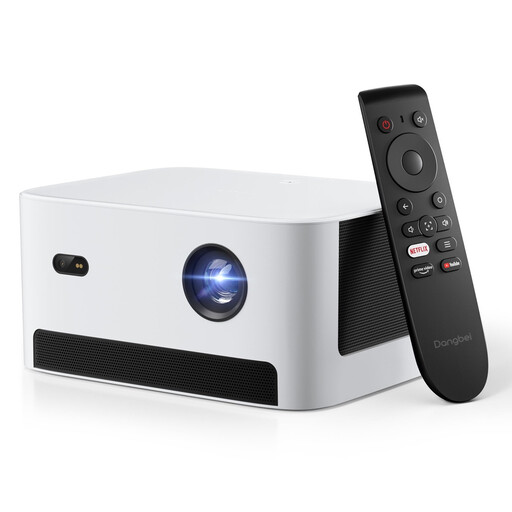
Dangbei Neo DLP Full HD projector
Consider this model if built-in streaming is part of your home-viewing plan, while checking that its placement works for your intended screen.
Its title specifies 1080P Full HD, 540 ISO lumens, Netflix, autofocus, keystone correction and a screen size of up to 120 inches. Check the required throw distance before planning around that size.
View on Joybuy
 No image available
XBJ A5Pro grey projector with touch tablet
Its autofocus and keystone features may appeal if setup convenience takes priority; check that the projector can fill your intended screen from the available position.
The listing describes native 1080P projection, 4K input support, autofocus, keystone correction and Wi-Fi 6. Check the exact SKU’s light-output specification before using brightness to compare it with another model: the supplied product information gives conflicting figures.
View on Joybuy
 No image available
Magcubic HY350Max portable projector
Consider its rotating design if you need to aim the picture from a movable position, but calculate the screen fit before settling on a location.
The title specifies native 1080P Full HD, 900 ANSI lumens, 180° rotation and automatic keystone correction. Its stated 8K support concerns input or decoding, not native 8K projection; check the projected screen size at your available distance.
View on Joybuy
 No image available
TCL C1 grey portable Full HD projector
This portable model is a choice to examine if you can work with a 1080P image and want to keep the setup movable. Check its throw range against your intended screen.
The title specifies 1080P Full HD projection and 4K input support. The latter does not mean native 4K projection; check HDR compatibility separately if it matters for your programmes.
View on Joybuy
Frequently asked questions
Do I need a separate screen for a home-cinema projector?
Plan the projection surface as part of the setup, whether you choose a screen or prepare a suitably flat wall. ProjectorCentral describes the projector and screen as a two-part system; measure the surface and intended image size rather than assuming that any wall will work equally well.
Can keystone correction solve an awkward mounting position?
Use correct physical placement and any available optical adjustment first; do not assume keystone correction can make an unsuitable position fit. Sony advises keeping the projector level and parallel to a flat screen to avoid an uneven or blurry image.
Is a higher lumen figure always better for wildlife series?
No: light output is relevant when ambient light is unavoidable, but it does not by itself tell you how dark habitats or HDR scenes will appear. Check the room’s light, the projection surface and the model’s picture features together; a darker dedicated cinema and a multi-use living room impose different conditions.
What else should I plan alongside the projector?
Plan the screen or projection surface, mounting position, source device, connections and sound system together. If you intend to use an audio return connection such as eARC, confirm that both the selected projector and your audio equipment support the required connection.


