Shared-lounge astronomy viewers
You watch astronomy programmes in a communal room where furniture, streaming devices and control over the lighting may change from one viewing session to another.


Start with the shared room: measure the available projection distance and decide how much light you can block before choosing a projector. Look for the native resolution, connections and audio arrangement your household needs, then check fan noise and placement against the exact model; a brightness figure alone cannot tell you how dark space scenes will look.
You watch astronomy programmes in a communal room where furniture, streaming devices and control over the lighting may change from one viewing session to another.
You want to see star fields and small on-screen graphics clearly, so native resolution and the light you can block matter more to your choice than portability alone.
You need a temporary setup that works around other residents. Fan-noise figures, an option for headphones or external audio, and somewhere to store the projector are practical checks.
In a shared flat, establish where the projector can stand and how much light you can block before comparing picture specifications and shared-use features.
| Concern | What to check | Who this matters to |
|---|---|---|
| Placement and setup | Measure lens-to-wall distance and usable image width; check the exact model’s throw ratio and zoom range. | If furniture limits where I can put the projector, the image needs to fit without a permanent mount. Around 29% of consumers put placement fit first. |
| Picture and room light | Check native rather than supported resolution, and compare stated brightness with its measurement unit in mind. | I want to follow fine graphics and dark space imagery, but the lounge may not be fully dark. For around 29% of consumers, picture detail and light control are the primary concern. |
| Noise and consideration | Check normal and Eco fan-noise figures and whether there is an audio output for headphones or a separate speaker. | During quiet narration or evening viewing, I do not want the projector or programme volume to disturb flatmates. Keeping viewing considerate comes first for around 24% of consumers. |
| Programme access and audio | Confirm that your intended streaming device or app works with the projector, and check the available audio connection. | When several residents share the setup, I want a straightforward way to start a programme and route its sound. Around 18% of consumers prioritise access and audio above the other concerns. |
A projector can accept a 4K signal while displaying it at a lower native resolution, which matters when you are looking at fine labels and graphics.
Check the native-resolution line for the exact model. BenQ UK specifies the TH685P as native 1920 × 1080 with 4K input support; ViewSonic lists the PX749-4K as native 3840 × 2160.
The available distance between the lens and wall affects the image width. A convenient shelf position will not necessarily produce the size you want.
Measure the positions you can actually use, then check the model’s throw ratio and zoom range. ProjectorCentral’s projection calculator can help relate distance to image size.
If the planned position does not work, you may need a different stand or screen position.
A built-in speaker specification does not establish dialogue clarity or whether fan noise will be acceptable during quiet scenes.
Check fan-noise figures and the available audio outputs. If evenings need to stay quiet, consider how headphones or a separate speaker would connect.
A separate speaker, headphones or an audio cable may be needed for your chosen arrangement.
The UK-listed TH685P is a conventional HDMI-connected, lamp-based option for viewers considering native 1080p rather than an integrated smart-projector setup.
The UK-listed EH-TW6250 is relevant if you want integrated Android TV and optical placement adjustment in a home-cinema projector.
The UK-listed PX749-4K is worth examining where native 4K resolution and the room’s available projection distance are both central to the choice.
These portable and smart projector listings are relevant to temporary viewing in a shared room. Compare their stated features with your available projection distance, lighting and plans for quiet audio rather than treating portability as proof that a model will fit.
 No image available
Consider it if you want a portable setup with built-in smart features for astronomy programmes. The listing states native 1080p, 900 ANSI lumens, Android 14, Wi-Fi 6, Bluetooth 5.4, 180° rotation and automatic keystone adjustment; it also says the projector supports 8K input, which is distinct from native resolution.
Check the image size at your available distance and whether fan noise suits shared viewing. The stated brightness alone does not establish how it will look with the room lights on.
 No image available
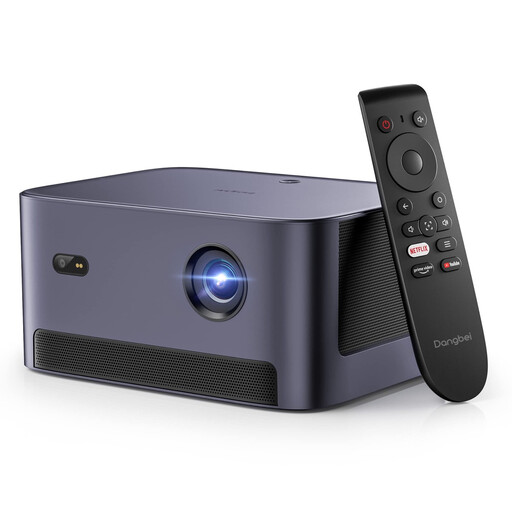
Consider it if direct access to streaming programmes matters in your shared room. Its listing names Netflix, 1080p Full HD, 540 ISO lumens, autofocus and keystone correction.
Confirm the operating system and support for the services you use before buying, as the system descriptions conflict. Check the image size at your available distance and the fan noise for evening viewing.
 No image available
This portable model is an option if you need to put the projector away between viewing sessions. The product name states 1080p FHD and 4K input support; check native resolution separately from the supported signal.
Confirm the throw distance and image size for your lounge, along with fan noise and the streaming connections you intend to use.
 No image available
Consider its rotating design if the projection surface changes between viewing sessions. The listing names Full HD 1080p, 500 lumens, automatic keystone adjustment, Wi-Fi, Bluetooth and HDMI.
Check the image size at your available distance and fan noise. Because this is labelled European Version, confirm the supplied plug and applicable electrical information for where you will use it.
 No image available
Consider it if you want a smart projector that can be repositioned for shared viewing. The listing states native 1080p, 4K input support, 900 ANSI lumens, autofocus, keystone correction and Wi-Fi 6.
Check the throw distance and resulting image size, as well as fan noise. The listed brightness is not a measure of how dark scenes will appear under your lounge lighting.
Measure the possible lens-to-wall distance and the widest image your wall or screen can accommodate. Throw ratio relates that distance to image width, so check the exact model and its zoom range in a throw-distance calculator rather than judging by a product photo.
No: input support and native display resolution describe different things. BenQ UK specifies the TH685P as native 1920 × 1080 with support for input up to 4K, while ViewSonic specifies the PX749-4K as native 3840 × 2160.
Check the light-source type, the manufacturer’s operating-life figures for the mode you expect to use, and replacement-lamp availability. BenQ lists 4,000 hours in Normal mode and 10,000 hours in Eco mode for the TH685P; ViewSonic lists 4,000 hours in Normal mode and 20,000 hours in SuperEco mode for the PX749-4K. These stated figures are not guarantees of household lifespan.
Check that the supplied plug and instructions suit where you will use a mains-powered projector. GOV.UK says electrical equipment placed on the Great Britain market is subject to the Electrical Equipment (Safety) Regulations 2016; Northern Ireland has separate provisions, so check the requirements applicable there rather than assuming GB guidance covers both.