Detail-first documentary viewers
You regularly watch science, nature, history or space documentaries and want small labels, textures, colour gradations and shadow information to remain legible on a large image.


For regular science-documentary viewing in a light-controlled room, consider a 4K home-cinema projector if fine detail matters most. A brighter ultra-short-throw model addresses close-to-wall placement and some ambient light; portable Full HD is a compromise when moving the projector between rooms matters more than maximum image detail. Check native resolution, the brightness measurement standard and the exact placement requirements before choosing.
You regularly watch science, nature, history or space documentaries and want small labels, textures, colour gradations and shadow information to remain legible on a large image.
You watch with some ambient light or have limited space between the projector and the wall. Room brightness and the projector's required position shape your choice.
You want to move the projector between rooms or store it away, and are willing to weigh compactness and easier setup against resolution and light output.
Choose the viewing room and projector position before comparing picture specifications: a dark, fixed setup, a shared living room and occasional room-to-room use call for different compromises.
Consider when: you frequently watch in a light-controlled room and want to examine fine documentary detail on a large image.
Trade-off: plan a suitable projector position and check the exact model's throw distance, connections and manufacturer-stated colour and HDR specifications.
Consider when: the projector needs to sit near the wall in a shared room where some ambient light is unavoidable.
Trade-off: a short throw path does not remove the need for a suitable image surface and model-specific positioning.
Consider when: occasional viewing, compact storage and moving between rooms take priority over maximum projected detail.
Trade-off: accept Full HD rather than native 4K and assess the stated light output against the lighting you can control.
| Concern | What to check | Who this matters to |
|---|---|---|
| Fine detail and dark scenes | Check native resolution separately from supported video input. Compare the exact model's stated colour coverage and HDR support. | When maps carry small labels or astronomy footage contains dark areas, I want to follow the detail on a large image. Around 36% of consumers put picture detail and dark-scene legibility first. |
| Ambient-light viewing | Match stated light output to the room and compare ratings only when their measurement standards are clear. Epson United Kingdom's buying guide places 2,500–3,500 lumens in its range for living rooms with some ambient light. | If I cannot fully darken the living room, I need the projected image to remain visible during a documentary; for around 29% of consumers, ambient-light viewing is the primary concern. |
| Placement | Measure the image surface, projector position and nearby furniture. Check the exact model's throw-distance and supported image-size guidance. | A rear shelf or ceiling position may not fit my room, so the projector's position comes before screen size. Placement is the first priority for around 21% of consumers. |
| Portability | Check native resolution, rated light output, power requirements and the streaming and audio options you need. | I would rather move the projector and put it away after an occasional viewing than arrange a permanent installation. Around 14% of consumers chiefly prioritise that flexibility. |
Automatic setup can make a projector easier to move, but it does not establish how visible its image will be with lights on. Epson United Kingdom's buying guide places living rooms with some ambient light in its 2,500–3,500-lumen range; portable models may state their output using a different measurement standard.
Decide how much light you can control, then check the candidate's stated output and measurement standard rather than relying on setup features alone.
A projector can accept or decode a 4K source while projecting at a lower native resolution. That distinction matters if small labels and fine textures are the reason you want a large image.
Find the native-resolution specification and read it separately from supported input formats.
Ultra-short-throw models still have specific positioning and image-size requirements. Epson specifies an image of up to 120 inches for the EH-LS650B, while Hisense specifies an 80–150-inch range for its PX3-PRO; neither range applies to every model.
Measure the intended surface and furniture position, then consult the exact model's placement guidance.
Depending on the setup, a suitable screen or a change to the furniture layout may also be needed.
Image size alone does not resolve a mismatch between room lighting and projector output. Manufacturer claims about HDR, contrast and shadow detail also apply to particular models, not every projector in a category.
For space, cave or deep-sea footage, consider light control alongside the exact model's native resolution and stated HDR capabilities.
These model examples show different setup routes; a specification for one model should not be assumed to apply across its brand's range.
Home-cinema options relevant to room brightness and projector placement.
A home-cinema example for a light-controlled room where colour and HDR specifications matter.
An ultra-short-throw route for a large image from a console close to the wall.
A portable option for occasional viewing with controlled lighting.
These portable Full HD choices suit viewers considering occasional or move-between-rooms documentary sessions. If your priority is a fixed 4K setup or viewing with ambient light, assess those requirements separately rather than treating portability as a substitute.
 No image available
Consider it when a movable Full HD setup matters more than native 4K detail. The product title states native 1080P, 900 ANSI lumens, Android 14, 180° rotation and automatic keystone correction; 8K refers to supported content, not native projection resolution. Check the placement requirements for your intended image size.
 No image available
Consider it for portable viewing when Full HD meets your detail needs and built-in streaming is useful. The product title states 1080P, 540 ISO lumens, Netflix, autofocus, keystone correction and Dolby Audio. Check the required throw distance for your room.
 No image available
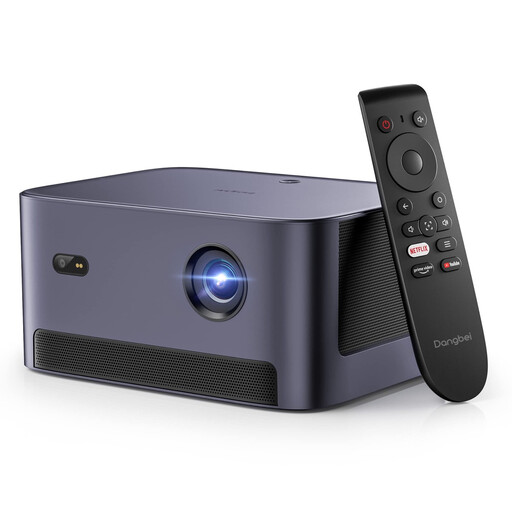
Consider it if flexible aiming is important for occasional Full HD viewing. The product title states 1080P, 360° rotation and automatic keystone correction. Confirm the supported image-size range, placement dimensions and supplied power equipment for your intended setup.
 No image available
Consider it for portable viewing if Full HD is sufficient. The product title states native 1080P and 4K input support; accepting a 4K source does not make the projected resolution native 4K. Check the light-output and placement specifications against your room.
 No image available
Consider it when a portable smart projector with automatic setup suits your viewing routine. The product title states native 1080P, 4K input support, Android, autofocus and keystone correction. Confirm the exact brightness and supported image-size range before deciding whether it fits your room.
Choose brightness for the room, not the documentary genre alone. Epson United Kingdom's buying guide gives 1,500–2,500 lumens for a dark dedicated home theatre and 2,500–3,500 lumens for a living room with some ambient light. Check how the exact model's light output is measured and how much room light you can control.
Full HD can be a reasonable choice when portability matters more than maximum detail; consider native 4K if you regularly examine small labels and textures on a large image. Check native resolution rather than assuming that 4K input support means native 4K projection.
It can if the exact model's image-size and positioning requirements fit the furniture and projection surface. Epson specifies an image of up to 120 inches for the EH-LS650B; Hisense specifies 80–150 inches for the PX3-PRO. Measure the intended position before choosing either model.
Built-in speakers may meet your needs, but their presence alone does not establish how clearly narration will carry in your room. Epson specifies Yamaha sound for the EH-LS650B, and XGIMI specifies dual 8W speakers for the MoGo 2 Pro. Check the exact model's audio connections if you may want an external system.
For a projector intended for Great Britain, check the applicable electrical-safety requirements and supplied power equipment. GOV.UK's Office for Product Safety & Standards explains that the Electrical Equipment (Safety) Regulations 2016 set requirements before electrical equipment is placed on the GB market; GOV.UK guidance recognises CE marking alongside UKCA marking for many products in Great Britain. Northern Ireland has different arrangements, so check its applicable guidance separately.