Communal-lounge film-night organisers
If everyone watches in the same living room, start with how much light reaches the wall or screen. Then check Full HD resolution and an HDMI connection for the devices your flatmates share.


Choose a brighter Full HD projector if comedy nights usually take place in one lounge where some light remains on. If flatmates move between rooms or change the projection angle, a portable smart model is easier to share, but plan to control the light and check its streaming and sound connections.
If everyone watches in the same living room, start with how much light reaches the wall or screen. Then check Full HD resolution and an HDMI connection for the devices your flatmates share.
If the projector moves between bedrooms and the lounge, storage, a flexible stand and quick image alignment matter. Check whether you need battery power as well as a convenient place to set it down.
If different flatmates start the programme, check the apps available on the exact model, how accounts will be used and whether HDMI provides a fallback for a laptop or streaming device.
Choose when: Comedy nights usually happen in one room and you cannot fully darken it.
Trade-off: A projector kept in the lounge is less convenient to put away or move between rooms.
Choose when: The viewing room, wall or seating position changes and flatmates want direct streaming.
Trade-off: Plan to dim the room; a portable model’s convenience does not establish that its picture will remain clear with lounge lights on.
| Concern | What to check | Who this matters to |
|---|---|---|
| Picture visibility | Compare stated brightness on its measurement basis, then consider your room lighting and intended image size. Epson UK associates 2,500–3,500 lumens with living rooms that have some ambient light. | If lamps stay on in our shared lounge, we need faces and captions to remain easy to see. Around 34% of consumers put ambient-light visibility first. |
| Flexible setup | Check the stand, automatic alignment and where the projector can sit relative to your viewing wall. | When we switch rooms, I want to aim the picture without rearranging the furniture each time; around 25% of consumers prioritise setup flexibility. |
| Streaming and sound | Confirm the apps you use, an HDMI fallback and a suitable external-audio connection if needed. | We take turns choosing a comedy, so playback and dialogue must work for the group without relying on one person’s laptop. For around 25% of consumers, shared streaming and sound are the primary concern. |
| Storage and portability | Check the dimensions, power arrangements and whether the projector is practical to put away after viewing. | I need to reclaim the shared space after film night and may take the projector to another room. Easy storage comes first for around 16% of consumers. |
A compact projector may be convenient to move, yet the picture can be harder to follow if the lounge stays bright. Epson UK places portable indoor viewing with controlled lighting in a different brightness range from living rooms with some ambient light.
Decide whether you can close curtains or dim lamps before comparing models. Check how each brightness figure is measured rather than treating differently labelled figures as interchangeable.
App availability and account access depend on the model and the services your household uses. Built-in streaming does not remove the need for another playback option.
Confirm the apps and current software support for the exact projector, and keep an HDMI route for a flatmate’s or guest’s device.
Built-in speakers may be convenient, but their presence alone does not tell you whether dialogue will reach everyone across a shared lounge.
Check the speaker specification and an external-audio connection. If you plan to use HDMI ARC, confirm that both the projector and sound equipment support it.
TV Licensing says the UK requirement depends on what you watch, not whether you use a projector: watching or recording live TV, or using BBC iPlayer for live or on-demand programmes, requires a TV Licence.
Check your household’s licence status before using those services. On-demand programmes on other services do not, by themselves, require a TV Licence.
Epson’s CO-FH02 is a Full HD example for a regular communal-lounge setup, with HDMI, keystone correction and built-in Android TV.
BenQ’s portable GV50P is a Full HD example for flatmates who change rooms or projection angles.
XGIMI’s MoGo 3 Pro is a compact Full HD example for occasional room-to-room viewing.
These portable projector choices suit flatmates considering flexible placement, room-to-room use or shared streaming. Check each model against your lounge lighting before choosing one for regular communal viewing.
 No image available
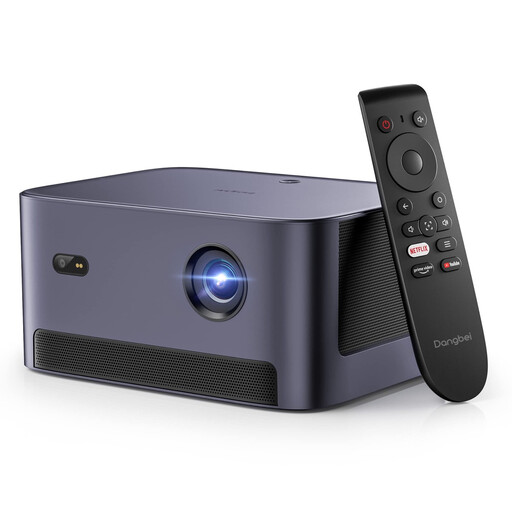
Consider this for a shared room where the projection angle changes. The listing names native 1080P, 180° rotation, auto keystone correction, Android 14 and HDMI; check that the apps you use are available. It states 900 ANSI lumens, so assess that claim against your room lighting and intended image size.
 No image available
Consider this if you need to aim the picture at different walls or a ceiling. The listing names Full HD 1080P, 360° rotation, auto keystone correction and HDMI. It states 500 lumens without an ANSI or ISO label in the product name; check the measurement basis and whether the image will suit your lighting.
 No image available
Consider this for occasional room-to-room viewing where automatic setup matters. The listing names 1080P, autofocus and keystone correction, and states 540 ISO lumens. Confirm the operating system and the streaming apps you need before relying on its smart features; check how the stated brightness fits your lounge.
 No image available
Consider this portable model if you move the projector between viewing spaces. Its product name specifies 1080P FHD and 4K support; 4K support is not a claim of native 4K resolution. Check the brightness measurement and an audio connection for your shared room before buying.
 No image available
Consider this if you need to move the projector or use it away from a convenient socket. The product name specifies a built-in battery, native 1080P, Wi-Fi 6, Bluetooth and sound by JBL. Check the battery duration for your viewing sessions and confirm its stated brightness before choosing it for a lit lounge.
Choose one for that use only after checking its stated brightness against the room and the image size you want. Epson UK associates 500–1,500 lumens with portable indoor viewing under controlled lighting, and 2,500–3,500 lumens with living rooms that have some ambient light; the exact model and measurement basis still matter.
Look for a stand or flexible base and automatic image alignment if the projector moves between rooms. BenQ specifies automatic adjustment and a flexible base for the GV50P, while XGIMI specifies automatic alignment and a 130° adjustable stand for the MoGo 3 Pro; agree on a regular projection wall where possible.
Do not assume they will be enough for dialogue across your shared lounge. Check the exact speaker specification and an external-audio option; BenQ lists HDMI ARC for the GV50P, which is useful only with compatible audio equipment.
The projector itself does not change the requirement: TV Licensing says you need a TV Licence to watch or record live TV on any channel or service, or to use BBC iPlayer for live or on-demand programmes. Watching only on-demand programmes on other services does not, by itself, require one.