Measure the distance available between the projector lens and the wall before choosing a type. A portable model suits viewing from changing positions, a conventional model needs enough room depth, and an ultra-short-throw model offers close-wall placement. For gardening programmes, judge image visibility in your usual lighting and check how you will stream programmes and hear the sound, rather than choosing by advertised screen size alone.
Who is this for?
Regular viewers with limited space
If you want to watch programmes regularly, your available lens-to-wall distance determines whether a conventional projector can make the image size you want. Check that distance before planning a permanent position.
Viewers who put the projector away
If you move the projector between viewing positions and store it afterwards, adjustable placement, streaming access and built-in sound can make each setup simpler. Check those features on the exact model.
Daytime and lamp-lit viewers
If you watch with curtains open or lights on, consider how much light reaches the projection surface. Assess the image at your intended size and lighting rather than relying on a brightness figure alone.
What matters when choosing?
Choose a placement route first, then check image visibility and the equipment needed for everyday viewing.
Flexible portable projector
Choose when: You need to change the projection angle or put the unit away after watching.
Trade-off: Flexible placement does not establish that the picture will remain clear with your room lights on.
Conventional home-cinema projector
Choose when: Furniture or a fixed position leaves enough lens-to-wall distance for your target image size.
Trade-off: A conventional model still needs a suitable position; lamp replacement and operating noise may matter for regular viewing.
Ultra-short-throw projector
Choose when: There is no practical position for a projector farther back from the wall.
Trade-off: Check the exact model’s placement requirements and whether your wall or screen suits its setup.
| Concern | What to check | Who this matters to |
|---|
| Room fit |
Measure lens-to-wall distance and check the exact model’s image size at that distance. Allow space for the projector body and cables. |
If the sofa and furniture leave little room behind them, I need to know whether the picture will fit on the wall from a workable projector position; roughly 46% of consumers put room fit first. |
| Image visibility |
Assess the intended image size with your usual curtains and lights. Note the measurement method attached to a brightness claim. |
When I watch in daylight, I want to make out plants, tools and on-screen labels without relying on a dark-room setup; about 27% of consumers prioritise visibility. |
| Everyday setup |
Confirm the apps and inputs you need, and consider sound, focusing and adjustment at the intended position. |
For programmes I watch often, I want to get started without repeatedly rearranging devices or speakers. Convenient setup is the main concern for around 27% of consumers. |
Buying pitfalls
-
Choosing by maximum advertised screen size
A maximum size does not tell you what a projector can produce from your available position. Epson specifies a 2.34–3.81 m throw distance for an 80-inch image with the EH-TW6150.
Measure from the proposed lens position to the wall, choose a target image size and check the exact model’s throw guidance before ordering.
-
Comparing every lumen figure as though it were measured alike
Brightness descriptions differ between the models discussed here: Epson identifies ISO 21118:2020 for the EH-TW6150, while BenQ describes the GV50 as 500 lm. Those figures alone cannot establish how either picture will look in your room.
Consider the stated measurement method, limit light falling on the wall where possible and assess the picture at your intended size.
-
Assuming every smart projector has your streaming apps
BenQ identifies Google TV on the GV50, and XGIMI identifies Google TV and built-in Netflix on the MoGo 3 Pro. That does not confirm every service or account arrangement you might need.
Check UK availability of your specific apps and the model’s HDMI inputs if you intend to connect another streaming device.
A separate streaming device may also mean accommodating its connection and any required service subscription.
-
Overlooking lamp upkeep and fan noise
Epson specifies a replaceable lamp for the EH-TW6150, with stated durability of 4,500 hours in normal mode or 7,500 hours in economy mode. It rates operating noise at 36 dB(A) and 28 dB(A) respectively.
Check genuine replacement-lamp availability and consider where the projector will sit relative to your usual seat.
Brands to consider
BenQ
BenQ’s GV50 is a portable option to examine if you need to change projection angles in a small room.
- BenQ describes the GV50 as a 1080p, 500-lumen laser projector with Google TV, a flexible base and image-rotation features.
- Check its picture in your usual lighting rather than assuming the stated brightness will suit a brightly lit room.
Epson
Epson provides both a conventional placement example, the EH-TW6150, and a close-wall ultra-short-throw route.
- Epson specifies optical zoom, lens shift and 2,800-lumen output under ISO 21118:2020 for the EH-TW6150.
- The EH-TW6150 needs 2.34–3.81 m for Epson’s stated 80-inch image and has a lamp and stated operating noise to consider.
XGIMI
XGIMI’s range includes compact smart models and home projectors with different stated brightness specifications.
- XGIMI describes the MoGo 3 Pro as a 1080p portable model with Google TV, built-in Netflix and dual 5 W speakers.
- Compare placement, app support and brightness measurement on the particular model you are considering, not across the brand as a whole.
Projectors for flexible home viewing
These Joybuy listings focus on movable or compact projectors for home viewing. Before choosing one for a small living room, confirm the image size at your available lens-to-wall distance and assess its picture in your usual lighting.
 No image available
Magcubic HY350Max projector, native 1080p
Consider this model if you want to change projection angles between viewing sessions. The listing specifies 180° rotation, native 1080p, a 1:1 throw ratio and a built-in 15 W speaker. Its stated 8K support is not native 8K resolution; confirm the image size at your measured distance and assess the stated 900 ANSI lumens in your room lighting.
 No image available
Magcubic HY300 Pro projector, grey, native 720p
The rotating stand suits a viewing position that changes between uses. The listing specifies a 0.8:1 throw ratio, a 0.6–2.5 m throw distance, native 720p resolution and a 5 W speaker. It describes automatic vertical keystone correction but manual focus; check the intended image size and lighting before buying.
 No image available
MAGCUBIC HY310 autofocus projector
Its listed autofocus and integrated apps may appeal if you set up the projector repeatedly. Before choosing it, confirm its native resolution: the listing’s 4K and 1080p wording is ambiguous. Also check the lens-to-wall distance needed for your intended image size rather than treating its 75-inch viewing-distance recommendation as a throw specification.
 No image available
XBJ 360° Portable Projector, European Version
The listed 360° rotation is relevant if you want to project from different positions. Product information specifies native 1080p, HDMI and a built-in 5 W speaker. Confirm the throw distance for your chosen image size, and assess the stated brightness under your normal room lighting.
 No image available
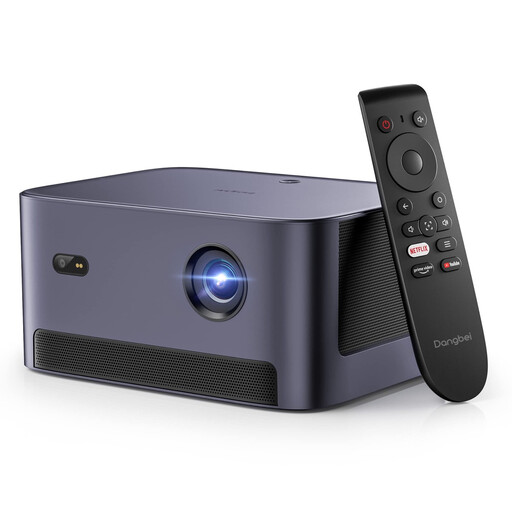
Dangbei Neo DLP projector, 1080p
This compact model is worth checking if built-in streaming and sound matter to your regular viewing setup. The listing specifies dual 6 W speakers and claims Netflix access, but gives conflicting descriptions of its operating system. Confirm the apps you need and the required lens-to-wall distance; the stated 540 ISO lumens do not establish visibility in your lighting.
Frequently asked questions
Can a conventional projector work in a small living room?
Yes, if its throw range fits your measured lens-to-wall distance at the image size you want. Epson specifies 2.34–3.81 m for an 80-inch image with the EH-TW6150, so check the exact model and your proposed projector position rather than assuming that any conventional model will fit.
Is a portable projector suitable for daytime gardening programmes?
It may suit daytime viewing if you can control the room light and the picture remains clear at your intended size. Portability alone does not establish daylight performance; check the model’s brightness description and assess the image with your usual curtains and lighting.
What should I check before choosing a lamp-based projector?
Check replacement-lamp availability and operating noise as well as room fit. For the EH-TW6150, Epson states lamp durability of 4,500 hours in normal mode and 7,500 hours in economy mode, with operating noise rated at 36 dB(A) and 28 dB(A) respectively.
Do I need a TV Licence to watch programmes on a projector?
In the UK, using a projector instead of a television does not remove the TV Licence requirement when you watch or record programmes as they are broadcast. GOV.UK also identifies BBC iPlayer viewing as requiring a licence. Check how you intend to watch your gardening programmes, not just the device displaying them.


