What matters when choosing?
Start with the room and the times you normally watch: a large projected image is less useful if its position or the available light does not work for you. Then check the route from your streaming service to the screen and speakers.
| Concern |
What to check |
Who this matters to |
| Room light and image fit |
Measure the available wall width and projector position against the exact model’s throw information. Assess daylight at the time you watch and whether you can reduce it. |
I want a larger picture for a daytime match, but it must fit the room and remain watchable with the light I can control. Roughly 42% of consumers put room fit and daylight first. |
| Streaming and shared-room sound |
Confirm the exact model’s UK app support or a compatible external-device connection, plus the audio outputs you would need. |
My chosen film or sport service must play through the setup, and everyone needs to hear it clearly. For roughly 33% of consumers, streaming and sound are the primary concern. |
| Moving and setting up |
Check the stand, focus and alignment features, storage space and power arrangement for each planned position. |
I need to clear the living room after viewing without making the next setup a chore. Ease of moving and setting up comes first for roughly 25% of consumers. |
Portable projector choices on Joybuy
These portable projector listings are relevant to flexible film-night and sport setups. Compare their stated specifications with your room and check the exact streaming and audio connections you need; this selection does not replace the choice between projection and a TV.
 No image available
Magcubic HY350Max native 1080P projector
Consider this portable model if you plan to change projection angles in a multi-use room; confirm that the intended image size fits your available position.
- The listing states native 1080P, 900 ANSI lumens and 180° rotation.
- It names Android 14, Wi-Fi 6, Bluetooth 5.4 and HDMI and USB compatibility.
- Check the exact UK streaming services you need and assess the picture in your normal room lighting.
View on Joybuy
 No image available
Wimius K1 1080P projector
This is a portable option to consider if you intend to connect a separate source for film or sport viewing. Plan that connection before choosing where the projector will stand.
- The listing states 1080P, 1,200 ANSI lumens, 4K support and vertical and horizontal keystone correction.
- It names Fire Stick, smartphone and PS5 compatibility; check the connection required by your own device.
- Confirm the image size at your available distance and check the Bluetooth version if it affects your audio setup.
View on Joybuy
 No image available
TCL C1 Grey 1080P smart projector
Consider the TCL C1 for a room where you would move the projector between viewing sessions. Confirm the required streaming services before relying on its smart features.
- The listing states 1080P FHD and 4K support.
- Check the throw distance for your intended image size and assess the picture under your usual lighting.
- Verify the exact UK app and account compatibility for the services you watch.
View on Joybuy
 No image available
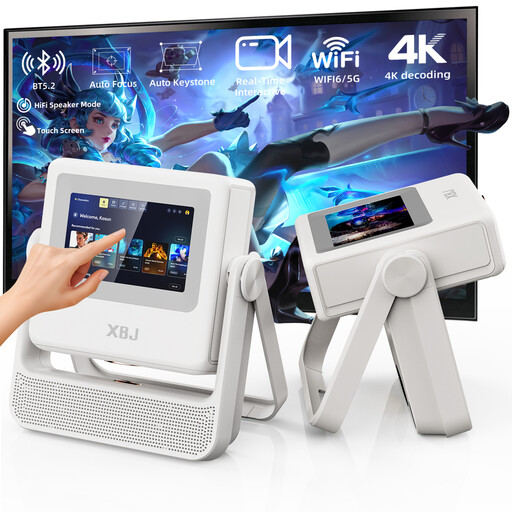
XBJ A5Pro White native 1080P projector
This model is worth checking if changing projection angles matters in your viewing space. Establish the image size your room can accommodate before relying on a maximum-size claim.
- The listing states native 1080P, 4K support, 900 ANSI lumens, auto focus and keystone correction.
- It names Wi-Fi 6 and PS5 and Switch compatibility; check the connections needed for your setup.
- The listing gives conflicting maximum image sizes of 250 and 300 inches. Confirm the usable size, throw distance, UK app support and audio connections for this SKU.
View on Joybuy
 No image available
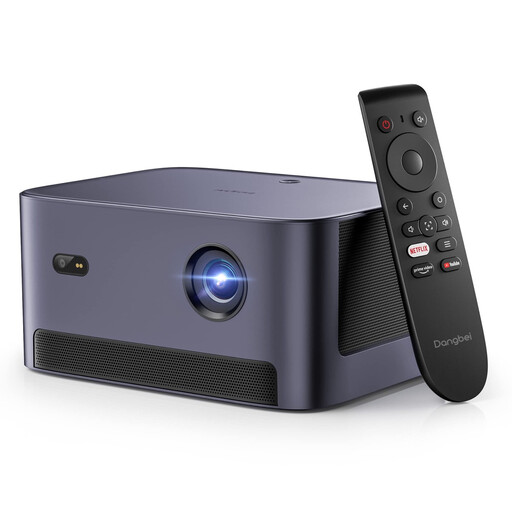
Dangbei Neo DLP 1080P projector
Consider this compact model if you need to move the screen between sessions and want to assess built-in audio as part of the setup.
- The listing states 1080P, 540 ISO lumens, Dolby Audio and a screen size up to 120 inches.
- Confirm the throw distance for the image size you want and assess brightness in your normal viewing conditions.
- Check the exact operating system and UK availability of your streaming services before relying on built-in apps.
View on Joybuy
Frequently asked questions
Can a projector replace a TV for everyday viewing?
A projector can serve as a main screen if its placement, setup and picture work under the light you normally have, but it will not automatically match a TV in a bright room. Expert Reviews notes that TVs generally offer more consistent brightness and colour depth; weigh that against the larger projected image you want for films and sport.
How can I watch Netflix without a working projector app?
Connect a Netflix-supported device to a compatible projector video input. Netflix describes using a supported computer, streaming stick or mobile device with HDMI or another suitable video adapter; check device, cable and projector compatibility, and confirm app support for the exact projector model if you prefer built-in streaming.
Are portable projector speakers enough for a group?
Their suitability depends on the room, seating distance and background noise, not just the speaker specification. XGIMI lists dual 3 W speakers for its Elfin Flip, but that figure alone cannot tell you whether dialogue will be clear to everyone; check audio-output options if you might connect separate speakers.
What if I buy a projector online and it does not suit my room?
For an eligible online purchase, GOV.UK says you can generally tell the seller you wish to cancel within 14 days of receiving the item, then have another 14 days to return it; applicable exceptions and return conditions still matter. Remedies for a faulty or misdescribed projector are separate from a change-of-mind cancellation, so check which situation applies rather than relying only on a retailer’s voluntary returns policy.
Can the projector and audio equipment share an extension lead?
They can share one only if the combined load stays within the lead’s marked rating. Electrical Safety First warns against overloading leads and adaptors, advises fully unwinding cable reels and says not to connect extension leads in a chain.


