
24/7 Customer Support

Free returns

Same-day & Next-day Delivery

Quality Guaranteed

Unlock Your Welcome Offers: FREE Delivery | Up to 80% OFF | Free 30-day JoyPlus trial
Download the APP
The PlayStation 5 console delivers a remarkable gaming experience straight out of the box. Yet, as you build your game library and log more hours, you might notice a few areas ripe for improvement. Perhaps you're tired of juggling game installs on the internal drive, your controller's battery always seems to die at a critical moment, or you simply want your PS5 gaming setup to reflect your personal style.
This guide is designed to help you navigate the world of PS5 accessories. We'll highlight practical solutions to common pain points, offering straightforward advice to help you choose peripherals that genuinely enhance your time with the console.
Before diving into specific products, here are a few key points to keep in mind. These considerations will help you make an informed decision that aligns with your needs and budget.
When selecting an accessory, you'll often see products described as "officially licensed for PlayStation". This designation means the product has been tested and approved by Sony to meet specific performance and quality standards. While many third-party accessories offer excellent value and functionality, an officially licensed product provides an extra layer of assurance for seamless compatibility with your PS5.
One of the most common challenges for PS5 owners is managing the console's internal storage. To expand PS5 storage, you have two main options. An internal M.2 SSD allows you to install and play PS5 games directly from the drive. Alternatively, a PS5 external storage SSD is a superb solution for storing your PS5 games (which can be quickly transferred back to the console to play) and for storing and playing your library of PS4 titles directly from the external drive.
Constantly plugging your controller into the console's front USB port can be inconvenient and lead to a cluttered setup. A dedicated DualSense charging station not only keeps your controllers organised but also ensures they are always fully charged and ready for your next session. This frees up the console's USB ports for other peripherals, like headsets or external drives, contributing to a tidier and more functional gaming area.
Here are a few standout accessories that address key needs for dedicated PS5 players, from personalisation to practical performance boosts.
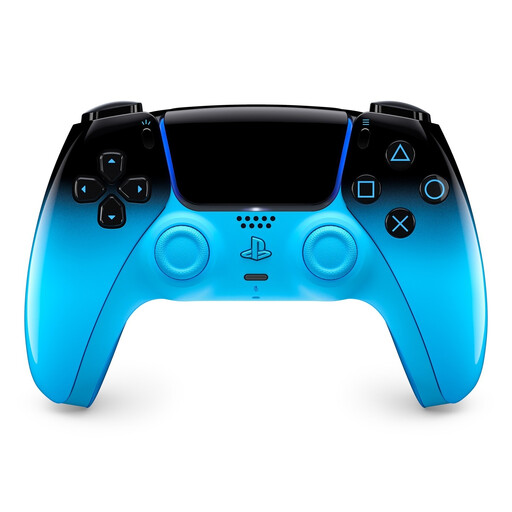
Why It Stands Out: This official DualSense wireless controller combines Sony's proven technology with a striking aesthetic. The Rhythm Blue colourway from the HYPERPOP Collection offers a way to personalise your setup without compromising on the core features that make the DualSense so immersive, such as its detailed haptic feedback and adaptive triggers.
Pros:
Who is it for? Gamers looking to add a second controller for multiplayer or simply want a stylish alternative to the standard white model, while retaining all the advanced features of an official Sony controller.

Why It Stands Out: This officially licensed portable SSD from SanDisk is a straightforward and reliable solution to the PS5's storage limitations. With 1TB of space and read speeds of up to 1000MB/s, it allows you to archive dozens of PS5 games and transfer them back to the console in minutes. Its rugged build also provides peace of mind.
Pros:
Who is it for? Players with an extensive digital game collection who are tired of deleting titles to make space and want a fast, durable and officially approved external storage drive.
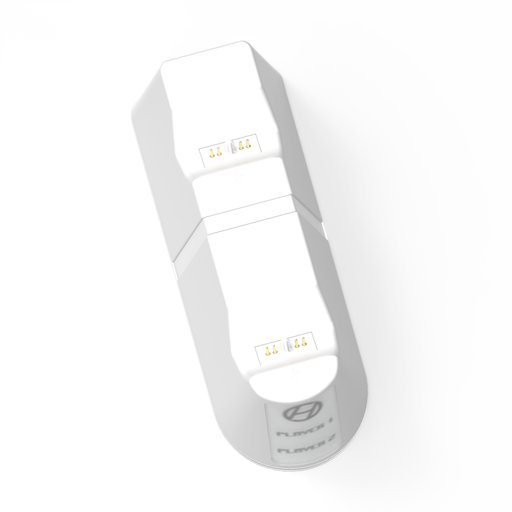
Why It Stands Out: The GigaBlast charging station is a highly practical accessory that solves the perennial problem of dead controllers. It charges two DualSense controllers simultaneously in under three hours and features a compact, vertical design that complements the PS5's aesthetic while saving desk space.
Pros:
Who is it for? Any PS5 owner with two or more controllers who wants a convenient, fast and tidy charging solution to ensure they're always ready for a game.
The accessories featured here are just a starting point for optimising your gaming experience. If you're searching for the latest titles, a new headset, or other peripherals, there is a wide world of options available.
Explore our full range of games and console accessories to find the perfect addition to your setup.
1. Can I use any external SSD with my PS5? While many external SSDs are compatible with the PS5 for storing games, Sony specifies certain performance requirements for the best experience. Using a drive that meets or exceeds a 5,500MB/s read speed is recommended for internal M.2 expansion, while a fast USB drive is suitable for external storage. An officially licensed PS5 external storage SSD is a safe choice as it guarantees it meets the necessary standards for storing PS5 games and playing PS4 games.
2. Is a dedicated PS5 controller charger worth it? For many gamers, yes. A dedicated PS5 controller charger offers significant convenience. It frees up the USB ports on your console, provides a designated and tidy spot to store your controllers and ensures they are always charged and ready for play. This eliminates the need to pause a game to plug in a low-battery controller.
3. What's the main benefit of having a second DualSense wireless controller? The most obvious benefit is for local multiplayer games with friends or family. Beyond that, having a second controller is incredibly convenient for solo players. When one controller's battery runs low during a long gaming session, you can seamlessly swap to a fully charged one and continue playing without interruption. It also allows you to have custom PS5 controllers with different designs for variety.