
24/7 Customer Support

Free returns

Same-day & Next-day Delivery

Quality Guaranteed

Unlock Your Welcome Offers: FREE Delivery | Up to 80% OFF | Free 30-day JoyPlus trial
Download the APP
Nothing interrupts a gaming session quite like a controller running out of battery. While the PlayStation 5's DualSense controller is a remarkable piece of kit, its battery life means that for many players, a dedicated charging solution is not a luxury, but a necessity. A good PS5 controller charging station keeps you in the game, organises your setup and frees up the console's valuable USB ports.
However, the market is flooded with options, and not all are created equal. Many promising-looking docks hide flaws that can lead to frustration, or worse, damage to your expensive controllers. Before you buy, it's crucial to understand the common pitfalls.
To ensure you get a reliable and safe product, focus on these core features. These are the non-negotiable specifications that separate a worthwhile purchase from a potential problem.
How a dock powers your controllers is critical. The most convenient and reliable models use a contact-point charging system, similar to the official Sony dock. This allows you to simply drop the controllers into the cradle without fiddling with cables.
Check the power source. A charging station that includes its own AC power adapter is generally preferable to one that plugs into the PS5. It delivers a more stable current, ensuring that two controllers can charge simultaneously at a good pace. A reasonable benchmark for a dual PS5 controller charger is the ability to fully charge two depleted controllers in under three hours.
This is paramount for protecting your gear. Look for explicit mentions of safety circuitry, such as:
These features ensure the charger intelligently manages power delivery, safeguarding the delicate electronics inside your controllers. Also, verify compatibility. While most are designed for the standard DualSense, if you own the premium model, you'll need to confirm the dock is also a compatible DualSense Edge charger.
A good PS5 charging dock should complement your gaming setup, not complicate it. Look for a stable, weighted base with anti-slip footing to prevent it from tipping over. Clear LED status indicators are also essential, allowing you to see at a glance whether your controllers are charging (often red or orange) or fully powered (often blue or green). A well-designed PS5 controller charging stand should be a seamless part of your PlayStation 5 accessories, keeping your space tidy and your controllers ready for action.
Based on the criteria above, here are a couple of options that align with different types of PS5 owners.
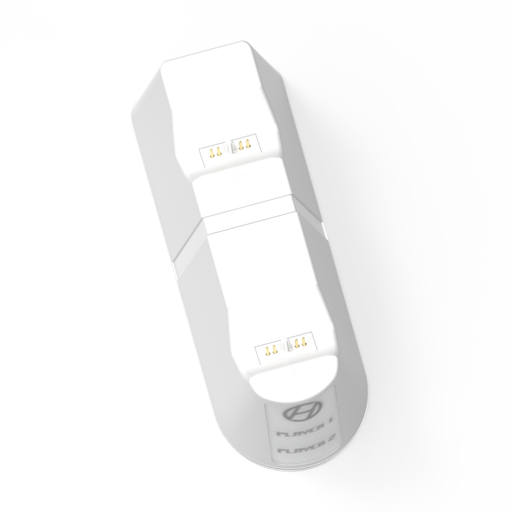
Why This Fits Their Persona: For households with multiple players or solo gamers who enjoy long sessions, having a second controller charged and ready is essential. This dock ensures there's no downtime waiting for a controller to charge via a USB cable.
It includes a dedicated USB-C power adapter, avoiding the slow-charge trap of relying on console USB ports. It also features advanced protection against over-current and over-voltage, mitigating safety risks.
Charges two controllers (DualSense & DualSense Edge) in approximately 2.5 hours. The secure magnetic connection points provide a stable and reliable fit.
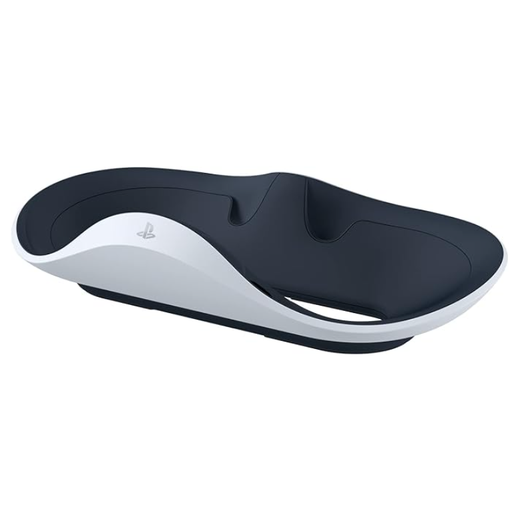
Why This Fits Their Persona: For PS5 owners who have invested in the PlayStation VR2, keeping the specialised Sense controllers charged is just as important. This is the official, purpose-built solution for that specific ecosystem.
As an official Sony product, it guarantees perfect compatibility and safe charging. The magnetic click-in design with included adapters completely avoids the flimsy connector pitfall, offering an effortless and secure dock every time.
Charges both PS VR2 Sense controllers as quickly as connecting them to the console. Its design perfectly matches the aesthetic of the PS5 and VR hardware, creating a cohesive and elegant setup.
We have compiled a complete, real-time list of products that fully satisfy these strict selection criteria and UK safety regulations.
A high-quality charging station with built-in safety protections (over-current, over-voltage, etc.) should not damage your controller. The risk comes from cheaply made, uncertified docks that do not regulate power correctly. Always choose a station from a reputable brand that clearly states its safety features to protect your controller's battery health.
This depends on the station's power source. A good dual charging station with its own AC adapter can typically charge one or two fully depleted DualSense controllers in around 2.5 to 3 hours. Models that rely on the PS5's USB port for power may take significantly longer, especially if both slots are in use.
No, you do not necessarily need the official Sony-branded station. While the official dock is a reliable benchmark, many third-party options offer comparable or even additional features, such as faster charging speeds or different design aesthetics. The key is to ensure any third-party dual PS5 controller charger you consider meets the safety and quality standards outlined in this guide.