
24/7 Customer Support

Free returns

Same-day & Next-day Delivery

Quality Guaranteed

Unlock Your Welcome Offers: FREE Delivery | Up to 80% OFF | Free 30-day JoyPlus trial
Download the APP
A controller is more than just a peripheral; it's your primary connection to the virtual worlds you explore. Whether your current gamepad is showing signs of wear, you're seeking a competitive edge or you need a more accessible way to play, navigating the market for a new PS5 controller can be a challenge. From advanced haptics to complete modular customisation, the options are more diverse than ever.
This guide is designed to help you understand the key features that matter. We'll break down what to look for in a new PlayStation 5 controller and present a few standout options tailored to different types of players, helping you make an informed choice without the marketing jargon.
Before diving into specific models, consider these factors to narrow down your search and find a controller that truly suits your gaming style.
While designed for the PlayStation 5, many controllers now offer multi-platform support. If you switch between console and PC gaming, look for a PS5 PC controller that provides stable connectivity on both. Most connect to a PC via Bluetooth or a USB-C cable, but be aware that advanced features like adaptive triggers and detailed haptic feedback may not be fully supported in all PC games without specific software or developer integration.
For players seeking a competitive advantage, a PS5 pro controller offers a suite of enhancements. Key features to look for include:
A custom PS5 controller with these features allows you to build a device that matches your exact preferences.
Comfort is crucial for any gaming session. The standard official PS5 controller features an ergonomic design that fits a wide range of hand sizes. However, for gamers with limited mobility, a specialised PS5 accessibility controller can be a game-changer. These are designed with highly adaptable layouts, low-force buttons and ports for connecting external switches and assistive devices, ensuring that everyone has the opportunity to play comfortably.
Based on their features, intended use and overall design, here are our recommendations for players looking for a new PS5 wireless controller this year.
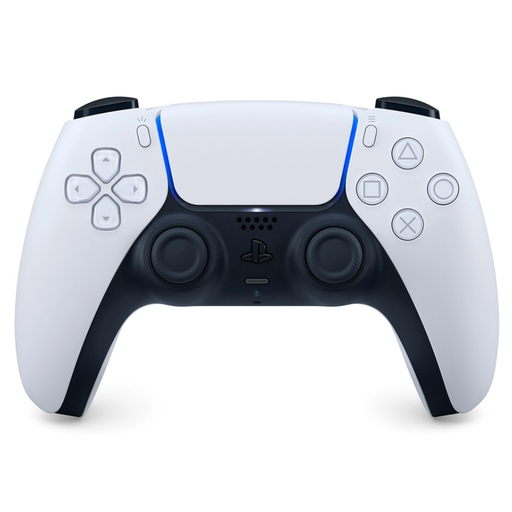
Why It Stands Out: The DualSense is the foundational PS5 experience. Its standout features are the haptic feedback and adaptive triggers, which provide a level of immersion that other controllers often can't replicate. The haptics create nuanced vibrations that simulate textures and impacts, while the triggers can vary their resistance to mimic actions like drawing a bowstring or pulling a jammed lever.
Pros:
Who is it for? This is the go-to controller for the vast majority of PS5 players. If you want the definitive, immersive experience that developers intended for their games and need a reliable, high-quality gamepad for all genres, the official DualSense is an excellent choice.

Why It Stands Out: The Victrix Pro BFG is built for competitive players who demand peak performance and customisation. Its fully modular design allows you to swap the left module to have either a standard PlayStation layout or an offset thumbstick configuration. It also includes a six-button fight pad module for fighting games. The Hall-Effect thumbsticks are a major highlight, offering enhanced durability and protection against stick drift.
Pros:
Who is it for? Competitive gamers who play FPS, fighting games or any genre where speed and precision are paramount. If you want to fine-tune your controller's layout, triggers and sticks to gain a performance edge, this is a strong contender.
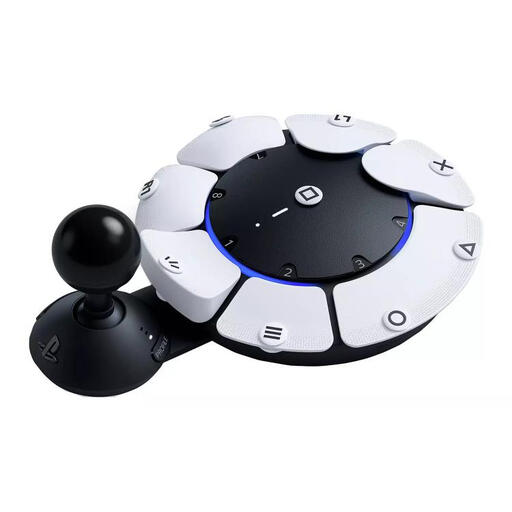
Why It Stands Out: Developed in collaboration with the accessibility community, the Access Controller is a highly customisable kit designed to remove barriers to play. It can be used on a flat surface or mounted, and it doesn't need to be held. The kit includes a wide array of swappable button and stick caps of different shapes and sizes, allowing users to create a configuration that suits their specific mobility, strength and dexterity needs.
Pros:
Who is it for? Gamers with limited mobility or anyone who finds traditional controllers difficult or uncomfortable to use. It's a powerful tool for creating a personalised control setup that makes gaming more comfortable and accessible.
If these recommendations don't quite match what you're looking for, there are many other controllers available with different features, designs and colour schemes.
? Explore our full range of gaming console controllers to find your perfect match.
Yes, the Sony DualSense and many other officially licensed PS5 controllers can be used on a PC. You can connect them via a USB-C cable for a wired connection or pair them using Bluetooth for a PS5 wireless controller experience. While many Steam games offer native support, full functionality for features like adaptive triggers and haptic feedback may depend on the specific game.
A standard controller like the DualSense is designed for a great all-around experience with a focus on immersion. A PS5 pro controller, such as the Victrix Pro BFG, adds features aimed at competitive players. These typically include remappable back paddles, interchangeable components (sticks and D-pads), adjustable trigger stops for faster actuation and often more durable internal components.
Hall-Effect thumbsticks use magnets and electrical conductors to track movement instead of mechanical parts that rub together. This non-contact system significantly reduces physical wear and tear, which is the primary cause of "stick drift"—an issue where the controller registers input even when the stick is not being touched. Controllers with Hall-Effect sticks offer greater long-term durability and consistent accuracy.