Choose a PS5 with a disc drive if you want to use PS4 or PS5 game discs, consider second-hand games or play movie discs. The Digital Edition suits a library built around downloads, but it cannot read discs on its own. A separately sold drive is a later option only for supported console models, so confirm the exact model before relying on that route.
Who each configuration suits
Households with physical games
If you own PS4 or PS5 discs, expect to use borrowed or second-hand games, or want to play movie discs, start by choosing how you will get disc access. PlayStation says its disc-equipped PS5 can play supported game discs as well as downloads.
Download-first players
If you plan to get your games digitally, have dependable internet access and do not need optical media, the PS5 Digital Edition may meet your needs. PlayStation describes it as a console without a disc drive.
Players who may want discs later
If your plans could change, check the precise Digital Edition model before counting on an add-on drive. PlayStation limits its detachable-drive route to specified compatible consoles; the original CFI-1000 Digital Edition does not have that stated route.
What matters when choosing
Decide first whether your existing games or movie collection requires a drive; then consider whether downloads alone will suit future purchases.
PS5 with built-in disc drive
Choose it when: You want supported PS5 or PS4 game discs and PlayStation Store downloads on the same console.
Bear in mind: Check whether particular older games are compatible and whether used discs are in playable condition.
PS5 Digital Edition
Choose it when: Your games will come through downloads and you do not need game or movie discs.
Bear in mind: Without a compatible add-on drive, it cannot read physical media.
Digital Edition with a later drive
Consider it when: You want to start with downloads but may later use discs on a supported console model.
Bear in mind: PlayStation specifies model-dependent compatibility for the separately sold CFI-ZDD1 drive; it is not a universal Digital Edition upgrade.
| Concern |
What to check |
Who this matters to |
| Physical games |
List the PS4 and PS5 discs you want to use. Look for a built-in drive or confirm the exact console model supports an add-on drive. |
If you already have game discs, losing access to that collection may rule out a disc-free setup. About 36% of consumers would put physical-game access first. |
| Game-buying options |
Consider whether you want to buy, borrow, lend or resell physical copies alongside digital purchases. |
You may not own discs yet but still want the option to choose between physical games and downloads later. Roughly 29% of consumers would make that flexibility their primary need. |
| Downloads and subscriptions |
Check your internet connection and the PlayStation Plus benefits of any plan you intend to use. |
If you expect to build your library through downloads, straightforward digital access may matter more than handling discs. Around 21% of consumers would prioritise that approach. |
| Movie discs |
Identify whether you need DVD, Blu-ray or 4K Ultra HD Blu-ray playback, and choose a disc-equipped or confirmed compatible setup. |
Your games might be digital while your films are still on discs, making media playback the deciding requirement. About 14% of consumers would put that need first. |
Mistakes to avoid
-
Assuming every Digital Edition accepts a later drive
PlayStation limits CFI-ZDD1 drive compatibility to specified console model groups. Its stated add-on route does not cover the original CFI-1000 Digital Edition.
Check the exact model against PlayStation’s current compatibility information before planning to add a drive.
-
Overlooking movie discs
A disc-free PS5 cannot read Blu-ray or DVD media on its own, even if you intend to buy all your games digitally.
Check your film collection separately from your game library before choosing a console.
-
Assuming physical formats work alike across platforms
PlayStation discs do not become Xbox games by changing consoles. Nintendo also says that some Switch 2 Game-Key Cards require a download because the card does not contain the full game data.
Choose the platform around the games you intend to use, then check what each physical edition contains.
Relevant brands for reference
PlayStation / Sony Interactive Entertainment
The platform at the centre of the disc-versus-digital PS5 decision.
- PlayStation says its disc-equipped PS5 supports PS5 and supported PS4 Blu-ray games alongside PlayStation Store downloads.
- The Digital Edition has no built-in disc drive; adding one later depends on the exact console model.
Xbox / Microsoft
An alternative to consider if your existing or preferred games belong to the Xbox library.
- Microsoft lists Xbox Series X configurations with a disc drive and an all-digital configuration.
- Compatibility with earlier Xbox game discs must be checked for the games you own; an Xbox does not play PlayStation discs.
Nintendo
An alternative when Nintendo games or portable play is the deciding need.
- Nintendo UK describes physical and downloadable games for Switch and Switch 2.
- Nintendo says Switch 2 Game-Key Cards do not contain the full game data and require a download.
PS5 console selections on Joybuy
These listings include disc-equipped PS5 consoles and Digital Edition consoles, both on their own and in bundles. For a Digital Edition, check the exact model before relying on a later disc-drive addition.
 Image unavailable
PlayStation 5 Disc Edition with Marvel’s Wolverine
For a household that wants a disc-equipped PS5 while retaining the option to download games. The bundle includes Marvel’s Wolverine; its listing identifies the game as PEGI 18, so check suitability for the intended players. Confirm the console’s storage specification before choosing it.
View on Joybuy
 Image unavailable
Sony PlayStation 5 Slim Disc Edition
For players who want to use supported physical PS5 or PS4 games as well as download titles. The listing describes a built-in Ultra HD Blu-ray drive. Check the exact storage specification for this console.
View on Joybuy
 Image unavailable
Sony PlayStation 5 Slim Digital Edition, CFI-2100
For players who expect to download games but may consider disc access later. The listing identifies a CFI-2100 console with 825GB storage and no included disc drive. Check this exact model against PlayStation’s drive-compatibility guidance before choosing an add-on.
View on Joybuy
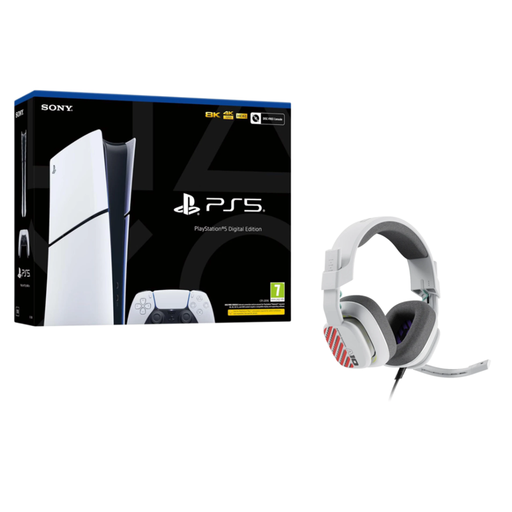 Image unavailable
Sony PlayStation 5 Slim Digital Edition with LOGITECH ASTRO A10 Gen 2 headset
For a download-first player who also wants the bundled white wired headset. The Digital Edition has no built-in disc drive. Check the console’s storage and exact model group before buying, particularly if you might want an add-on drive later.
View on Joybuy
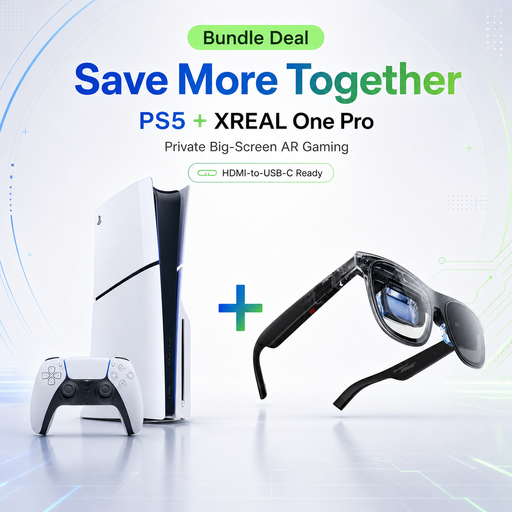 Image unavailable
Sony PlayStation 5 Slim Digital Edition with XREAL One Pro M AR glasses
For a player considering a digital PS5 bundled with the named display accessory. The Digital Edition does not provide built-in disc access. Confirm the console’s storage and model group, and check drive compatibility separately if physical games might matter later.
View on Joybuy
Common questions
Can a PS5 Digital Edition play my PS4 or PS5 game discs?
Not on its own: PlayStation says the Digital Edition has no disc drive. Its separately sold CFI-ZDD1 drive provides a disc route only for specified compatible consoles, so check the exact model and whether each game is supported before relying on your existing discs.
Can I download games on a PS5 that has a disc drive?
Yes. PlayStation says its disc-equipped PS5 can download games from PlayStation Store as well as play supported PS5 and PS4 Blu-ray game discs.
Does PlayStation Plus replace a disc collection?
No. PlayStation Plus is a membership service, not a way to turn your existing discs into digital games. PlayStation says benefits vary by plan, so check the relevant tier and its available games if a particular title matters to you.


