What to consider before choosing
Disc-capable PS5
Choose it when: you want access to supported physical games or disc films without adding a drive.
Trade-off: compare the initial console cost with the digital model, and remember that new PlayStation games released from January 2028 are due to be digital-only, according to Sony.
PS5 Slim Digital Edition
Choose it when: you expect to buy and download games and do not need discs at the outset.
Trade-off: a compatible detachable drive is a separate purchase and needs internet pairing during setup.
PS5 Pro
Choose it when: its 2 TB storage and features in games you intend to play are worth prioritising.
Trade-off: it is all-digital; Sony says enhancements vary by supported game, and disc access requires a separate compatible drive.
Decide which game formats you need first, then check offline access and any game-specific features before comparing the console setups.
| Concern |
What to check when buying |
Who this matters to |
| Physical games and existing discs |
Check that the console has a drive, or confirm the exact Digital Edition model is compatible with Sony’s detachable drive. Supported PS4 discs must stay inserted while playing. |
If I want to keep using supported PS4 discs or choose physical games, I would make disc access a priority. About 36% of consumers put access to physical games first. |
| Digital library and setup cost |
Compare the complete console-and-drive setup you would use, and check the prices of the games you actually want from relevant sellers on the same day. |
If I mainly download games, I would weigh the simpler all-digital setup against the possibility of buying a drive later. About 29% of consumers prioritise digital purchasing and setup cost. |
| Offline play |
Enable Console Sharing and Offline Play on the intended PS5, download games before a connection interruption and check each game’s online requirements. |
When I need access during connection interruptions, I would check offline settings as well as whether a game requires an online connection. About 21% of consumers make offline access their main concern. |
| Pro features and storage |
Check whether the games you plan to play support the Pro features you want, and whether you need a separate drive for physical media. |
If I am considering Pro for specific games or its built-in storage, I would check those features title by title and decide separately about discs. About 14% of consumers prioritise Pro features or storage. |
Joybuy PS5 options
These Joybuy listings cover digital and disc-capable PS5 consoles, including bundles with a headset, projector, AR glasses, game or additional controllers. Check the specific bundle contents and whether its console supports the game formats you want.
 No image available
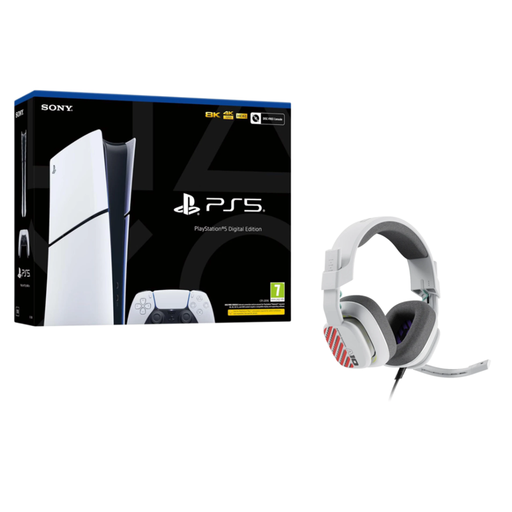
Sony PlayStation 5 Slim Digital Edition with LOGITECH ASTRO A10 Gaming Headset Gen 2
For a download-first setup, this bundle combines a PS5 Digital Edition Slim console with a wired headset.
The console is all-digital and accesses games through PlayStation Store. The named headset is a white LOGITECH ASTRO A10 Gaming Headset Gen 2.
Joybuy
 No image available
Sony PlayStation 5 Slim Digital Edition with Yaber K3 Smart Projector
This bundle pairs a PS5 Slim Digital console with a Yaber K3 Smart Projector for a console-and-projector setup.
The console is a Digital Edition, so this bundle is for digital game access rather than built-in disc playback.
Joybuy
 No image available
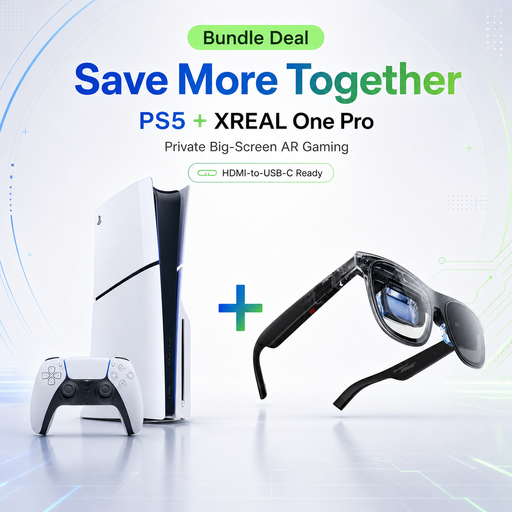
Sony PlayStation 5 Digital Edition Slim with XREAL One Pro M AR Glasses
This bundle combines a PS5 Digital Edition Slim console with XREAL One Pro M AR glasses for a personal-screen setup.
The console is a Digital Edition; check that a disc-free library suits your needs before choosing it.
Joybuy
 No image available
PlayStation 5 Disc Edition Console with Marvel’s Wolverine
For players considering physical games, this bundle names a PS5 Disc Edition console and Marvel’s Wolverine.
The bundle listing identifies the included game as PEGI 18.
Joybuy
 No image available
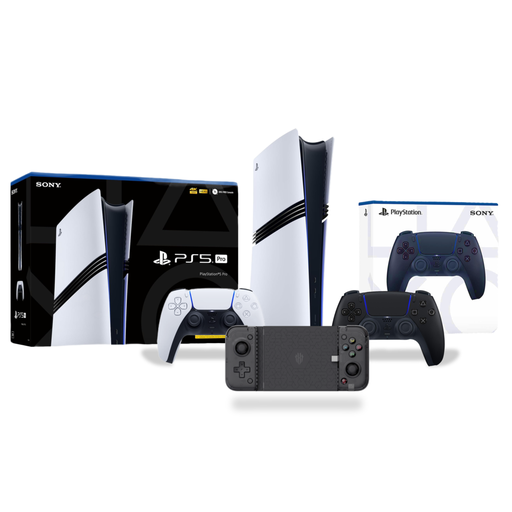
PlayStation 5 Pro with DualSense Wireless Midnight Controller and REDMAGIC Shadow Blade Gamepad
For players considering the Pro route, this bundle names a PS5 Pro console, a DualSense Wireless Midnight Controller and a REDMAGIC Shadow Blade Gamepad.
Sony describes PS5 Pro as an all-digital console; physical media requires a separate compatible drive.
Joybuy
PS5 buying questions
Can I play PS4 discs on any PS5?
No. Sony Support says supported PS4 game discs can be played on a disc-capable PS5, and the disc must stay inserted during play. A Digital Edition or Pro needs a compatible separate drive for disc use; check the console model and the individual game’s requirements.
Will downloaded games work if my internet connection is down?
Sony Support says purchased and downloaded games can be played offline on a PS5 with Console Sharing and Offline Play enabled. Download and sign in beforehand, and check the specific game’s online requirements; the feature can be enabled on one PS5 at a time.
Do I need PlayStation Plus to buy games or play offline?
A PlayStation Plus subscription is not a general requirement for buying a game or for offline use of an eligible purchased download with the console’s offline-play setting enabled. Sony Support says Plus is needed for online multiplayer in most PS4 and PS5 games; subscription-catalogue access has separate membership conditions.
Which PS5 models can use Sony’s detachable disc drive?
Sony specifies the drive for PS5 Pro and CFI-2000 or CFI-2100 Digital Edition consoles. Sony also says an internet connection is required to pair the drive during setup, so check the console’s model number before buying.
Does buying a digital game mean I own a transferable copy?
Sony’s UK Software Usage Terms describe purchased software as licensed rather than owned. Access to a physical disc and transfer of a digital licence are different questions; UK Intellectual Property Office guidance on resale of qualifying genuine goods does not establish that every game-disc transaction or digital licence transfer is permitted.


