What matters when choosing
Start with how you want to obtain and keep games, then check the display features and storage arrangements that matter to your household.
| Concern |
What to check |
Who this matters to |
| Disc access |
Choose a built-in drive for boxed games, or confirm the exact console model group before planning a later CFI-ZDD1 drive. PlayStation UK limits add-on-drive compatibility to specified models. |
If my household wants to keep using game discs or play supported disc films, I need a console route that accepts them. About 31% of consumers put physical-library access first. |
| Download-first setup |
Check that an internet-connected PlayStation account and digital game purchases suit you; a Digital Edition has no built-in disc drive. |
When I expect to download my games rather than buy discs, I would choose around that habit instead of a drive I do not plan to use. Download-first convenience is the primary need for about 31% of consumers. |
| PS5 Pro features |
Check your intended games for PS5 Pro enhancements and your display’s capabilities. Sony describes its visual and performance features in the context of supported games. |
If I am choosing around enhanced games, I want to know whether my screen and the titles I play can use the features Sony describes. About 15% of consumers put those display-led features first. |
| Library space |
Compare stated console storage and expansion needs. PlayStation UK says a compatible M.2 SSD can launch PS5 games, while USB extended storage cannot launch them directly. |
If I keep many games installed, I need a workable storage plan; I may also want to decide whether PlayStation Plus features belong in my library routine. Storage and service planning comes first for about 23% of consumers. |
PS5 consoles and bundles on Joybuy
These selections cover PS5 Disc Edition and Digital Edition consoles and bundles. Choose by the library format you need, then check whether a named bundle accessory fits your setup.
 Image unavailable
Sony PlayStation 5 Disc Edition Slim
Consider this console if physical games are central to your library but you also want the option to download games. It is listed as a Disc Edition Slim; check its stated storage and the exact items supplied before choosing it for a particular setup.
View on Joybuy
 Image unavailable
PlayStation 5 Disc Edition + Marvel’s Wolverine
This named bundle is relevant if you want a disc-capable PS5 and the included game. The listing identifies Marvel’s Wolverine as PEGI 18, so check its age suitability for your household; also confirm the complete bundle contents and console storage.
View on Joybuy
 Image unavailable
Sony PlayStation 5 Digital Edition Slim
This is the download-first console choice among these selections; a disc drive is not included. If you want the option to add a drive later, confirm the console’s CFI model group against Sony’s compatibility guidance and plan for a separately sold drive.
View on Joybuy
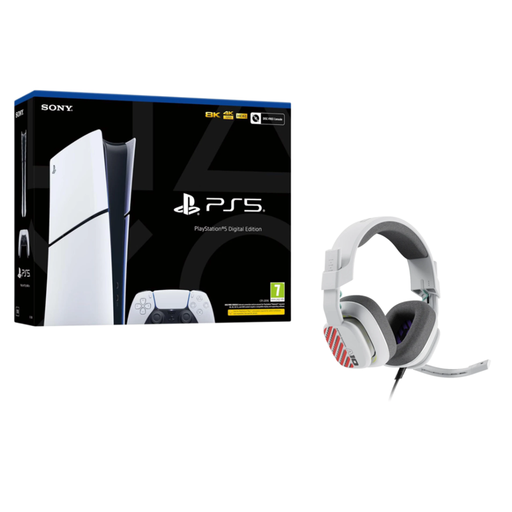 Image unavailable
Sony PS5 Digital Edition Slim + Logitech ASTRO A10 Gen 2
Consider this download-first bundle if you also want the named wired headset. Check the headset’s connections for your intended setup, along with the console’s CFI model group and storage; the Digital Edition has no built-in drive.
View on Joybuy
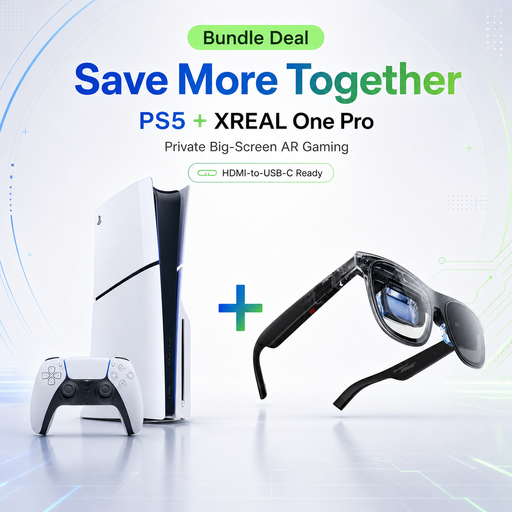 Image unavailable
Sony PS5 Digital Edition Slim + XREAL One Pro M
This bundle pairs a download-first console with named AR glasses. Before choosing it for a personal-display setup, check the glasses’ connection and setup requirements, the console’s storage and the complete bundle contents; the bundle name alone does not establish how the glasses will work with your intended games.
View on Joybuy
Frequently asked questions
Can I add a disc drive to any PS5 Digital Edition?
No. PlayStation UK lists the CFI-ZDD1 drive for PS5 Pro and specified CFI-2000 and CFI-2100 Digital Edition model groups, not the original CFI-1000 Digital Edition. A compatible drive also needs an internet connection for pairing during setup.
Do I need a 4K 120Hz screen to choose PS5 Pro?
No specific screen is a prerequisite to owning it, but the features worth choosing PS5 Pro for depend on your games and display. Sony describes support for 60Hz and 120Hz displays and identifies enhanced games separately, so check the titles you play and the capabilities of your screen.
Should I use USB storage or an M.2 SSD for PS5 games?
Choose a compatible M.2 SSD if you want to launch PS5 games from added storage. PlayStation UK says USB extended storage can hold PS5 games, but they must be copied back before play; supported PS4 games can be played directly from USB extended storage.
Do I need PlayStation Plus to build a PS5 library?
No. You can choose games without subscribing, while PlayStation Plus provides membership features including online multiplayer. PlayStation UK says Extra and Premium also provide access to a game catalogue, so check which features you intend to use before subscribing.
How can I check whether a bundled game suits my household?
Check the individual game’s PEGI age classification rather than judging it by the console bundle. PEGI says physical console games display their age classification on the box; for the Marvel’s Wolverine bundle shown here, the listing identifies the game as PEGI 18.


