What to consider before choosing
Decide how you will acquire games first, then check the console’s drive, supported features and storage against the library you plan to use.
| Concern |
What to check when buying |
Who this matters to |
| Game format |
Check for a built-in drive if you want physical PS5 games or supported PS4 discs. Sony Interactive Entertainment / PlayStation Blog announced that physical game-disc production for new releases will stop from January 2028; previously released physical games are unaffected. |
If my library includes physical games, I want to know which console can play them and what Sony’s release change means for future choices; around 33% of consumers put game-format flexibility first. |
| Drive now or later |
Check whether the optional CFI-ZDD1 drive is listed for your exact console model. Sony lists compatibility with PS5 Pro and Digital Edition consoles in the CFI-2000 Slim and CFI-2100 groups; internet access is required for pairing during setup. |
If I may want disc access later, I need to check whether the drive fits my console before choosing a route; about 25% of consumers put the complete hardware setup first. |
| Pro features |
Check support for the games you intend to play and the capabilities of your display. Sony says PS5 Pro enhanced features vary by game. |
If I am choosing Pro for supported visual or frame-rate features, I want to confirm they apply to my games and display; about 25% of consumers put enhanced graphics first. |
| Installed-library capacity |
Compare the exact model and package. Sony’s UK specifications list 825GB for the Digital Edition, 1TB for the Disc Edition and 2TB for Pro; Sony also documents compatible M.2 storage expansion. |
If I want to keep more of my intended library installed, I need to compare the console’s listed capacity and expansion options; around 17% of consumers put installed-library capacity first. |
Joybuy PS5 options
These Joybuy listings cover Digital Edition bundles, disc-capable consoles and a PS5 Pro bundle. Check each listing for its exact model and included items.
 No image available
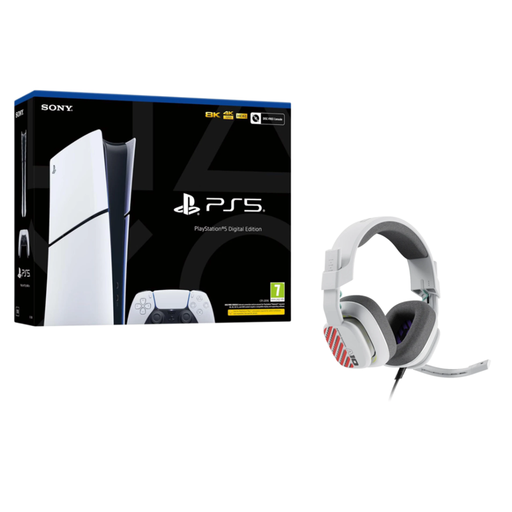
Sony PlayStation 5 Slim Digital Edition + Logitech ASTRO A10 Gaming Headset Gen 2, Wired, White
For a download-first library, this listing pairs a PS5 Slim Digital Edition with a Logitech ASTRO A10 headset.
The title identifies the headset as wired and white; the listing says the optional disc drive is sold separately.
View on Joybuy
 No image available
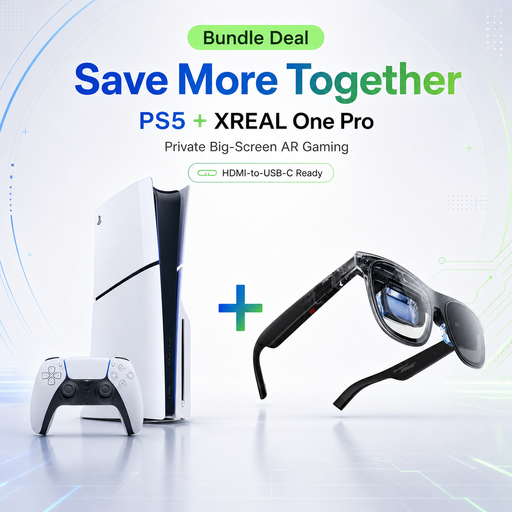
Sony PlayStation 5 Slim Digital Edition + XREAL One Pro M AR Glasses
This Digital Edition bundle is listed with XREAL One Pro M AR glasses for a private-screen gaming setup.
The listing says the console does not include a disc drive.
View on Joybuy
 No image available
PlayStation 5 Disc Edition Console + Marvel’s Wolverine Bundle
For physical-game access, this bundle is listed with a PlayStation 5 Disc Edition console and Marvel’s Wolverine.
The listing marks the included game PEGI 18 and says age verification is requested on delivery.
View on Joybuy
 No image available
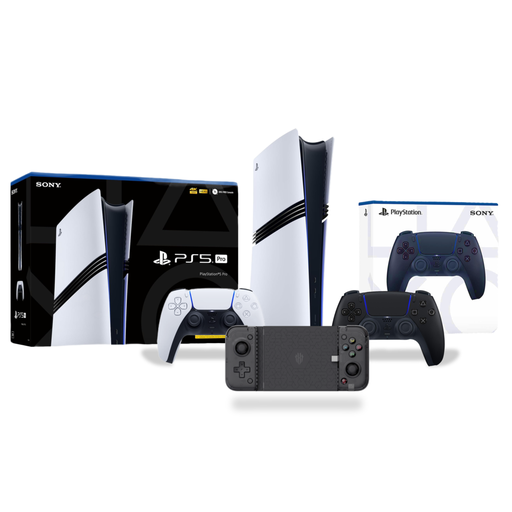
PlayStation 5 Pro + DualSense Midnight Controller + REDMAGIC Shadow Blade Gamepad
This listing centres on a PS5 Pro bundle and names an additional DualSense Midnight controller and REDMAGIC Shadow Blade gamepad.
The listing says Pro enhancements apply to supported titles; it describes the gamepad as compatible with supported iPhone and Android devices.
View on Joybuy
 No image available
Sony PlayStation 5 Slim Disc Edition
For a library that combines physical games and downloads, this listing describes a Slim Disc Edition with a built-in Ultra HD Blu-ray drive.
The listing says the drive plays physical PS5 and supported PS4 game discs, and that games can also be downloaded from the Store. It also describes M.2 storage expansion support.
View on Joybuy
PS5 buying FAQs
Can you play physical PS4 games on a PS5?
Many PS4 games are supported, but compatibility is not universal. Sony’s PlayStation Support guidance says a supported PS4 disc game needs a console with a disc drive, may require an update and must remain inserted while you play.
Can the optional disc drive be attached to any PS5 Digital Edition?
No. Sony lists the CFI-ZDD1 drive for PS5 Pro and Digital Edition consoles in the CFI-2000 Slim and CFI-2100 groups. Check your console’s model group against that list before choosing the accessory; internet access is required to pair it during setup.
What should you do before fitting the optional disc drive?
Follow Sony’s model-specific instructions: turn the console off, unplug its power cord and cables, and let it cool before attaching the drive. An internet connection is required to pair the drive with the console during setup.
Can you expand PS5 storage later?
Yes. Sony documents compatible M.2 storage expansion for downloading, copying and launching PS5 and PS4 games. Check Sony’s current requirements before choosing an expansion drive; the console’s stated capacity does not indicate how many particular games will fit.
Can you get a refund for a digital game after trying it?
Under PlayStation Store’s stated policy, a request for an ordinary game or DLC must be made within 14 days, and the content must not have been downloaded or streamed; faulty content is an exception. Sony says its policy does not limit additional rights under local law.


