Choose a disc-equipped PS5 if you expect to use physical game discs or disc movies without adding an accessory. A Digital Edition suits download-first buying, but a later disc drive works only with specified models; PS5 Pro is worth considering for its 2TB storage and enhancements in select games, not as a shortcut to disc playback.
Who is each PS5 route for?
Physical-game buyers
If you own game discs or want to buy pre-owned copies, a PS5 with a built-in drive gives you a disc route without a separate accessory. Sony says a compatible drive can also be added to specified Digital Edition models and PS5 Pro, but not to the original CFI-1000 Digital Edition.
Download-first players
If you plan to get games through PlayStation Store rather than use discs, the Digital Edition fits that approach. Sony says it has no built-in drive; buying and downloading games through the store requires a PlayStation account and internet connection.
Players considering PS5 Pro
PS5 Pro is a separate choice for players interested in its 2TB storage and enhancements in select games. Sony says those enhancements vary by game. Pro has no built-in disc drive, although it can use the separately sold compatible drive.
What should you check before choosing?
Start with how you expect to get games, then check the exact console model, storage and any extras your setup calls for.
| Priority | What to check | Your needs |
|---|
| Disc access |
Check for a built-in drive if you want to use physical games or disc movies immediately. Sony says the Digital Edition has no built-in drive. |
I have game discs already, or I want the option to buy pre-owned discs and use film discs. |
| Future drive compatibility |
Confirm the exact CFI model group before buying a separate drive. Sony lists the CFI-2000 slim and CFI-2100 Digital Edition groups and PS5 Pro as compatible routes; the original CFI-1000 Digital Edition cannot use the later attachable drive. Initial pairing requires internet access. |
Downloads suit me now, but I may want to use discs later. |
| Game-buying route |
Compare the games you expect to buy, pre-owned availability, any trade-ins and optional subscriptions. CeX offers a UK buy-and-sell route for games, but that does not make physical copies cheaper in every case. |
I want to choose between store downloads and physical copies based on the games I actually expect to use. |
| Storage and Pro features |
Sony lists 825GB for the current Digital Edition, 1TB for its disc PS5 and 2TB for PS5 Pro. A compatible M.2 SSD can launch PS5 games; USB extended storage cannot play them directly. Sony says Pro enhancements vary by game. |
My download library may grow, or I am considering Pro for games with supported enhancements. |
Common buying mistakes
-
Assuming every Digital Edition accepts a later disc drive
Sony excludes the original CFI-1000 Digital Edition from the attachable-drive route. A console labelled Digital Edition is not, by itself, enough to establish compatibility.
Check the exact model group before choosing a console or drive, and make sure you can connect to the internet for initial drive pairing.
-
Assuming one game format always costs less
Physical copies offer a pre-owned and trade-in route, while digital purchasing and subscriptions create different options. The useful comparison depends on the particular games and how you plan to obtain them.
Compare your likely game purchases and any subscription use rather than deciding from a single title.
-
Choosing PS5 Pro mainly for disc access
PS5 Pro has no built-in drive, and Sony says its enhanced features vary by game. If discs are your main requirement, a disc-equipped PS5 provides that route without an accessory.
Consider Pro for its storage and enhancements in games you expect to play; check the separate drive if you also need discs.
-
Overlooking storage and subscriptions
Sony says PS5 games stored on a USB extended drive must be moved to console storage or an M.2 SSD before play. PlayStation Plus is a separate, recurring subscription that includes online multiplayer.
Check your expected download library and the multiplayer requirements of your games before settling on a console and any extras.
Relevant brand reference
PlayStation / Sony Interactive Entertainment
Sony's PS5 range provides the disc-equipped, Digital Edition and Pro configurations relevant to this choice.
- Sony's UK product and support information identifies the console storage options and the model groups eligible for its attachable disc drive.
- The Digital Edition and PS5 Pro have no built-in disc drive. Sony says Pro enhancements vary by game, and the attachable drive does not work with the original CFI-1000 Digital Edition.
PS5 console options on Joybuy
These listings include Digital Edition and disc-equipped PS5 consoles, including bundles. Check the exact model and bundle contents where they matter to your plans for discs or downloads.
 No image available
Sony PlayStation 5 Digital Edition Slim
A download-first option with no built-in disc drive. If adding a drive later matters, confirm the exact console model and compatible accessory before buying; Sony requires internet access for initial drive pairing.
View on Joybuy
 No image available
PlayStation 5 Disc Edition + Marvel’s Wolverine bundle
The disc-equipped console suits a buyer planning to use physical games. Check the console model group and storage capacity, and confirm the bundle contents and the PEGI 18 game's age suitability.
View on Joybuy
 No image available
Sony PlayStation 5 Disc Edition Slim
A built-in disc drive makes this a route for physical PS5 or PS4 game discs. Confirm the exact console model group and storage capacity if those details affect your choice.
View on Joybuy
 No image available
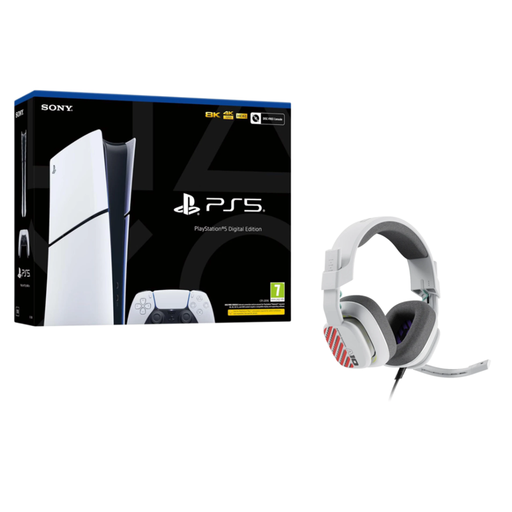
Sony PS5 Digital Edition Slim + Logitech Astro A10 Gen 2 wired headset, white
This download-first bundle includes a wired headset, but the headset does not change the console's disc capability. If you may add a disc drive, confirm the console model group; also check its storage capacity against your expected library.
View on Joybuy
PS5 buying questions
Can every PS5 Digital Edition use a separate disc drive?
No. Sony lists the CFI-2000 slim and CFI-2100 Digital Edition groups and PS5 Pro for its attachable drive; the original CFI-1000 Digital Edition cannot use it. Check the exact model group before buying the accessory.
Will a compatible disc drive need an internet connection?
Yes. Sony says an internet connection is required to pair the attachable drive with a compatible PS5 during setup. Confirm both model compatibility and setup connectivity before relying on a later disc upgrade.
Do I need PlayStation Plus for online PS5 play?
PlayStation Plus is Sony's paid subscription service that includes online multiplayer. Check the requirements of the games you plan to play, because multiplayer requirements can differ by game type.
Can I play PS5 games directly from a USB extended drive?
No. Sony says PS5 games on USB extended storage must be moved back to console storage or an M.2 SSD to play. A compatible M.2 SSD can be used to download, copy and launch PS5 games.


