Owners of PS4 or PS5 discs
If you want to keep using physical games, check the titles you own and choose a drive-equipped console where they are supported. PlayStation Support notes that PS4 disc compatibility has exceptions.


If you need to play physical PS4 or PS5 games now, choose a PS5 with a disc drive; a digital-only console cannot read discs unless you add a compatible drive. If you buy games digitally, consider a Digital Edition, while choosing Pro only if its features in supported games matter to you; Pro does not include a disc drive.
If you want to keep using physical games, check the titles you own and choose a drive-equipped console where they are supported. PlayStation Support notes that PS4 disc compatibility has exceptions.
If you usually get games through PlayStation Store, consider whether you are comfortable with a console that has no disc drive as supplied.
If you are weighing PS5 Pro, check whether the features Sony describes for select supported games matter to you, and decide separately whether you need disc access.
Start with the games you want to play: immediate access to discs calls for a drive-equipped route, while digital purchasing leaves more room to choose between Digital Edition and Pro features.
Choose this when: You own compatible PS4 discs or plan to play physical PS5 games.
Consider: Check individual PS4 titles; compatibility is not universal.
Choose this when: You expect to get games digitally and do not need to insert discs.
Consider: Disc access requires a compatible drive, purchased separately and paired with an internet connection during setup.
Choose this when: Features for supported games are a specific reason for your choice.
Consider: Pro is digital-only as supplied; disc access requires a compatible drive.
| Concern | What to check when buying | Who this matters to |
|---|---|---|
| Access to physical games | Check whether the console includes a drive and whether your PS4 titles are compatible. PlayStation Support lists exceptions to PS4 compatibility. | If I own PS4 discs or plan to play physical PS5 games, I need a drive-equipped route and title-by-title checks. Around 36% of consumers put access to an existing or planned disc library first. |
| Digital-first use | Confirm that you are happy to obtain games digitally and that the console’s stated storage suits your choice. | If I usually buy games digitally, I may not need a drive unless I want disc access later. Around 29% of consumers prioritise digital purchasing and avoiding a drive they do not expect to use. |
| Pro features | Check whether the games you intend to play support the features Sony describes for Pro; the console has no included disc drive. | If supported-game features are central to my choice, I should check them for the titles I play and decide about discs separately. Around 21% of consumers put Pro features first. |
| Adding a drive later | Verify the exact console model’s compatibility with the drive and allow for internet pairing during setup, as Sony requires. | If I want to defer the disc decision but keep an upgrade route open, I need to confirm my console model before buying a drive. Around 14% of consumers prioritise that later flexibility. |
Sony specifies compatible slim Digital Edition model groups and PS5 Pro for its detachable drive; compatibility does not extend to every earlier Digital Edition.
Check the console model group and drive model against Sony’s compatibility information before buying either component.
A Digital Edition does not play discs as supplied. Adding disc access means buying a compatible drive and pairing it with an internet connection during setup.
If you may want to use discs, compare the complete console-and-drive option with a console supplied with a drive.
Sony has stated that newly released PlayStation games from January 2028 will be offered in digital format only, while earlier discs remain playable. This forward-looking statement does not change whether your existing discs work now.
Base your current choice on the discs you own and the games you plan to play, and check Sony’s format information before relying on it for later releases.
Sony describes Pro enhancements for select PS5 games, and Pro is supplied without a disc drive.
Check support for the games you intend to play, then decide separately whether you need a compatible drive for physical games.
The console and compatible detachable-drive options covered here are PlayStation products; this is a comparison of specific PS5 routes, not a ranking of console brands.
These Joybuy listings cover the disc-equipped PS5 route, Digital Edition and PS5 Pro, including a Pro bundle. Choose according to your need for disc access and interest in features for supported games.
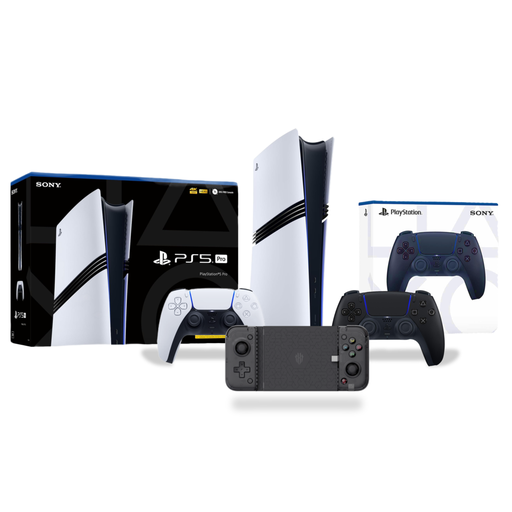 No image available
Consider this bundle if you want a PS5 Pro alongside the named controller and gamepad accessories.
Sony describes Pro enhancements for supported PS5 titles; they do not apply universally. The console has no disc drive, so physical-game access requires a compatible drive separately.
 No image available
Consider this route if you want to play physical PS5 or PS4 game discs without adding a separate drive.
The listing specifies a built-in Ultra HD Blu-ray drive. PS4 disc compatibility has exceptions, so check the titles you plan to play.
 No image available
Consider this route if you expect to get games digitally and do not need disc playback as supplied.
The listing identifies the CFI-2100 model group and 825 GB storage. It describes compatibility with an optional drive; check the exact console model and pairing requirements before buying one.
Not as supplied, because a Digital Edition has no disc drive. PlayStation Support says most PS4 games are playable on PS5, but there are exceptions; a PS4 disc must remain inserted when playing on a drive-equipped console.
You need a console model compatible with the drive and an internet connection for pairing at setup. Sony’s instructions say to turn the console off, disconnect its cables and let it cool before fitting the drive.
Under Sony’s UK PlayStation Store policy, cancellation within 14 days generally requires that downloading or streaming has not started. Faulty content is treated separately, and applicable legal rights remain unaffected; this policy concerns digital purchases, not returns of a physical console.
GOV.UK says consumers buying at a distance can generally notify the seller of cancellation within 14 days of receiving an item and then have another 14 days to return it. Faulty or misdescribed goods have separate protections; check the circumstances of the purchase and the seller’s terms.