What to check before choosing
Start with how your household obtains games, then check whether future disc access, storage and display-dependent features matter enough to change the console route.
| Priority |
What to check |
Your needs |
| Disc library and media |
Check for a built-in disc drive or compatibility with the CFI-ZDD1 Disc Drive. PS4 game discs need a disc-capable PS5 and must remain inserted while playing. Confirm whether Blu-ray and DVD playback matters at home. |
I want to keep using boxed PS4 or PS5 games, buy second-hand, lend games, or use the console for disc media. |
| Digital-first setup |
Confirm that downloads through PlayStation Store suit your buying habits. A Digital Edition has no built-in drive; a later upgrade requires an eligible CFI-2000 or CFI-2100 model and a separately sold compatible drive. |
I usually buy downloads and do not need to insert game or movie discs straight away. |
| Account and online play |
Plan for a PlayStation account and internet connection for digital-console setup. PlayStation states that most PS4 and PS5 online multiplayer games also require PlayStation Plus. |
I want to separate the console decision from game purchases and any ongoing multiplayer subscription. |
| PS5 Pro features |
Check the games you intend to play for PS5 Pro enhancement and assess your display setup. PlayStation describes support for higher or more consistent frame rates on compatible titles and displays, but enhancements vary by game. |
I value extra storage and want visual or performance features that can make a difference with my display and chosen games. |
Joybuy PS5 options
Joybuy product options for the disc-console, digital-first and PS5 Pro routes in this PS5 home-gaming decision.
 No image available
Sony PlayStation 5 Slim Disc Edition
A disc-capable route for households using physical PS4 or PS5 games and disc media.
Built-in Ultra HD Blu-ray drive; supports PS4 and PS5 game discs. The vertical stand is optional, and installed storage capacity should be checked if game-library size is important.
Joybuy
 No image available
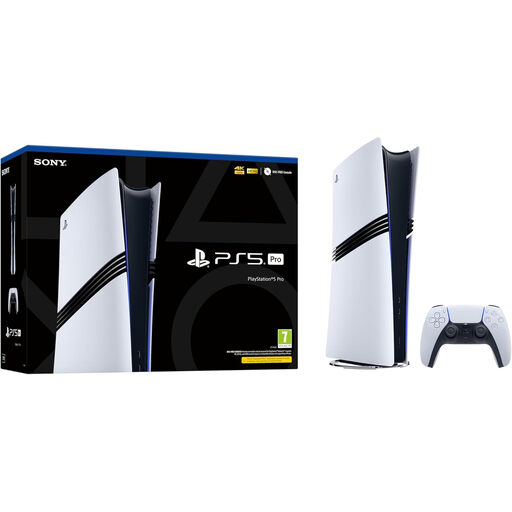
Sony PlayStation 5 Pro Digital Edition
A premium digital route for players prioritising PS5 Pro-enhanced games and a larger download library.
2TB storage and all-digital operation. No disc drive is included; compatible disc access requires a separately sold drive, and enhanced features vary by game.
Joybuy
 No image available
Sony PlayStation 5 Digital Edition Slim
A download-first option for homes that do not need physical games or disc media immediately.
All-digital CFI-2100 configuration with a possible compatible Disc Drive upgrade. A PlayStation Network account and internet access are needed for digital setup and purchases.
Joybuy
Frequently asked questions
Can I use PS4 game discs on a PS5?
Yes, if the PS5 has disc capability. PlayStation says the overwhelming majority of more than 4,000 PS4 games are playable on PS5, although some features may differ; keep the disc inserted when playing. A PS5 Digital Edition needs a compatible separately sold drive before it can use PS4 game discs.
Can every PS5 Digital Edition accept the removable Disc Drive?
No. PlayStation states that the CFI-ZDD1 Disc Drive is compatible with PS5 Pro and specified PS5 Digital Edition CFI-2000 and CFI-2100 model groups. Check the console model number before buying, and note that internet access is required to pair the drive during setup.
Do I need PlayStation Plus to use a PS5?
No, PlayStation Plus is not a general requirement to use the console or buy downloaded games. However, PlayStation states that most PS4 and PS5 online multiplayer games require an active PlayStation Plus subscription, so include it in your plans if multiplayer is important.
Do I own a downloaded PlayStation game in the same way as a physical disc?
No. Under PlayStation's UK Software Usage Terms, buying software grants a licence to use it rather than ownership of the software. Check the applicable store and publisher terms when this distinction matters to how you prefer to buy games.


