
24/7 Customer Support

Free returns

Same-day & Next-day Delivery

Quality Guaranteed

Unlock Your Welcome Offers: FREE Delivery | Up to 80% OFF | Free 30-day JoyPlus trial
Download the APP
Buying a PS5 DualSense wireless controller seems straightforward until you compare official colours, specialist versions, PC compatibility and charging accessories. A low-priced listing may not include the cable shown in its image, while a stylish limited-edition model may offer the same core controls at a higher price.
For UK households, the right choice depends on how you play, how many controllers you need and whether you use a PlayStation 5 controller with a PC or mobile device. This guide highlights common buying traps, the specifications worth checking and suitable options for different types of player.
The term “wireless PS5 controller” can cover official DualSense models, third-party gamepads and specialist arcade controls. They may differ in haptic feedback, adaptive triggers, motion sensing, microphone support and PS5 compatibility.
If you want the features designed for supported PS5 games, check that the listing specifically identifies the product as a genuine Sony DualSense controller. A generic Bluetooth gamepad may connect to a console or PC but not reproduce the same tactile effects.
DualSense controller colours range from Midnight Black and Starlight Blue to iridescent Chroma finishes and themed editions. Colour is a legitimate reason to buy, particularly for collectors or a matching gaming room, but it does not necessarily indicate different internal performance.
Compare the functional specifications first. A standard DualSense model and a special colourway can share the same rechargeable battery, touchpad, motion sensor, microphone and USB-C connection.
Some listings show a controller beside a charging dock, cable or accessories that are not part of the package. For example, the Sony Official PlayStation 5 DualSense Charging Station is supplied without controllers. Always check the “in the box” information before paying, especially when buying a PS5 replacement controller.
Also consider charging arrangements. A controller charged directly from the console occupies a USB port; a separate dock may be more convenient for a multiplayer household.
A haptic feedback controller uses more detailed vibration effects than traditional rumble, while an adaptive trigger controller can vary resistance through the L2 and R2 buttons. The effect depends on game support and can usually be adjusted or disabled in PS5 settings.
These features are useful for players who enjoy immersive single-player games, racing or action titles. Competitive players may prefer lower-intensity settings if trigger resistance or vibration distracts from rapid inputs.
Official DualSense models generally connect to PS5 using Bluetooth or a USB-C cable. Many also work with Windows PC, Mac, Android and iOS devices, but feature support varies by game, operating system and connection method.
Before choosing a PS5 controller for PC, check:
For PS5 use, pairing the controller with a USB cable is normally the simplest first setup. Keep the firmware updated through the console or compatible software where required.
DualSense controllers have built-in rechargeable batteries and charge through USB-C. Actual play time varies according to game features, headset use, microphone activity and vibration settings, so treat stated battery figures as guidance rather than a guarantee.
For two-controller homes, a charging dock can reduce cable clutter. The Sony Official PlayStation 5 DualSense Charging Station charges up to two DualSense controllers at once and frees the console’s USB ports for other devices. A third-party option such as the GigaBlast Dual Controller Super Charging Station is also designed for two DualSense or DualSense Edge controllers and includes charge indicators and a USB-C power adapter.
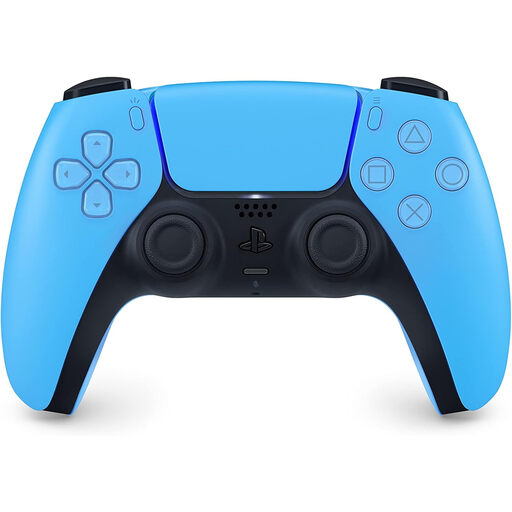
Why This Fits Their Persona: A straightforward official controller for a first purchase, replacement or second player in a UK household. It combines PS5 support with PC connectivity through USB-C or Bluetooth.
The product specification identifies it as a DualSense wireless controller rather than a generic PS5 gamepad, with haptic feedback, adaptive triggers and a rechargeable battery.
Official PS5 compatibility, USB-C charging, built-in microphone, motion sensors and a supplied USB-C charging cable.
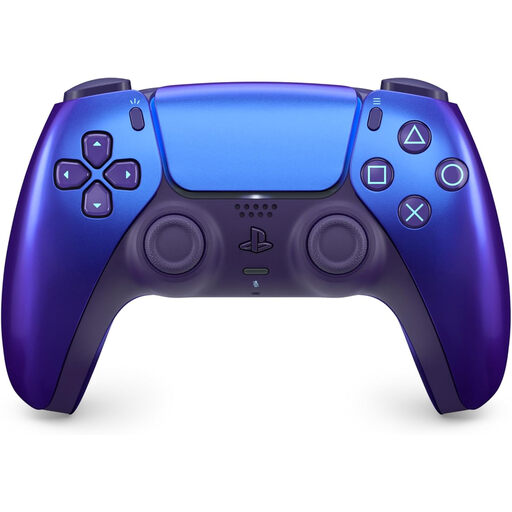
Why This Fits Their Persona: Suitable for buyers who want official DualSense functionality with a colour-shifting finish that gives a gaming setup a more distinctive appearance.
The colour-focused design is clearly identified, while the core specifications still list Bluetooth, USB-C, haptic feedback, adaptive triggers and a built-in microphone.
Iridescent Chroma Indigo finish, rechargeable battery, touchpad, motion sensor and compatibility with PS5 and supported PC or mobile uses.
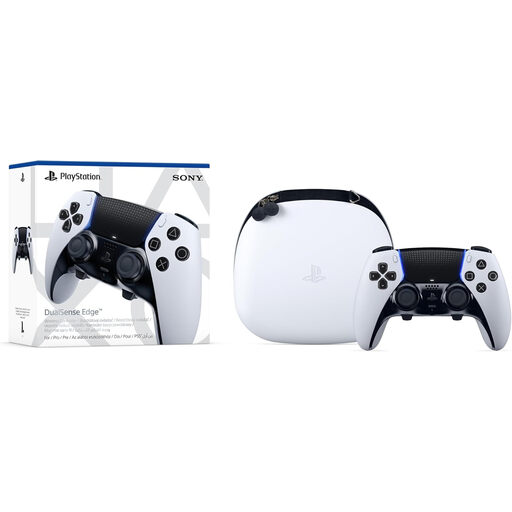
Why This Fits Their Persona: Designed for competitive and enthusiast players who want to adjust controls for different games rather than use a fixed standard layout.
It provides clearly specified customisation, including remappable inputs, adjustable trigger travel, interchangeable back buttons and replaceable stick modules sold separately.
Includes multiple stick-cap styles, back-button options, a carrying case and USB-C connectivity, alongside DualSense haptics and adaptive triggers.
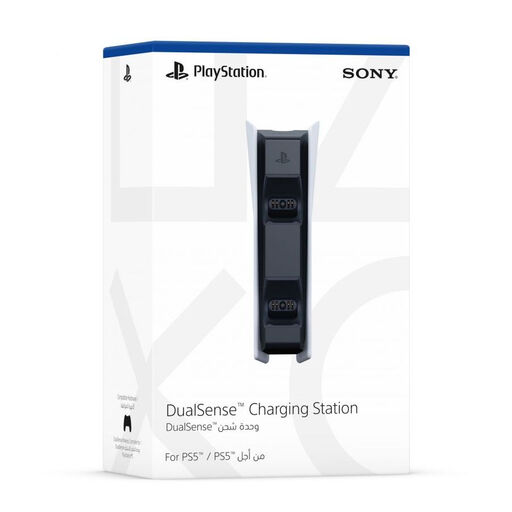
Why This Fits Their Persona: A practical add-on for homes with two controllers, helping keep both charged between gaming sessions without occupying two console USB ports.
The listing states clearly that no controllers are included, so it is easy to budget for the dock as an accessory rather than mistake it for a controller bundle.
Charges up to two DualSense controllers simultaneously, uses a secure snap-on design and requires one USB connection.
We have compiled a complete, real-time list of products that fully satisfy these strict selection criteria and UK safety regulations.
Yes, compatible DualSense models can connect to a Windows PC using USB-C or Bluetooth. However, haptic feedback, adaptive triggers, microphone functions and button prompts depend on the game and connection method. Check the individual game’s controller support before buying specifically for PC use.
Charging time varies with battery level, power source and usage. A charging station can simplify storage and charge two controllers together. The Sony DualSense Charging Station uses a supplied power connection and displays charging through the controller light bar; controllers are not included.
The DualSense Edge controller supports everyday PS5 play, but its additional customisation is most useful if you want remappable controls, adjustable trigger travel or alternative stick caps. For casual use, a standard DualSense model may provide the required PS5 features with fewer components to manage.