
24/7 Customer Support

Free returns

Same-day & Next-day Delivery

Quality Guaranteed

Unlock Your Welcome Offers: FREE Delivery | Up to 80% OFF | Free 30-day JoyPlus trial
Download the APP
There's nothing more frustrating than settling in for a gaming session only to see the "Wireless Controller battery is low" notification pop up. Juggling USB-C cables, trying to find a free port on your console and leaving controllers strewn across your entertainment unit can detract from the sleek, next-generation experience the PlayStation 5 offers.
A dedicated PS5 DualSense charging station is a simple accessory that solves these problems, providing a neat home for your controllers while ensuring they are always powered up and ready to go. This guide will walk you through the key features to consider and present our top recommendation to help you keep your gaming setup organised and your play uninterrupted.
Choosing the right charging dock is straightforward once you know what matters. Here are a few practical points to consider before you buy.
Consider how the charging station is powered. Many options, including the official PS5 controller charger, use a dedicated AC adapter that plugs directly into a wall socket. This is highly practical as it frees up the valuable USB ports on your PS5 for other accessories like external hard drives or headsets. Other models may draw power from the console itself, which can be a tidy solution but occupies a port that you might need for something else.
The ease of use often comes down to the docking design. Look for a DualSense charging dock with a simple and secure mechanism. Many high-quality stations use a "click-in" or "drop-and-charge" system that makes it effortless to seat the controllers correctly. This not only ensures a reliable connection every time but also turns the dock into a stable PlayStation 5 controller stand, keeping your gaming space tidy.
When selecting a Sony controller charger, you have the choice between official and third-party products. The official station is designed by Sony to perfectly match the aesthetics of the PS5 and guarantees seamless compatibility. Third-party docks may sometimes offer additional features, such as extra USB ports or different visual designs, but it's important to verify their compatibility and charging safety standards.
After reviewing the available options, one product consistently stands out for its reliability, design and user-friendly features.
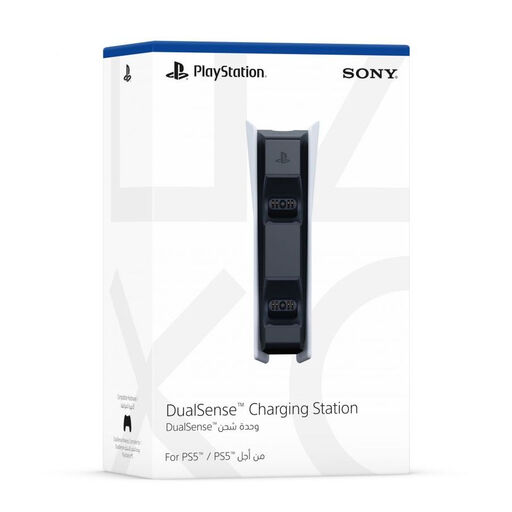
Why It Stands Out
As the official accessory from Sony, this charging station is engineered to be the perfect companion for your PS5. Its design language, from the colour scheme to the curved lines, mirrors the console and controllers, creating a cohesive and tidy look for your setup. The primary benefit is its sheer convenience—it allows you to charge two PS5 controllers at once without tethering them to the console.
The click-in design is simple and effective. You place the controllers onto the dock, and they click securely into place, with the controller's light bar pulsing orange to indicate charging. This removes any guesswork and ensures they are always charging correctly. By using its own AC power adapter, it also leaves your console's USB ports free for other peripherals.
Pros
Who is it for? This charging station is ideal for any PS5 owner, especially those with two or more controllers. If you value a clean, organised gaming area and want the peace of mind that comes with an official, purpose-built accessory, this is the straightforward choice. It eliminates cable clutter and ensures you're always ready for a local co-op match or a long single-player adventure.
View the Sony DualSense Charging Station on Joybuy
The official Sony station is a fantastic all-rounder, but every gamer's setup is unique. If you're interested in exploring docks with different designs, additional storage or other features, there is a wider market to browse.
For a full selection of charging solutions for various consoles and devices, take a look at our broader charging station category.
1. How long does the official PS5 charging station take to charge controllers? The Sony DualSense Charging Station is designed to charge your controllers as quickly as connecting them to the PS5 console. A full charge for a depleted controller typically takes around three hours.
2. Is it safe to leave my PS5 controllers on the charging station all the time? Yes, it is generally safe. The official charging station includes protection to prevent overcharging. Once the controllers reach full battery, the charging process stops, so you can conveniently store them on the dock until your next gaming session.
3. Does the PS5 DualSense charging station have to be plugged into the console? No. The official Sony charging station comes with its own AC power adapter and plugs into a standard wall socket. This is a key benefit, as it does not occupy any of the USB ports on your PlayStation 5 console.