
24/7 Customer Support

Free returns

Same-day & Next-day Delivery

Quality Guaranteed

Unlock Your Welcome Offers: FREE Delivery | Up to 80% OFF | Free 30-day JoyPlus trial
Download the APP
Buying a Sony PS5 DualSense wireless controller should be straightforward, but product listings can make comparison harder than it needs to be. Colour variants may look different while sharing the same core controls, and feature-heavy descriptions do not always explain compatibility, charging or what is included in the box.
Whether you need a replacement, a second controller for local multiplayer or a more configurable gamepad, check these common buying traps before paying.
A DualSense controller can connect to a PS5, PC, Mac or selected mobile devices, but feature support depends on the game, operating system and connection method. Haptic feedback and adaptive triggers may be available on compatible PS5 games, while PC and mobile support can be more limited.
If you are buying a Bluetooth PS5 controller for PC or mobile gaming, check the individual game’s support rather than assuming every DualSense function will operate wirelessly.
Battery performance varies with game activity, speaker use, microphone use, haptic feedback and adaptive trigger settings. A listing may quote “up to” a particular duration, but this is not a guaranteed runtime for every session.
A built-in rechargeable battery is convenient, although it also means you cannot simply swap in standard AA batteries. Confirm that the controller has USB-C charging and consider a charging dock if your household regularly uses two controllers.
Limited-edition and coloured PS5 controller designs can change the look of your setup, but colour does not necessarily mean additional gameplay controls. Also check whether a USB-C cable is supplied, as packaging can vary by region and model.
For competitive players, the DualSense Edge controller is a different proposition because it adds adjustable controls and interchangeable components. It should not be confused with a standard colour variant.
For PS5 use, an official Sony PlayStation controller pairs through a USB-C cable during initial setup and then operates wirelessly. Standard DualSense models support Bluetooth wireless and USB-C wired connection. A wired connection can be useful for PC play, charging or situations where you want to reduce reliance on wireless connectivity.
PC, Mac, iOS and Android compatibility is subject to supported games and device settings. If you intend to use one controller across several platforms, confirm the operating system requirements before ordering.
The main difference between a DualSense and a basic gamepad is its combination of haptic feedback and adaptive triggers. Haptic feedback uses more detailed vibration effects, while adaptive L2 and R2 triggers can provide variable resistance in supported games.
These functions can be adjusted on a PS5 through the controller settings menu. They may also affect battery consumption, so players who prioritise longer sessions can reduce their intensity when needed.
A rechargeable PS5 gamepad should have a built-in lithium-ion battery and a USB-C charging port. Product listings commonly quote around 12 hours as an upper estimate, but actual use varies.
For multiplayer households, useful checks include:
If you have smaller hands or play for long periods, consider the shape, grip texture and weight rather than choosing solely by colour.
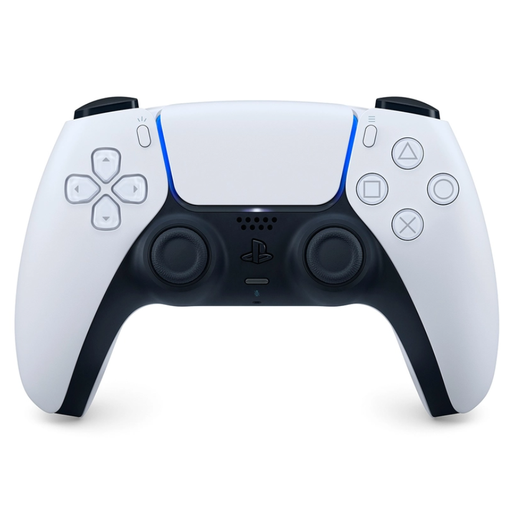
Why This Fits Their Persona: A practical choice for a first replacement or second controller, with the familiar standard PS5 design and core DualSense functions.
It makes the standard feature set clear rather than charging for a decorative finish or unsupported extras.
Haptic feedback, adaptive triggers, USB-C charging, built-in microphone and 3.5mm headset support.
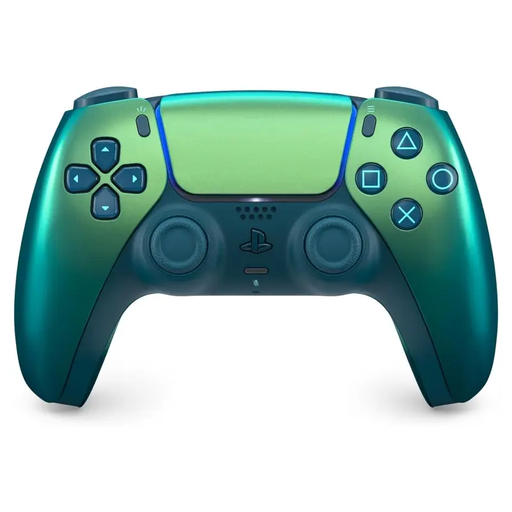
Why This Fits Their Persona: Suits buyers who want official DualSense functions alongside an iridescent finish that adds a distinct look to a UK gaming room.
The colourway is presented as a design choice, while the practical specification remains visible for an informed comparison.
USB Type-C and Bluetooth connectivity, rechargeable battery, haptic feedback and adaptive triggers.
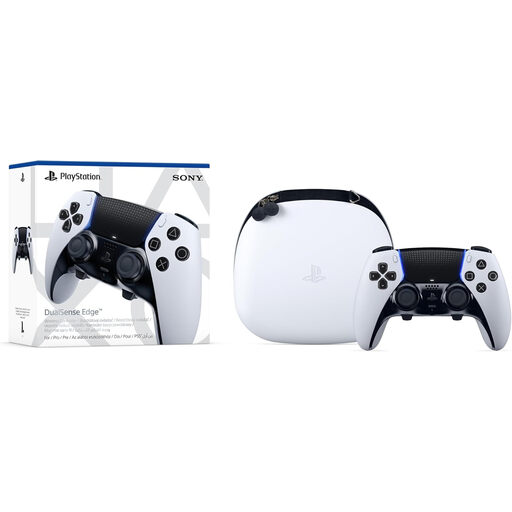
Why This Fits Their Persona: Designed for players who want adjustable controls for competitive games, repeated sessions or different control profiles.
Its extra cost is linked to identifiable hardware: back buttons, swappable stick caps, adjustable trigger travel and saved profiles.
Includes a carrying case and multiple stick-cap and back-button options; supports wired USB-C and Bluetooth connections.
We have compiled a complete, real-time list of products that fully satisfy these strict selection criteria and UK safety regulations.
Yes, compatible models can connect to Windows PC through USB-C or Bluetooth. However, game support for haptic feedback and adaptive triggers varies. A wired connection may be required for certain advanced features.
Listings commonly quote up to approximately 12 hours, but actual runtime depends on game features, audio and settings. Charging time, battery condition and wireless use can also affect results.
Selected iOS and Android devices support DualSense pairing through Bluetooth. Compatibility depends on the phone, operating system and game. Check the game’s controller support before purchase, particularly if you need haptic feedback or adaptive triggers.