Buyers who still use physical games
If you own, borrow or plan to buy PS4 or PS5 discs, a 1TB disc PS5 gives you a built-in disc drive. Sony Interactive Entertainment notes that compatible disc drives are sold separately for relevant digital models.


Choose the 1TB disc PS5 if you want to use PS5 or PS4 discs alongside downloads, including eligible disc-based upgrades. The Digital Edition suits download-first households with reliable internet, while PS5 Pro is a more specialised option for buyers with a compatible 4K 60Hz or 120Hz display and games that support PS5 Pro enhancements.
If you own, borrow or plan to buy PS4 or PS5 discs, a 1TB disc PS5 gives you a built-in disc drive. Sony Interactive Entertainment notes that compatible disc drives are sold separately for relevant digital models.
The 825GB Digital Edition suits households that expect to buy through PlayStation Store, have reliable home internet and do not need disc playback. Sony Interactive Entertainment states that this route requires an internet connection and a PlayStation account.
PS5 Pro is aimed at buyers with a compatible 4K 60Hz or 120Hz display who will check whether their intended games are PS5 Pro enhanced. Sony Interactive Entertainment says enhancements vary by game.
Start with how you will access games, then consider storage, online play and the accessories your household will genuinely use. Sony Interactive Entertainment’s UK product and support pages set out the relevant console and accessory conditions.
| Priority | What to check | Your needs |
|---|---|---|
| Game access | Check whether you need PS5 or PS4 discs, disc-based upgrades or Blu-ray media. Confirm the console model group before relying on a separately sold disc drive. | I want to keep using owned, borrowed or second-hand discs while retaining the option to buy downloads. |
| Console and add-ons | Compare the complete configuration if you may add a disc drive later. Decide separately whether local multiplayer calls for another controller or a charging station. | Our household may play together, but I do not want to buy accessories that will sit unused. |
| Storage | Look beyond the stated SSD capacity, as system software uses part of it. A compatible M.2 SSD can launch PS5 and PS4 games; PS5 games stored on USB extended storage must be moved back before play. | I expect to keep a larger download library installed rather than repeatedly deleting games. |
| Online play and subscriptions | For the Digital Edition, make sure your home connection and PlayStation account setup suit downloading games. Check whether the games you play need PlayStation Plus for online multiplayer and whether a changing catalogue is useful to you. | I want to separate buying individual games from paying for online multiplayer or a subscription catalogue. |
A later disc drive can add to the overall configuration and still needs to match the console model group.
When physical games, Blu-ray media, lending or disc-based PS4 upgrades matter, compare the disc PS5 with the exact Digital Edition and compatible drive before ordering.
PS5 Pro-specific benefits depend on PS5 Pro-enhanced games and a compatible display, so the route may not match every household’s play setup.
List the games you expect to play, check their PS5 Pro enhancement status and confirm your display’s 4K and refresh-rate capabilities before choosing Pro for visual or performance reasons.
Part of internal SSD capacity is reserved for system software and other functions. USB extended storage can hold PS5 game data, but it cannot play those games directly without moving them back.
Plan around the size of your installed library and consider a compatible M.2 SSD later if storage pressure becomes routine.
A second controller helps with local multiplayer or keeping one controller charged, but it does not change a solo player’s core PS5 access or performance.
For one-person play, start with the console. Add another controller for real local multiplayer needs, and choose a charging station only if a dedicated two-controller charging spot is useful.
The directly relevant ecosystem for this decision: Sony Interactive Entertainment’s UK pages list Digital Edition, disc PS5 and PS5 Pro routes, plus PlayStation Plus, storage expansion, disc-drive and controller accessories.
A relevant alternative ecosystem when preferred games, friends or a subscription preference point to Xbox rather than PlayStation. Microsoft offers disc-drive and all-digital Series X configurations.
Nintendo Switch 2 is a separate option for buyers who prioritise a hybrid console format and Nintendo’s own game ecosystem over PS5-specific games and features.
Joybuy console options for the three main PS5 setup routes: disc access, download-first play and the specialist PS5 Pro configuration.
 No image available
A flexible route for households that want to use physical PS5 or PS4 discs as well as downloads.
Built-in Ultra HD Blu-ray drive; M.2 SSD expansion slot; HDMI 2.1 support.
Advertised 4K and up-to-120 FPS capabilities depend on the game and compatible display.
 No image available
Suited to download-first game buying where disc playback is not part of the plan.
CFI-2100 Slim model; 825GB console package; all-digital design.
There is no built-in disc drive. Disc games and disc media require a separately sold compatible drive, while purchases and downloads need an internet connection and PlayStation account.
 No image available
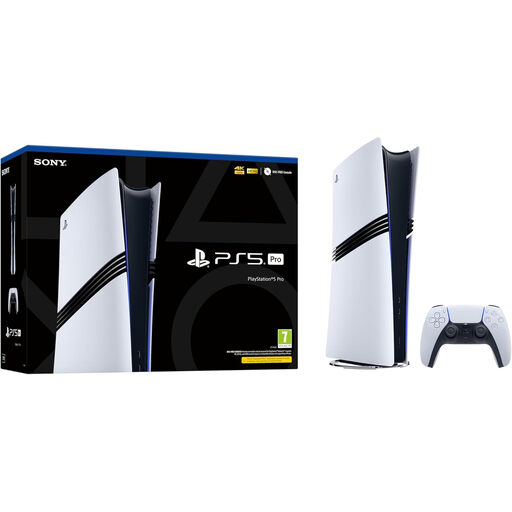
A specialist option for buyers planning around PS5 Pro-enhanced games and a compatible 4K 60Hz or 120Hz display.
2TB stated storage; digital-only design.
No disc drive is included, so physical games and disc media require a separately sold compatible drive. Check your display and intended games before choosing this route.
No, not for basic single-player console use or buying games. Sony Interactive Entertainment states that a paid PlayStation Plus subscription is required for online multiplayer; Extra and Premium also provide access to a larger catalogue that can change over time.
Only if it is a compatible model and you add Sony’s separately sold disc drive. Sony identifies CFI-2000 and CFI-2100 slim Digital Edition model groups, plus PS5 Pro, as compatible; the older CFI-1000 Digital Edition does not support disc-based games or media.
Not necessarily. Start with the console if you expect a modest installed library, then consider a compatible M.2 SSD if you regularly keep many PS5 games installed. Sony Interactive Entertainment says PS5 games held on USB extended storage must be moved back to console storage or an M.2 SSD before play.
It is not necessary for one-person play. It becomes useful for local multiplayer or when you want one controller charging while another is in use; Sony’s charging station is optional and can charge up to two compatible controllers.
Check each game’s PEGI age rating rather than treating the console itself as age-rated. UK Government guidance states that PEGI 12, 16 and 18 ratings have legal backing, while PEGI 3 and 7 ratings are advisory.