What should you check before choosing?
Start with how the household will obtain games, then check the console model, storage and shared-use arrangements that follow from that choice.
| Priority | What to check | Your needs |
|---|
| Disc access |
Check whether you need a built-in drive for compatible game discs or disc films. The Digital Edition and PS5 Pro have no built-in drive; a separate drive works only with specified models. |
We already have game discs, or we want the console to play disc films as well as games. |
| Digital games |
Check how you will obtain downloads through PlayStation Store and whether an optional PlayStation Plus plan includes the games or features you expect. Catalogue access can change. |
Buying and downloading games suits us, and we do not need to use physical discs immediately. |
| Drive compatibility |
PlayStation lists its separate Disc Drive for PS5 Pro and Digital Edition slim CFI-2000 and CFI-2100 model groups. Confirm the exact console model; internet pairing is required during drive setup. |
We might want discs later, so the particular digital console must support the drive before we rely on that option. |
| Storage |
PlayStation lists 825GB for the Digital Edition, 1TB for the disc PS5 and 2TB for PS5 Pro. Installed capacity is not all available for games. For expansion, check PlayStation’s M.2 SSD interface, capacity and cooling requirements. |
Several people may keep different games installed, so we need to plan around the games we will keep on the console at once. |
| Pro enhancements |
Identify the games you expect to play with PS5 Pro enhancements and check your display setup. PlayStation describes these features for select enhanced games, not every title. |
Visual performance matters to us for particular games, rather than simply having a console for shared play. |
| Shared use |
Check Console Sharing and Offline Play settings for the main home PS5, which benefits other local users can access, and each game’s PEGI age label and content information. |
Different people will use their own profiles, and we need to choose games suitable for the players in our household. |
PS5 console options on Joybuy
These options cover digital and disc-capable PS5 consoles, including bundles. Compare each listing’s configuration and contents with the way your household plans to get games.
 No image available
Sony PlayStation 5 Digital Edition Slim
A digital-only console for a household planning to obtain games through downloads. It has no built-in disc drive; confirm the exact model group if a separate drive may be needed later.
View on Joybuy
 No image available
Sony PlayStation 5 Disc Edition Slim
A disc-capable choice for a household that wants to use compatible physical games without adding a drive. Check the listing’s installed storage capacity when comparing configurations, and allow space around the console for airflow.
View on Joybuy
 No image available
PlayStation 5 Disc Edition + Marvel’s Wolverine bundle
This bundle pairs a disc-capable PS5 with Marvel’s Wolverine. The listing marks the included game PEGI 18, so check its suitability for the household; also confirm the console revision and installed storage if either affects your choice.
View on Joybuy
 No image available
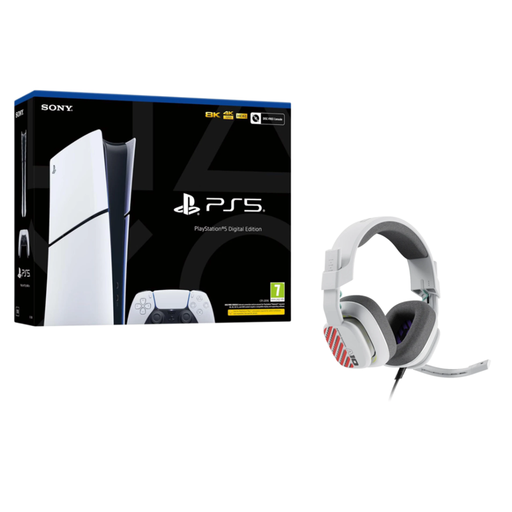
Sony PlayStation 5 Digital Edition Slim + Logitech ASTRO A10 Gen 2 wired headset, white
A digital-only PS5 bundle for a household that also wants a wired headset. Confirm the console model group before planning a later disc-drive addition, and check the installed storage and other box contents against your setup needs.
View on Joybuy
Common questions
Can different profiles on one PS5 use downloaded games?
Yes, when the game-owning account enables Console Sharing and Offline Play on that PS5. PlayStation says other users of the enabled console can play eligible purchased and downloaded games and access some PlayStation Plus benefits; the setting can be active on one PS5 at a time.
Do we need PlayStation Plus to use a PS5?
No. PlayStation Plus is an optional subscription, not a requirement for using the console. PlayStation includes online multiplayer with its memberships; check the current plan terms and catalogue if those features matter to your household.
Can a Digital Edition or PS5 Pro use discs later?
Yes, with a separate compatible Disc Drive, but not with every Digital Edition revision. PlayStation lists PS5 Pro and Digital Edition slim CFI-2000 and CFI-2100 model groups; the drive needs an internet connection for pairing during setup.
What SSD should we check for more game storage?
Check for an M.2 NVMe PCIe Gen4 x4 SSD meeting PlayStation’s requirements. PlayStation specifies a capacity of 250GB to 8TB, recommends a sequential read speed of at least 5,500MB/s and requires effective heat dissipation; M.2 SATA SSDs are not supported.
How can we check whether a game suits younger players?
Check that game’s PEGI age label and content information before buying or downloading it. PEGI’s age labels address content suitability, not how difficult a game is; the console model does not make every available game suitable for children.


