Choose a compatible internal M.2 SSD if you want to launch PS5 games directly from the added storage. PlayStation UK says USB extended storage can hold PS5 games, but you must move them back to console or M.2 storage before playing; that makes USB more suitable for an archive. Before buying an internal drive, check the exact SSD and its cooling assembly against PlayStation UK’s current M.2 requirements.
Who needs which type of storage?
Players keeping PS5 games ready to launch
If you switch between installed PS5 titles and do not want to transfer them before play, a compatible internal M.2 SSD addresses that need. Check the selected drive against PlayStation UK’s requirements before purchase.
Players building an archive
USB extended storage can hold less-played PS5 games until you need them again. PlayStation UK says those games must be moved back to console or M.2 storage to play.
Buyers checking internal-drive fit
If you are considering an M.2 SSD, check the exact variant’s specifications and the dimensions of its cooling assembly, not just whether its listing mentions PS5 or M.2.
What should you check before choosing?
Decide whether the added space must launch PS5 games or mainly store them for later, then check the requirements for that route.
| Priority | What to check | Your needs |
|---|
| PS5 games ready to play |
PlayStation UK says M.2 storage can launch PS5 games, while PS5 games on USB storage need to be moved back to console or M.2 storage before play. Check that an internal drive meets the current M.2 requirements. |
I want to switch between installed PS5 games without transferring them from an external drive first. |
| Internal SSD fit |
For the exact M.2 variant, compare its interface, capacity, physical dimensions and complete cooling assembly with PlayStation UK’s current requirements. An M.2 label alone does not establish fit. |
I want to know that the drive and its heatsink will fit the PS5 expansion slot before I buy. |
| External library |
Check the drive’s USB connection and capacity against PlayStation UK’s extended-storage guidance. Allow for transferring archived PS5 games back before play; check the intended use for PS4 games separately. |
Keeping less-played PS5 games on another drive matters more to me than launching them straight from it. |
| Managing fewer games |
Consider whether keeping a smaller installed library and downloading games again when needed fits how often you change titles. |
I can manage which games stay installed rather than add another drive. |
Storage mistakes to avoid
-
Expecting a USB drive to launch PS5 games
PlayStation UK says USB extended storage can hold PS5 games, but they must be moved back to console or M.2 storage before play. An archive will not keep those titles ready to launch from the USB drive.
If direct play from added storage is your priority, choose the internal M.2 route and check the drive against PlayStation UK’s requirements.
-
Assuming every M.2 drive and heatsink will fit
PlayStation’s M.2 guidance sets requirements for the drive and heat dissipation. A suitable-looking bare SSD does not establish that the assembled drive and cooling structure will fit.
Compare the exact capacity and cooling variant, including its assembled dimensions, with PlayStation UK’s current M.2 guidance before buying.
Relevant brand references
These product lines illustrate internal and external storage routes; a brand name alone does not establish compatibility for a particular variant.
WD_BLACK
The SN850P is an internal M.2 SSD line aimed at PS5 storage expansion.
- SanDisk describes the SN850P as certified and tested for PS5 consoles; a listed version comes with an optimised heatsink.
- Check the exact capacity and assembled cooling dimensions against PlayStation UK’s current requirements rather than relying on the product-line name.
Seagate
Seagate offers external Game Drive products for PlayStation library storage; A 2 TB PS4 and PS5 Game Drive is also available.
- Seagate UK describes 1 TB and 2 TB external PS5 SSD options.
- An external Game Drive does not change PlayStation UK’s requirement to move USB-stored PS5 games back before playing them.
Samsung
Samsung UK lists a 4 TB 990 PRO with Heatsink PCIe 4.0 M.2 SSD.
- The listing identifies both the M.2 drive variant and its heatsink.
- Check that the exact drive-and-heatsink assembly meets PlayStation UK’s current M.2 fit and cooling requirements before choosing it for a PS5.
Joybuy USB storage options
These external drives are options for keeping PS5 games in a USB archive, rather than launching PS5 games directly from added storage. Check each drive’s connection and intended use against PlayStation UK’s extended-storage guidance.
 No image available
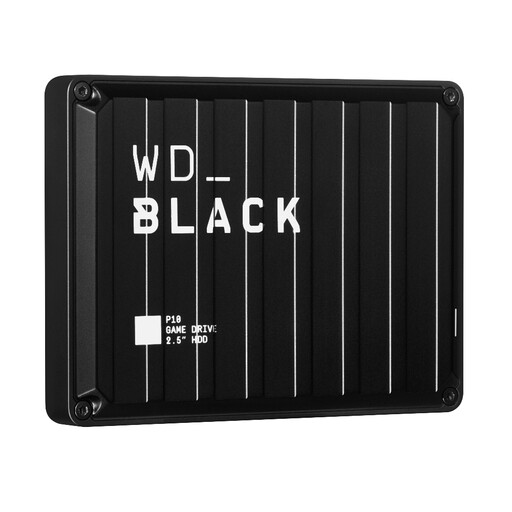
Western Digital WD_BLACK P10 Game Drive 5TB
A 5TB option for an external game archive. PS5 games kept on USB storage must be moved back to console or M.2 storage before play.
View on Joybuy
 No image available
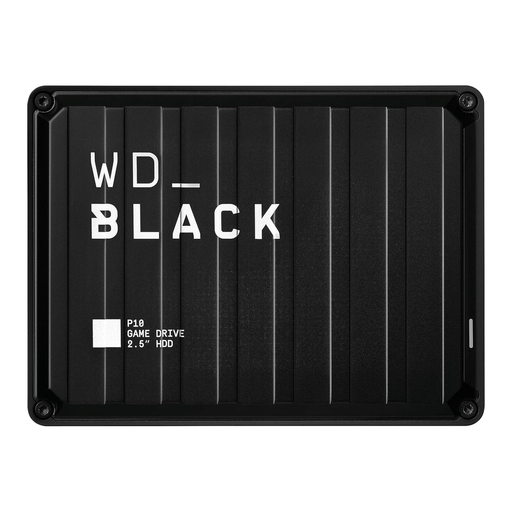
Western Digital WD_BLACK P10 Game Drive 2TB
A 2TB option for storing games externally. If you archive PS5 games on it, transfer them back to console or M.2 storage to play.
View on Joybuy
 No image available
Western Digital WD_BLACK P10 Game Drive 6TB, black
A 6TB external archive option for a larger game library. USB-stored PS5 games still need to be moved back before play.
View on Joybuy
 No image available
Lexar ES4 Portable SSD with Magnetic Set 2TB
This 2TB portable SSD is described as USB 3.2 Gen 2 and names PS5 and PS4 among its compatible devices. For PS5 games stored over USB, plan to transfer them back before play.
View on Joybuy
 No image available
SanDisk Extreme 2TB Portable SSD for PlayStation 5 Console and PC
A 2TB portable SSD for an external archive-and-transfer setup. PS5 games stored on a USB drive cannot be launched from that drive.
View on Joybuy
PS5 storage questions
Can I play PS5 games directly from a USB drive?
No. PlayStation UK says USB extended storage can hold PS5 games, but you must move them to console or M.2 SSD storage before playing. Choose a compatible internal M.2 SSD if launching PS5 games from the added drive is the requirement.
Is any M.2 SSD suitable for a PS5?
No. PlayStation sets requirements for M.2 storage, including the drive and its heat dissipation. Compare the exact SSD variant and assembled cooling dimensions with PlayStation UK’s current requirements before buying.
Do I need cooling for an internal PS5 M.2 SSD?
Yes. PlayStation’s M.2 guidance calls for effective heat dissipation. Check the complete SSD-and-cooling assembly against the current UK fit requirements, rather than checking the bare drive alone.


