
24/7 Customer Support

Free returns

Same-day & Next-day Delivery

Quality Guaranteed

Unlock Your Welcome Offers: FREE Delivery | Up to 80% OFF | Free 30-day JoyPlus trial
Download the APP
Buying a PS5 wireless controller can look straightforward until you compare connection types, haptic features, battery claims and compatibility notes. A low-priced controller may lack important PS5 functions, while an expensive model may include customisation features you never use.
For UK households, the practical choice depends on how you play, whether you also use a PC or mobile device and whether accessibility or specialist controls matter. This guide explains the main buying traps and highlights options for different types of player.
A controller may connect to a PS5 but still lack the functions associated with the official DualSense wireless controller. Haptic feedback, adaptive triggers, motion sensing, the touchpad, microphone and speaker support can depend on both the controller and the game.
Check the product specification carefully. “Wireless” describes the connection method; it does not automatically confirm compatibility with every PS5 feature.
Battery performance varies according to game type, headset use, microphone activity, vibration intensity and adaptive trigger settings. A stated figure such as “up to 12 hours” is a guide rather than a guaranteed result for every session.
Also check whether the package includes a USB-C cable. Some listings may show a charging cable separately or note that the cable can vary by region. A PS5 charging station can be useful for households with two controllers, but remember that a dock normally charges compatible controllers rather than replacing them.
A PS5 fighting stick is designed for arcade-style input, not for every game. Similarly, an adaptive PS5 controller may need mounting space, external switches or additional setup. Consider the physical layout, connection method and available space before ordering.
For PC users, compatibility can also vary. A DualSense may work through Bluetooth or USB-C on Windows, but some PC games may require a wired connection, controller mapping or an XInput wrapper.
A PS5 controller with haptic feedback uses more detailed vibration effects than traditional rumble in supported games. Adaptive triggers can change resistance during actions such as braking or drawing a bow. These effects can be adjusted or disabled in console settings, which may be useful for players who prefer lighter input or longer battery life.
Do not assume that every PC or mobile game supports these functions. On other platforms, feature support depends on the title, operating system and connection method.
For PS5, Bluetooth wireless connectivity offers a tidy setup, while USB-C provides a direct wired connection and charging. If you need a PS5 controller for PC, confirm whether the listing specifies Windows compatibility and whether support is available through Bluetooth, USB-C or both.
Mobile compatibility is often listed for Android and iOS, but “compatible” does not mean every game will recognise every button or feature. Check the game’s controller support before buying for mobile use.
A standard DualSense controller is approximately 280g according to several product listings in this range. Weight and grip shape can affect comfort during long sessions, especially when using a headset or playing with vibration enabled.
Players with mobility requirements may need more than a conventional layout. The PlayStation Access Controller Kit includes low-force buttons, interchangeable caps, an adjustable stick arrangement, four 3.5mm auxiliary ports and flexible orientation options. Check mounting requirements and the need for external switches before purchase.
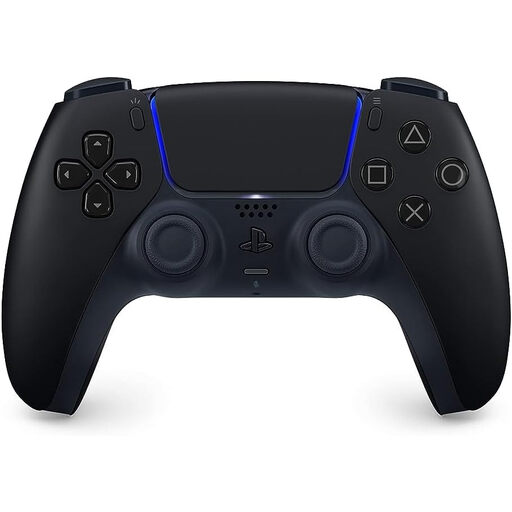
Why This Fits Their Persona: A practical replacement or additional controller for households that want official PS5 functions without choosing a specialist layout. The understated Midnight Black finish also suits shared living rooms and gaming desks.
It is an official DualSense model with Bluetooth and USB-C connectivity, rather than a generic wireless pad whose PS5 feature support may be unclear.
Haptic feedback, adaptive triggers, built-in microphone, 3.5mm headset jack and USB-C charging.
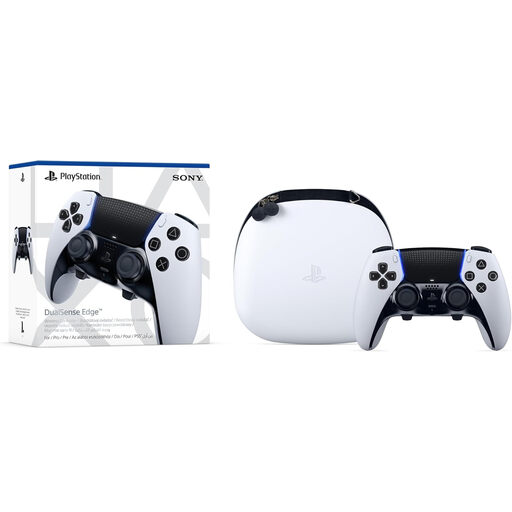
Why This Fits Their Persona: Suitable for players who want to adjust controls for different genres, save profiles and carry the controller between a PS5 and a Windows PC.
Its additional cost is tied to defined hardware features, including interchangeable stick caps, adjustable trigger travel, back buttons and custom profiles.
Includes a hard carrying case, braided USB-C cable, multiple stick caps and two back-button styles.
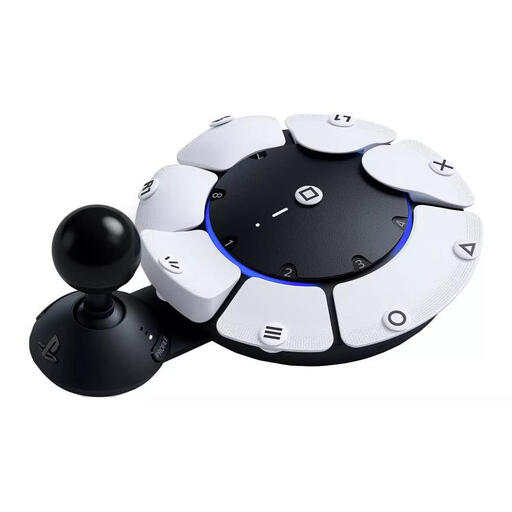
Why This Fits Their Persona: Designed for players who need adaptable positioning, lower-force activation or external switches. It can also be paired with a DualSense or DualSense Edge for a broader control arrangement.
The modular design makes its intended use clear, with 360-degree orientation, four 3.5mm auxiliary ports and mounting options that a standard controller does not provide.
Up to 30 customisable profiles, three quick-switch profiles, low-force buttons and PS5/PC support via Bluetooth 5.1 or USB-C.
We have compiled a complete, real-time list of products that fully satisfy these strict selection criteria and UK safety regulations.
Many official DualSense models support Windows PC through Bluetooth or USB-C. However, haptic feedback and adaptive triggers may require a wired connection and a compatible game. Some PC titles may also require controller configuration or an XInput wrapper.
Battery duration depends on vibration, trigger resistance, microphone use, headset connection and the game being played. Product listings may state up to around 12 hours, but real-world use varies. A charging dock can reduce interruptions for households with more than one controller.
The PlayStation Access Controller Kit can pair with a DualSense or DualSense Edge. This allows players to combine modular controls with the functions of a conventional controller, although the ideal setup depends on the player’s preferred position, switches and mounting arrangement.