Who should consider these options?

PS5 and Xbox Series X players seeking high-frame-rate modes

You play supported fast-paced or competitive games and want to assess whether 4K 120Hz, VRR, ALLM and the correct HDMI 2.1 input are worthwhile for your setup. PlayStation and Xbox Support set out the compatible display and game requirements for these modes.

Living-room console households replacing a general TV

You need a shared-screen television that works for console gaming without paying for features you cannot use. Which? distinguishes ordinary HDMI connectivity from gaming features such as high refresh rates and VRR.

Desk-based PS5 or Xbox Series X|S players

You are deciding whether a compatible monitor suits your setup better than a living-room TV, particularly where 1440p and 120Hz at close viewing distance are relevant. PlayStation and Xbox Support confirm that compatible displays can support these modes.

Buying priorities

Gaming-capable television

Choose it when: You use PS5 or Xbox Series X|S in the living room and play supported 120Hz titles or want VRR and automatic low-latency switching.

Keep in mind: 4K at 120Hz still depends on the game, console settings, cable and the exact HDMI input; Xbox may use a lower resolution to retain 120Hz where HDMI 2.1 is unavailable.

Standard television with suitable HDMI

Choose it when: Casual or cinematic console play matters more than supported 120Hz modes.

Keep in mind: An HDMI input connects a console, but 4K at 120Hz, VRR and automatic low-latency switching are not universal features.

Dedicated gaming monitor

Choose it when: The console is used at a desk or from close seating and the display supports the console mode you intend to use.

Keep in mind: PC-focused 144Hz-and-above claims do not automatically apply to console output, so confirm HDMI capability, resolution and VRR support.

Priority What to check Your needs
Console connection Confirm the TV or monitor, intended HDMI port and cable path support the output mode from your console. For Xbox Series X 4K at 120Hz, Xbox Support specifies an Ultra High Speed HDMI cable and an HDMI 2.1-capable TV. I want the display chain to support the mode my console can actually send, rather than relying on the TV headline alone.
120Hz and VRR Check 120Hz at the intended resolution and HDMI VRR on the input used by the console. PlayStation states that 120Hz and VRR require compatible displays and, for PS5, supported games. Fast-moving games matter to me, so I want to know whether my usual titles can use smoother high-frame-rate modes or variable refresh rate.
Game mode Look for ALLM or documented manual game-mode controls. HDMI Licensing Administrator explains that low-latency mode can reduce picture processing, so compare non-gaming picture settings separately. I want a responsive gaming mode without making ordinary TV and film viewing less convenient for the household.
Screen format Choose TV or monitor placement before comparing specifications. Check viewing distance, room layout and whether a compatible 1440p/120Hz monitor better fits desk use. I need a screen that works from the sofa for shared play, or from close range at a desk, rather than assuming a larger TV suits every room.

Common buying pitfalls

  • Assuming “120Hz” means every console game runs at 4K/120Hz

    PS5 needs both a compatible display and a game that supports 120Hz output. Xbox Series X also has specific console, cable and HDMI 2.1 requirements for 4K at 120Hz, and may use a lower resolution for 120Hz where necessary.

    Check the games you play, the console video-output settings and the TV’s exact supported input modes before paying extra for a 4K/120Hz feature.

  • Checking only the TV headline instead of the HDMI connection path

    The correct HDMI port, enhanced-format setting, firmware, cable and any AV receiver or soundbar in the path can affect whether the intended mode is available. Sony UK and Xbox Support both advise checking the complete connection route.

    Identify the console port, intermediary devices and cable length before purchase.

    A replacement certified Ultra High Speed HDMI cable may be needed when the supplied cable is too short or the existing connection path prevents the intended output mode.

  • Treating PC-oriented 144Hz-plus specifications as a console benefit by default

    For PS5 and Xbox, the useful starting point is supported 4K/120Hz or 1440p/120Hz input, VRR and game mode. Samsung notes that some 4K 144Hz, 165Hz and 240Hz modes apply only to compatible PC games and graphics hardware.

    Prioritise the console modes your display accepts over a higher refresh-rate headline aimed at PC use.

  • Treating low-latency mode as a no-compromise picture setting

    HDMI Licensing Administrator notes that low-latency mode can stop some display processing, which may change the picture for non-gaming viewing.

    Use ALLM or game mode for gaming, then compare separate film and TV settings so other viewers can switch modes when needed.

Relevant brand references

LG

Relevant when comparing OLED televisions in smaller living-room sizes as well as larger TV formats; check exact-model specifications rather than assuming every LG TV has the same gaming inputs.

  • LG UK lists 4K 120fps via HDMI, VRR, ALLM and Game Optimiser for the OLED42C24LA.
  • Those specifications apply to OLED42C24LA, not the full LG range; confirm current availability, support status and ports for the exact model.

Samsung

Relevant for buyers comparing LED, Mini LED and OLED gaming-TV options, including bright-room-oriented models and very large screens.

  • Samsung UK describes HDMI 2.1 gaming features on applicable models and lists VRR with 4K at 120Hz for the 98-inch DU9000.
  • Features can vary by size and model: Samsung states the DU9000 50-inch variant does not support that VRR/4K-at-120Hz specification, while some higher refresh-rate claims are for PC use.

Sony BRAVIA

Relevant for PS5-oriented households seeking manufacturer guidance on HDMI enhanced format, VRR and game mode on compatible BRAVIA models.

  • Sony UK provides setup guidance for enabling gaming features on applicable products.
  • The guidance is model- and operating-system-specific, so check HDMI 2.1 support, firmware, settings and the correct port.

Hisense

Relevant for shoppers comparing gaming-focused 4K LED or Mini LED television lines and wanting a manufacturer explanation of 120Hz, HDMI 2.1, VRR and input lag.

  • Hisense UK identifies refresh rate, HDMI 2.1, VRR and input lag as gaming-TV considerations.
  • These are brand-authored buying claims; check the exact UK model specification and HDMI ports before relying on them.

Joybuy product options

Joybuy product options for living-room console setups, including gaming-capable televisions with stated 4K, HDMI 2.1, VRR and ALLM features, plus one standard-TV route for buyers who can accept Full HD for its stated 120Hz Game Accelerator.

TCL 50Q6C QD-Mini LED 4K HDR Smart Google TV

TCL 50Q6C QD-Mini LED 4K HDR Smart Google TV

Consider this 50-inch option for a living-room PS5 or Xbox setup using supported high-frame-rate modes.

Stated features include 4K, 120Hz, HDMI 2.1, VRR, ALLM and four HDMI inputs. Confirm which individual ports support 4K/120Hz, VRR and ALLM together, and check the complete cable and receiver path.

Joybuy

TCL 98Q6C QD-Mini LED 4K HDR Smart Google TV

TCL 98Q6C QD-Mini LED 4K HDR Smart Google TV

This 98-inch TV is aimed at a large-room console setup where screen placement has been planned carefully.

It states 4K, 120Hz, HDMI 2.1, VRR, ALLM and four HDMI inputs. Check room dimensions, viewing distance and mounting or furniture capacity, then confirm the supported modes on the intended HDMI port.

Joybuy

TCL 55P8K QLED 4K HDR PRO Smart TV

TCL 55P8K QLED 4K HDR PRO Smart TV

Consider this 55-inch model for shared living-room PS5 or Xbox play in supported high-frame-rate titles.

The listing states 4K, 120Hz, HDMI 2.1, VRR, ALLM and four HDMI 2.1 inputs. Do not assume its stated 144Hz or 288Hz gaming claims add a console benefit beyond the modes supported by your console and games.

Joybuy
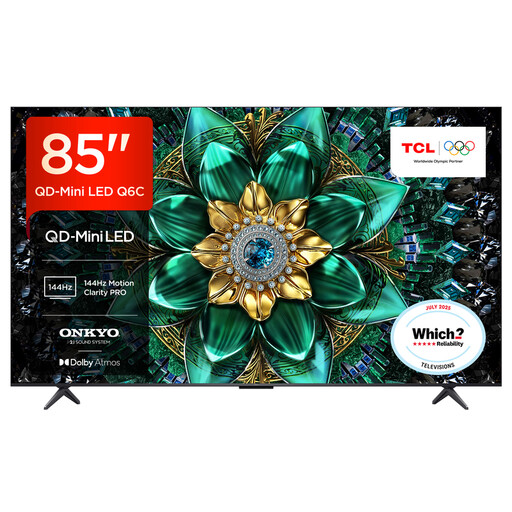
TCL 85Q6C QD-Mini LED 4K HDR Smart Google TV

TCL 85Q6C QD-Mini LED 4K HDR Smart Google TV

This 85-inch option suits a large living-room console arrangement where supported high-frame-rate modes are a priority.

Stated features include 4K, 120Hz, HDMI 2.1, VRR, ALLM and four HDMI inputs. Check the room layout and whether the chosen HDMI port supports the required 4K/120Hz, VRR and ALLM combination.

Joybuy

TCL 50V6C Direct LED 4K HDR Smart Google TV

TCL 50V6C Direct LED 4K HDR Smart Google TV

Consider this 50-inch TV for shared console play when a Full HD high-frame-rate route is acceptable.

The listing states HDMI 2.1, VRR, ALLM, Game Master and a 120Hz Game Accelerator at Full HD. It does not confirm 4K at 120Hz, so check the intended HDMI input, resolution and mode combination before buying.

Joybuy

Frequently asked questions

Do PS5 and Xbox games automatically use 4K at 120Hz?

No. PlayStation states that PS5 120Hz output requires both a compatible display and a game that supports a 120Hz frame rate. Xbox Support specifies a Series X console, an Ultra High Speed HDMI cable and an HDMI 2.1-capable TV for 4K gaming at 120Hz, so check game performance settings as well as console display settings.

Can a normal HDMI television still be used for PS5 or Xbox?

Yes. Which? states that a games console can connect to any TV with an HDMI input. The trade-off is that high refresh rates and VRR are not universal, although Xbox can use 120Hz at a lower resolution when the display supports 120Hz but not HDMI 2.1.

How do I verify VRR and ALLM before buying?

Check the exact UK model specification and the specific HDMI input intended for the console. On PS5, VRR works with compatible TVs and games; ALLM can signal a compatible TV to enter low-latency mode. Sony UK also advises checking firmware, the correct HDMI port and enhanced-format settings on applicable BRAVIA televisions.

Is a 144Hz or 165Hz TV automatically better for PS5 or Xbox?

Not necessarily. Start with console-supported input modes such as 4K/120Hz or 1440p/120Hz where applicable, plus VRR and low-latency mode. Samsung states that some 4K 144Hz, 165Hz and 240Hz claims apply only to compatible PC games and graphics hardware.

Does buying a gaming TV create a UK TV Licence requirement?

The purchase itself is not the test set out by TV Licensing. A licence is required when you watch or record live TV on any TV service or streaming service, or watch or download BBC iPlayer, including when those activities are on a TV or games console. Check the official TV Licensing guidance for your household’s viewing use.