Who this is for

PS5 and Xbox Series X players seeking 120Hz play

For players using supported current-generation games who want 4K/120Hz or VRR, check the full chain: console, game, display input and cable. PlayStation and Xbox Support describe these modes as dependent on compatible equipment and content.

Living-room console players replacing a main TV

For shared-room players who need a screen that fits the space as well as a usable HDMI connection and game mode. Which? notes that a console can connect to a TV with an HDMI input; choose gaming features around the games you actually play.

Desk-based console players considering a monitor

For players sitting close to the display who may prefer a 1440p or 4K monitor. Confirm HDMI, 120Hz and VRR support for your specific PS5 or Xbox setup before buying.

Buying priorities

Gaming-oriented television

Choose it when: Sofa or shared-room play includes supported PS5 or Xbox Series X|S games where 120Hz, VRR or low-latency switching matter.

Check first: These modes rely on the game, console, cable and the exact TV input, and may not improve every title.

General television

Choose it when: Casual play, older consoles or conventional frame rates matter more than 120Hz and VRR.

Check first: A 4K label alone does not establish 120Hz, VRR, ALLM or a low-latency game mode.

Desk monitor

Choose it when: You play close to a smaller display at a desk and want a monitor-focused setup.

Check first: PC refresh-rate and adaptive-sync labels do not by themselves confirm console support over HDMI.

Priority What to check Your needs
Console video modes Confirm supported resolution, 120Hz and VRR for the exact console, game and HDMI input. For Xbox Series X 4K/120Hz, check the display and cable requirements. I want to use the modes my console and games can actually output, rather than paying for a feature that the setup cannot use.
Room and screen fit Measure wall, stand or desk space; check overall dimensions, stand depth and viewing position, not only the screen diagonal. I need a display that works in my sofa area, shared room or desk space. YouGov reported in March 2025 that about 66% of British households had a main TV smaller than 50 inches, describing existing ownership rather than an ideal gaming size.
Connection setup Identify the HDMI port assigned to gaming features, enable the relevant game mode where available, and use a certified Ultra High Speed HDMI cable for high-bandwidth setups that require one. I want the advertised mode to work after connection, without discovering that the selected port or replacement cable limits it.
Delivery and replacement planning Check the seller’s return arrangements, keep packaging while you assess room fit, and plan collection or recycling for the old display. I need a practical plan for a large screen that may be awkward to move or repack. GOV.UK states that qualifying distance purchases can generally be cancelled within 14 days of receipt, subject to the applicable conditions.

Common buying pitfalls

  • Treating a 120Hz panel as proof of 4K/120Hz console support

    A refresh-rate claim does not establish that the required HDMI input and console mode will work. PS5 and Xbox Series X high-frame-rate output depends on compatible equipment and supported games.

    Check the manufacturer specification for the exact UK model and size, including the supported HDMI input, 4K/120Hz, VRR and ALLM or Game Mode limitations.

  • Using the wrong HDMI port or replacement cable

    Some TVs reserve 4K/120Hz gaming mode for a specified HDMI input. A cable route that is too short can also require a suitable replacement for the intended configuration.

    Plan the cable route before purchase, use the port named in the manual and select a certified Ultra High Speed HDMI cable when the setup requires it.

    A longer cable may be needed when the included cable does not reach the chosen TV position.

  • Paying for 8K solely for standard PS5 gaming

    8K output is conditional on a compatible PS5 model, display and supported game, so it is not a default requirement for console TV shopping.

    Prioritise the modes you expect to use, such as suitable HDMI support, game mode, VRR and 120Hz where relevant, before treating 8K as a deciding feature.

  • Using generic TV-size popularity as a room-fit calculation

    Existing household screen-size figures do not determine the right display for an individual gaming room, desk or TV unit.

    Measure the stand or wall position, check the TV’s full dimensions and stand footprint, and consider whether viewing will be from a sofa, shared seating area or desk.

Relevant brand references

LG

Relevant when comparing LG OLED and other TV lines with gaming-oriented feature claims.

  • LG’s UK guidance highlights high refresh rate, VRR, low input lag and 4K as gaming considerations.
  • LG describes selected products with refresh rates up to 165Hz; confirm the exact model, size and input configuration rather than assuming these features apply across the range.

Samsung

Relevant for shoppers comparing a broad TV range that includes Game Mode and selected 4K/120Hz models.

  • Samsung’s support material identifies low input lag, HDMI connection and Game Mode as gaming factors.
  • Samsung states that 4K/120Hz Game Mode is available only on selected TVs and may require a specified HDMI port.

Sony BRAVIA

Relevant for PS5 owners considering BRAVIA and PlayStation integration alongside HDMI 2.1 gaming features.

  • Sony describes selected BRAVIA models with PS5-oriented functions alongside 4K/120fps, VRR and ALLM features.
  • These are Sony and eligible-model claims, so confirm the exact BRAVIA model before relying on a particular feature.

TCL

Relevant for comparing large-screen QLED or Mini-LED TVs and TCL monitors for desk-based console play.

  • TCL’s UK catalogue includes models advertised with 4K and 144Hz specifications, while its monitor support material addresses VRR with PS5 and Xbox.
  • Check each TV or monitor specification sheet for HDMI inputs and console-mode compatibility.

Joybuy product options

Joybuy product options for gaming-oriented television setups, with stated HDMI and gaming features to compare against your room and console requirements.

TCL 50Q6C QD-Mini LED 4K HDR Smart Google TV 50Q6C-UK

TCL 50Q6C 50-inch 4K QD-Mini LED TV

For a living-room setup where stated HDMI 2.1, VRR and ALLM features are relevant to compatible console play.

50-inch 4K display; stated 120Hz with up to 144Hz VRR; four HDMI inputs. With-stand dimensions are approximately 1111 × 709 × 295 mm. Check the UK manual for the HDMI input used by each gaming mode.

Joybuy

TCL 98Q6C QD-Mini LED 4K HDR Smart Google TV 98Q6C-UK

TCL 98Q6C 98-inch 4K QD-Mini LED TV

For a dedicated large-screen room where stated HDMI 2.1, VRR and ALLM features can be checked against the intended console setup.

98-inch 4K display; stated 120Hz with up to 144Hz VRR; four HDMI 2.1 ports. With-stand dimensions are approximately 2180 × 1285 × 420 mm, so measure the installation space carefully.

Joybuy
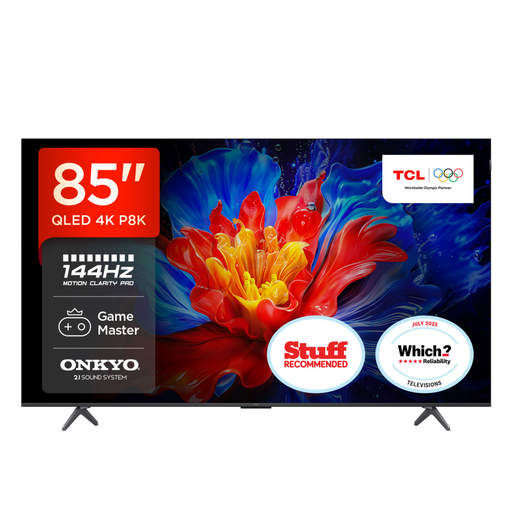
TCL 85P8K QLED 4K HDR PRO Smart TV 85P8K-UK

TCL 85P8K 85-inch QLED 4K TV

For large sofa or shared-room console play where placement and connection flexibility both need checking.

85-inch 4K display; stated 120Hz with up to 144Hz VRR, four HDMI 2.1 inputs, VRR and ALLM. With-stand dimensions are approximately 1893 × 1156 × 374 mm.

Joybuy

TCL 55P8K QLED 4K HDR PRO Smart TV 55P8K-UK

TCL 55P8K 55-inch QLED 4K TV

For a medium-sized living-room setup where high-frame-rate console features are relevant to compatible games.

55-inch 4K display with stated HDMI 2.1, VRR and ALLM features; with-stand dimensions are approximately 1224 × 770 × 292 mm. Confirm the required HDMI port and game-mode settings for your console.

Joybuy

TCL 55V6C Direct LED 4K HDR Smart Google TV

TCL 55V6C 55-inch Direct LED 4K TV

For general 4K console and streaming use where stated Game Master, VRR and ALLM features are useful to compare.

55-inch 4K UHD display with stated HDMI 2.1, VRR, ALLM and Game Bar. Its 120Hz Game Accelerator is labelled FHD; confirm console resolution, refresh-rate support and physical fit before buying.

Joybuy

Frequently asked questions

Can you use any TV for a PS5 or Xbox console?

Yes. Which? states that a console can connect to a TV with an HDMI input. A basic HDMI TV can suit casual play, while 120Hz and VRR are worth checking when they matter to the games you play.

Do you need HDMI 2.1 for console gaming?

Not for every type of console gaming. Xbox Support specifies an HDMI 2.1-capable TV and an Ultra High Speed HDMI cable for its Xbox Series X 4K gaming at 120Hz configuration; other supported setups can still play at different resolutions or refresh rates.

Can a PS5 use a 1440p desk monitor?

Yes, when the monitor supports the required HDMI signal. PlayStation provides a PS5 1440p output test for SDR or HDR at 60Hz or 120Hz and VRR, while Xbox Support also describes 1440p support on compatible TVs and monitors. Check HDMI specifications, not only DisplayPort or PC refresh-rate claims.

What should you check before connecting a console through an AV receiver or soundbar?

Check every device in the signal path. The receiver or soundbar, cable and TV input must all support the video mode you want; Xbox Support advises consulting the AVR manufacturer if Xbox Series X 4K/120Hz does not work through the receiver.

What UK rights apply if a TV bought online is unsuitable or faulty?

For qualifying online, mail or telephone purchases, GOV.UK states that you can tell the seller within 14 days of receiving the item that you wish to cancel, then have another 14 days to return it. GOV.UK also states that a full refund is required if an item is faulty, not as described or does not do what it is supposed to do.