What matters when choosing
Start with the particular games you want to play and the connection your headphones need. Then decide whether portable play or access to physical discs changes your choice.
PlayStation 5
Consider it when: You play at a TV and want to explore the PS4 and PS5 narrative adventures covered by PlayStation’s UK guide, with a personalised PS5 headphone 3D-audio profile.
Allow for: A supported headset connection; do not assume ordinary Bluetooth headphones will pair directly. PS5 Digital Edition has no built-in disc drive.
Nintendo Switch 2
Consider it when: You want to move a game between TV, tabletop and handheld sessions.
Allow for: Bluetooth microphones cannot be used, and Nintendo says some original Switch games are not supported or fully compatible.
Xbox Series S or Series X
Consider them when: The Xbox games you want are available and you prefer a home-console setup; Microsoft lists its Xbox Wireless Headset as compatible with both Series S and Series X.
Allow for: Series S cannot use game discs. Series X comes in both disc-equipped and digital-only variants, so check the exact model.
| Concern | What to check | Who it matters to |
|---|
| Headphone connection |
Identify whether your headset uses a 3.5 mm plug, USB connection, console-specific wireless connection or Bluetooth. Check its compatibility with the exact console and whether you need its microphone. |
If I already have a headset, I want to know that I can listen privately without replacing it or losing the microphone function I need. Around 29% of consumers would put headset compatibility first. |
| Games and compatibility |
Check each intended game’s platform and edition. For an existing Switch collection, check each title’s Switch 2 compatibility status with Nintendo. |
Having one particular story or puzzle game to play makes its availability more important to me than the console’s other features. For around 29% of consumers, access to their chosen games would be the primary concern. |
| Where you play |
Decide whether you need handheld or tabletop sessions, or will play at a TV or monitor. |
I may want to continue a puzzle away from the TV rather than be tied to one screen. Portable play would come first for roughly 24% of consumers. |
| Discs and storage |
Check whether the exact variant accepts your game discs and whether its usable storage suits the number of games you keep installed. |
If I own discs or keep several downloads ready to play, the console’s format and available space could settle my choice. Around 18% of consumers would make this their primary concern. |
Joybuy product choices
These choices include PS5 models for TV-based play, Switch 2 models for handheld or tabletop sessions, and a separate retro handheld. The retro handheld is worth considering only after you have checked its actual game selection and headphone connection.
 No image available
Sony PlayStation 5 Slim Disc Edition
Consider this PS5 for TV-based narrative games if you want a disc-edition console. PS5 offers personalised headphone 3D-audio settings; check your headset’s supported connection and the availability of each game you want.
View on Joybuy
 No image available
Sony PlayStation 5 Slim Digital Edition
This PS5 suits TV-based play if you intend to use digital games rather than a built-in disc drive. PlayStation says a compatible disc drive for PS5 Digital Edition is sold separately; check your headset connection and intended games before buying.
View on Joybuy
 No image available
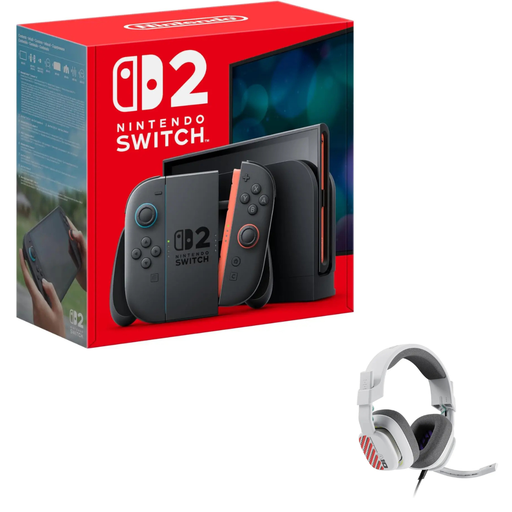
Nintendo Switch 2 with Logitech ASTRO A10 Gen 2 wired headset, white
Consider this bundle for handheld or tabletop play if its included headset meets your listening needs. Check the headset’s connection with Switch 2 before relying on the bundle, and confirm that your intended games are available or compatible.
View on Joybuy
 No image available
Nintendo Switch 2 Console, UK Version
Consider Switch 2 if handheld or tabletop puzzle sessions matter alongside TV play. Nintendo lists a 7.9-inch, 1080p display and a 3.5 mm audio jack; Bluetooth microphones cannot be used, and original Switch games need individual compatibility checks.
View on Joybuy
 No image available
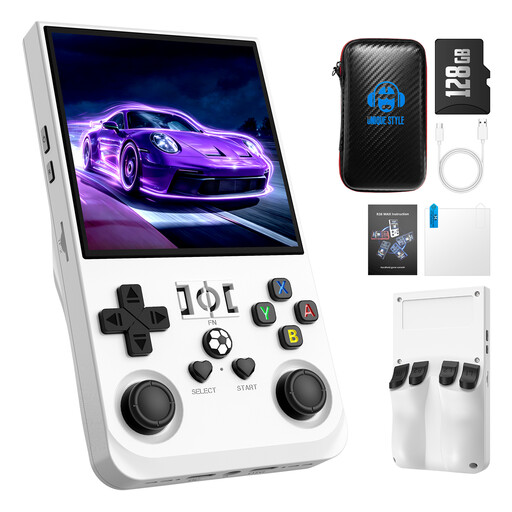
AISLPC R36MAX retro handheld console, white
This handheld is a separate route for portable play, but choose it for narrative puzzles only if you can confirm the specific games you want. Its title specifies a 4.0-inch IPS display with 720 × 720 resolution; check the supplied storage configuration and headphone connection before buying.
View on Joybuy
Questions about games and headphones
Can I connect any Bluetooth headphones directly to PS5?
Do not assume ordinary Bluetooth headphones will connect directly to PS5. PlayStation documents a Bluetooth-device compatibility error for PS5; check whether your exact headset uses a supported wired, USB-adapter or console-compatible wireless connection.
Can I use a Bluetooth headset microphone on Switch 2?
No: Nintendo says Bluetooth microphones cannot be used on Switch 2, although Bluetooth audio is supported. If headset voice chat matters, check another supported connection method before choosing your headset.
Will my existing Switch games work on Switch 2?
Compatible physical and digital Switch games can be played on Switch 2, but Nintendo says some games are unsupported or not fully compatible. Check each narrative or puzzle title you intend to keep playing.
Do I need a disc-capable console for narrative games?
Choose disc access if using your physical games is important; the genre alone does not determine which format you need. Xbox Series S cannot play discs, PS5 Digital Edition has no built-in disc drive, and Series X variants differ, so check the exact model.
What should I check when choosing a narrative game for a child?
Check the specific game’s PEGI age rating and content descriptors rather than assuming a puzzle game is suitable. PEGI says its age ratings concern content and are not a measure of game difficulty.


