Console-first puzzle players
If your PS5, Xbox or docked Nintendo Switch runs the game, start with a controller intended for that console. Check the exact console generation as well as the game.


Choose a controller supported by the device running your puzzle game, rather than choosing by screen size alone. Check the individual game’s controller support and how the controller connects to that device; features such as haptics or extra buttons matter only when the game and platform can use them.
If your PS5, Xbox or docked Nintendo Switch runs the game, start with a controller intended for that console. Check the exact console generation as well as the game.
If a Windows PC or SteamOS device runs the game, check both the controller’s connection to that device and the individual game’s controller-support information.
If several people use the same large screen, consider how easily the controller connects and charges, and whether its full-size layout suits the people using it. Advanced controls are less relevant unless your games use them.
Identify the console or computer running the puzzle game, then check that game’s controller support before comparing connection methods and controls.
| Concern | What to check | Who this matters to |
|---|---|---|
| Device and game compatibility | Match the exact controller to the device running the game, then check the game’s controller-support listing. | If my TV displays a game from a PC or console, I need the controller to work with both that device and the game. Around 36% of consumers put compatibility first. |
| Connection and charging | Check whether your setup uses Bluetooth, a suitable USB connection or a wireless adapter, and what charging equipment the listing includes. | From my usual seat, I want a connection I can use conveniently and a straightforward way to keep the controller ready. Connection and charging are the main concern for around 29% of consumers. |
| Full-size controls | Compare the directional pad and button layout; where possible, assess how the controller feels to hold. | For puzzle games with frequent directional input, I care about the layout and whether it remains comfortable through a session. Around 21% of consumers prioritise those controls. |
| Extra features | Check whether your games and platform support the feedback, motion controls or button mapping you want to use. | I want additional controls only if they help with actions in my games. Those features are the primary concern for around 14% of consumers. |
The screen displays the game, but the console, computer or other device running it determines which controllers can connect. The game must also recognise the controller.
Note the game host and the puzzle titles you play, then check both sets of compatibility information.
PlayStation says haptic feedback and adaptive triggers are available in supported games and may require a USB connection.
If either feature matters to you, check the exact game’s support information and whether your setup allows the required connection.
Remapping, motion controls and enhanced feedback depend on the controller, platform and game. They need not affect a puzzle game that uses standard inputs.
Establish compatibility and your preferred directional layout before making extra features a deciding factor.
Controllers with similar names can belong to different console generations or editions. A familiar product title alone does not establish that the model suits your device.
Check the full model and platform version on the product-detail page, along with the accessories included.
Microsoft’s Xbox Wireless Controller is a first-party option for Xbox consoles and Windows PCs.
DualSense is a first-party PS5 controller that PlayStation also lists for compatible PC, Mac and mobile use.
Nintendo offers full-size Pro Controller models for its Switch consoles; check which generation you own.
The Ultimate 2 Wireless Controller offers another route for compatible computer setups.
These controllers cover Xbox or Windows PC setups, Nintendo Switch 2 play and a DualSense option for PS5 or compatible PC play. Choose by the device running your puzzle game, then check the game itself.
 No image available
Consider this model for puzzle games running on an Xbox or Windows PC, subject to support in the individual game.
Microsoft lists Xbox Wireless and Bluetooth connectivity and a hybrid D-pad for the standard Xbox Wireless Controller. Check which connection your game host accepts.
 No image available
Consider this wireless model for an Xbox or PC setup if configurable controls are important to how you play.
Check that your puzzle games recognise the controller and that the layout options you want are useful in those games.
 No image available
This is the Nintendo Switch 2 option for a large-screen puzzle setup using that console.
Nintendo describes mappable GL/GR buttons on the Switch 2 Pro Controller. Check your game’s controls, and do not substitute this model for the original Switch Pro Controller without confirming compatibility.
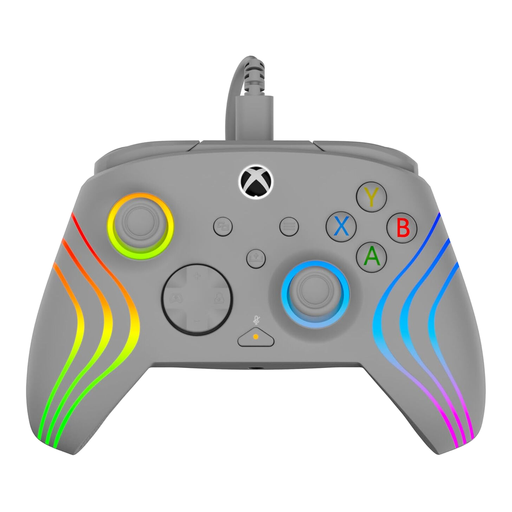 No image available
Consider this wired Xbox controller when your playing position is close enough to the game host for a cable.
Check cable reach from your seat, the connection available on your host device and support in your puzzle games.
 No image available
Consider DualSense for a PS5 puzzle setup or compatible PC play after checking the individual game.
PlayStation documents Bluetooth and USB-C PC connections. Haptic feedback and adaptive triggers work only in supported games and may require USB.
Screen size alone cannot establish controller compatibility. Identify the device running the game, check which controllers it accepts and confirm that the puzzle game supports controller input.
Yes, PlayStation supports connecting DualSense to a Windows PC by Bluetooth or USB-C, but you still need to check the individual game. Haptic feedback and adaptive triggers are limited to supported games and may require USB.
Steam does not require one controller for all puzzle games. Valve’s Controller-Friendly filters distinguish support for Xbox, DualShock and DualSense controllers; check the listing for the exact title you plan to play.
Nintendo describes USB Type-C charging and a USB Type-C cable for the original Switch Pro Controller. Check the contents of the exact listing and use compatible charging equipment; the Switch 2 Pro Controller is a different model.