Players using a particular platform
If you mainly play on one console, PC or mobile device, establish controller and game compatibility before weighing up its layout or extra features.


Choose a controller that supports the device and puzzle game you actually use: consider an Xbox controller for supported Xbox or Windows play, DualSense for a PS5-first setup, or the Pro Controller made for your Nintendo Switch generation. Check whether its directional controls and button layout suit repeated inputs, and look at adaptive controls if a conventional pad is difficult to use. Deal with glare through the screen and room setup; a different controller will not remove reflections.
If you mainly play on one console, PC or mobile device, establish controller and game compatibility before weighing up its layout or extra features.
If daylight or strong indoor lighting makes puzzle pieces or text hard to see, assess the display separately from the controls.
If a fixed button layout or conventional grip is difficult to use, remapping, alternative controls or mounting options may matter more than standard controller features.
Start with support for your device and game. Then consider how the controls feel for repeated puzzle inputs, while treating screen visibility as a separate issue.
| Concern | What to check | Who this matters to |
|---|---|---|
| Device compatibility | Check the exact console generation or operating system, connection method and puzzle game’s controller support. Bluetooth alone does not establish compatibility. | If I play across an Xbox and a Windows PC, I need the controller and game to work on both. Around 40% of consumers put device compatibility first. |
| Repeated inputs | Consider D-pad position, button feel and grip where you can assess them; check that the game accepts controller input. | When a puzzle involves frequent directional and menu inputs, I want a layout I can use comfortably. For around 30% of consumers, control comfort is the main concern. |
| Adaptable controls | Identify the remapping, switches or mounting you need, then check compatibility with the chosen adaptive system. | If a fixed layout makes buttons hard to reach, I need another way to place or activate those controls. Adaptable input comes first for around 20% of consumers. |
| Screen visibility | Try changing screen position, lighting and brightness; check the game’s text or interface options. | When reflections obscure puzzle pieces, I need to see the screen clearly before changing how I control the game. Around 10% of consumers prioritise display visibility. |
Bluetooth describes a connection method, not support for every console, operating system or game.
Match the exact controller to your device and check the puzzle game’s controller requirements before ordering.
A controller changes how you give inputs; it does not remove reflections or make washed-out screen content clearer.
Try adjusting display placement and room lighting first, then choose controls for compatibility and comfort.
PlayStation says DualSense haptic feedback and adaptive triggers depend on game support and may require a USB connection.
Check support for your particular puzzle game before making those features a deciding factor.
An adaptive controller may need compatible external controls to provide the layout a player requires. PlayStation also cautions that not every third-party device works with its Access controller.
List the buttons, switches and mounting options you need, then check each item against the selected system.
Setting up the controls may take additional equipment and time.
Microsoft offers a conventional Xbox controller route for supported Xbox, Windows and mobile-device use, alongside an adaptive controller for alternative inputs.
Sony’s DualSense is a PS5-first conventional controller, while the Access controller provides a configurable PS5 control route.
Nintendo has generation-specific Pro Controller models for Nintendo Switch and Nintendo Switch 2 setups.
These options cover Xbox and Windows play, a compatible mobile-device setup, Nintendo Switch 2 and PS5. Choose by your actual device and puzzle game, not by assuming every controller works across those platforms.
 No image available
Consider this wireless controller for an Xbox or Windows puzzle-game setup if its layout suits your repeated inputs. Check support for your exact device and game before buying.
 No image available
This conventional wireless controller is an option for supported Xbox or Windows puzzle play. Confirm support for your device and game, and check that its power arrangement suits you.
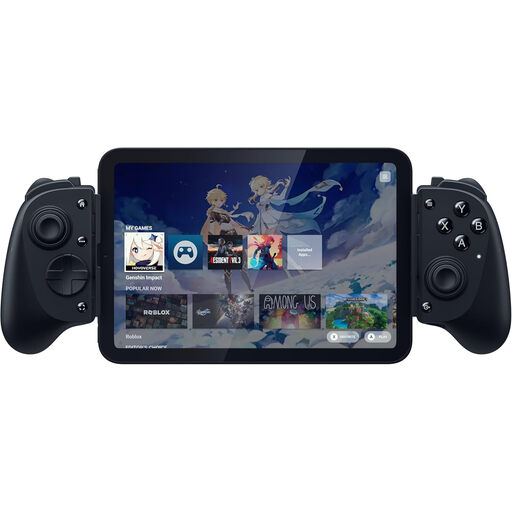 No image available
Consider this mobile controller if you play puzzles on a compatible phone or tablet. Check your exact device, case fit and the game’s controller support before choosing it.
 No image available
This is an option for a Nintendo Switch 2 puzzle-game setup. Nintendo lists mappable GL/GR buttons for this model; check your game’s controller support and do not assume compatibility with an earlier Switch generation.
 No image available
Consider this wireless controller for PS5 puzzle play, or check compatibility if you intend to use it with a PC. PlayStation says haptic feedback and adaptive triggers require game support and may require USB.
No controller is needed specifically to address room brightness. Check screen placement, reflections and display settings separately, then choose controls that support your device and game.
No. PlayStation says haptic feedback and adaptive triggers work only in supported games and may require a USB connection. Check the particular game before relying on either feature.
No. PlayStation cautions that not all third-party devices work with the Access controller. Check each required switch or other input device against PlayStation’s connection guidance before planning your setup.
No. GOV.UK advises that unwanted electrical products and batteries should not go in household rubbish. Check the appropriate local collection route for the controller and its battery.