PC puzzle players at a desk
You play on a Windows home-office PC and need a connection that works alongside your keyboard, monitor and available USB ports.


Choose a controller that supports the device and puzzle games you use, then decide which connection and directional controls suit your desk. An Xbox Wireless Controller is a route for Windows and Xbox play, DualSense suits PS5-first players who also use supported computers or mobile devices, and the 8BitDo Ultimate 2C offers specified 2.4G or wired connections for Windows. For Switch play, consider a Switch-compatible controller rather than assuming a PC-focused model will work.
You play on a Windows home-office PC and need a connection that works alongside your keyboard, monitor and available USB ports.
Your puzzle games run mainly on Xbox, PS5 or Nintendo Switch, even though the screen is on your desk. Start with support for that console and the games you play.
You want a grip and directional controls you can use comfortably for extended puzzle sessions, without choosing extra features your games may not support.
Check your game and playing device before choosing a connection for the desk; then consider the grip and controls you will use most.
| Concern | What to check | Who this matters to |
|---|---|---|
| Device and game support | Confirm support for your device, operating system and intended games; check the connection mode on that device. | If I move between a PC and console, I need a controller that works with my devices and games; around 40% of consumers put compatibility first. |
| Long-session comfort | Consider grip shape, button reach and published dimensions; handling a controller is more informative than its shape on a screen. | During a longer puzzle session, I want a grip and button layout I can manage comfortably; for around 30% of consumers, comfort is the primary concern. |
| Desk connection | Choose between a supported wired, Bluetooth or 2.4G mode, accounting for available ports and cables. | My desk already has other devices connected, so I want a controller connection that fits the space; around 20% of consumers prioritise desk connection. |
| Directional controls | Inspect the D-pad layout and check whether button remapping is available on your platform if you need it. | When a game calls for repeated directional moves, I want controls that feel manageable; around 10% of consumers put directional controls first. |
PlayStation says DualSense haptic feedback and adaptive triggers depend on game support and may require USB. General controller support does not establish support for those features in a particular puzzle game.
Check the game’s controller information and settings before making those features a reason to choose a model.
8BitDo specifies Bluetooth for Android on the Ultimate 2C Wireless Controller, but 2.4G or wired connectivity for Windows.
Match the stated connection mode to the device you will actually use.
A polling-rate figure or extra controls do not establish that a controller will suit a particular puzzle game. Compatibility and the inputs used by that game remain separate questions.
Check your game’s control scheme before prioritising performance figures or remapping options.
Connection accessories and battery arrangements can differ between controller packages. For example, Microsoft identifies a USB-C cable with its Xbox controller cable bundle, which should not be assumed for every package.
Confirm the model, colour variant and included accessories on the product page before ordering.
Microsoft’s Xbox controller line is relevant when puzzle games run on a Windows PC, Xbox or both.
Sony’s DualSense line is relevant to PS5 players who may also use a controller with a supported PC, Mac or mobile device.
The 8BitDo Ultimate 2C Wireless Controller is a Windows-desk option for players considering a 2.4G receiver or wired connection.
Nintendo’s Switch Pro Controller is relevant when the puzzle games are played mainly on Nintendo Switch.
These controllers cover different home-office puzzle-game set-ups, including Windows or Xbox play, PS4 or PC play, and a twin-pad option for Switch. Choose by your playing device and preferred controls rather than treating the models as interchangeable.
 No image available
Consider this wireless controller for a Windows PC or Xbox desk set-up, but confirm support for your exact device: the product information gives conflicting compatibility details. Check the included power and connection accessories before ordering.
 No image available
For Xbox or Windows 10/11 PC puzzle play, consider this model if configurable controls are useful to you. Check that its layout suits your games and confirm which connection accessories come with the package.
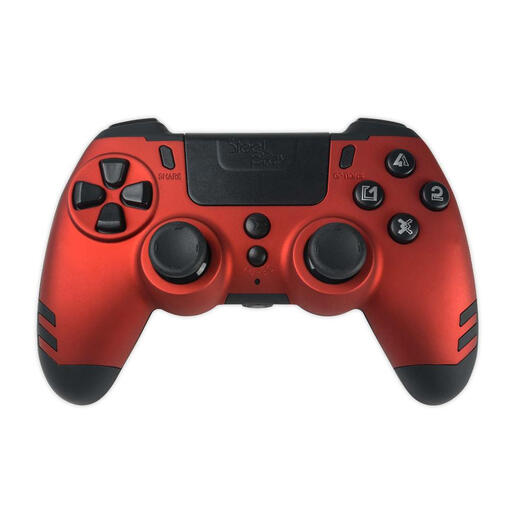 No image available
This slim wireless controller is a choice to check for PS4 or PC puzzle play. Confirm that its wireless connection works with your device, and inspect the directional controls if your games rely heavily on them.
 No image available
Consider these twin pads for Switch puzzle games if separate controls suit how you play. They are not a single full-size pad; check the layout and your games’ controls before choosing them for directional play.
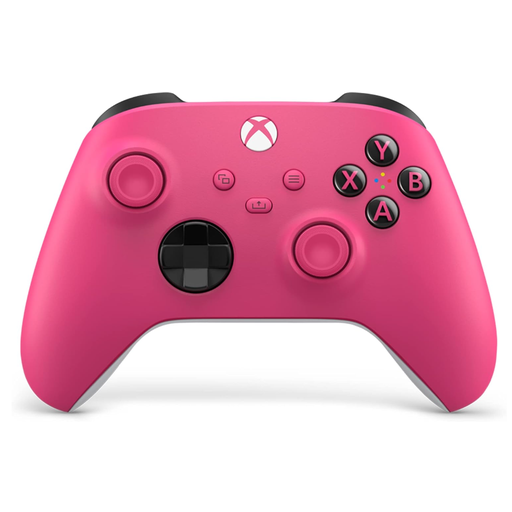 No image available
This wireless Xbox controller is relevant to Windows PC or Xbox puzzle play. Check game and device support, and confirm the included batteries or other power accessories against the package you select.
Not necessarily: start with support for your computer, connection method and games. Valve’s Steam Input offers custom bindings and community configurations for many controllers, but that does not guarantee the same support or features in every puzzle game.
Choose a connection your controller supports on your playing device and that fits the ports and cables at your desk. For example, 8BitDo specifies 2.4G or wired use on Windows for the Ultimate 2C Wireless Controller, while its Bluetooth mode is specified for Android.
Contact the seller about the applicable remedy and keep your order details and a record of the problem. GOV.UK distinguishes goods that are faulty or not as described from a simple change of mind, so check which situation applies before requesting a return.
A controller marked with the crossed-out wheelie-bin symbol should go to an appropriate electrical recycling collection point, not household rubbish. GOV.UK gives the same direction for batteries and marked electrical products; if the battery cannot be removed, check that the collection point accepts the whole controller.