Device-first puzzle players
You already play on a particular console, computer or mobile device. Start with a controller intended for that device, then check the puzzle game’s controller support.


Choose for the device and puzzle game you actually use before considering controller features: Switch 2 controllers, Xbox controllers and DualSense have different compatibility limits. In a shared bedroom, check how you will use headphones and, if you want to play together, whether the game supports your planned controller arrangement. A wireless connection does not establish that buttons or vibration will be quiet.
You already play on a particular console, computer or mobile device. Start with a controller intended for that device, then check the puzzle game’s controller support.
You want to solve or compete in puzzles with someone sharing the room. Check the game’s local multiplayer mode and its controller requirements; Nintendo describes a Joy-Con 2 pair as suitable for local multiplayer in compatible Switch 2 games.
You want to hear the game without playing its sound aloud near someone else. The useful question is how headphones connect to your particular controller and device, not whether the controller itself is wireless.
Start with device and game compatibility, then decide whether sharing the game or keeping its audio personal changes the setup you need.
| Concern | What to check | Who this matters to |
|---|---|---|
| Device and game compatibility | Match the exact console generation or device to the controller, then check the puzzle game’s input support. | If I play on one particular device, I need the controller to work with both that device and my game. Around 42% of consumers put compatibility first. |
| Playing together | Check the game’s local player modes and whether each player needs a full controller or a supported split arrangement. | When we want to tackle a puzzle together, I need a game and controller arrangement that lets the other person join. For around 33% of consumers, shared play is the primary need. |
| Personal audio | Check the headset connection and how your device routes game sound; some connections require a cable. | If someone nearby is resting or studying, I want to listen without playing game audio aloud. Keeping audio personal comes first for around 25% of consumers. |
A Bluetooth label does not establish that a controller works with your console or that your puzzle game accepts its input. Nintendo’s Switch 2 controllers, the Xbox Wireless Controller and DualSense have different stated device ranges.
Check the exact device and the game’s controller-support information before ordering.
A controller that cannot be used with your setup may leave you needing a different one.
Nintendo describes Joy-Con 2 local multiplayer for compatible games; the ability to connect multiple controllers does not add a two-player mode to a single-player puzzle game.
Check the game’s local co-operative or versus modes and its controller arrangement before buying for a second player.
An additional controller may go unused for the game you intended to share.
Wireless describes the controller connection, not where game sound plays. PlayStation says the DualSense headset jack requires a wired controller connection on PC and Mac and is unavailable on mobile devices.
Check the headset plug, device audio routing and any cable requirement. If vibration could disturb someone, check the game’s settings as well.
Your chosen audio route may require compatible headphones or a cable.
GOV.UK advises against disposing of unwanted electrical products and batteries in household rubbish.
Take an old controller to a suitable electrical-waste collection point instead.
Nintendo’s Switch 2 controllers address different arrangements for that console: an additional Joy-Con 2 pair for compatible local multiplayer or a Pro Controller for a conventional single-player layout.
The Xbox Wireless Controller is an option to assess if you play on an Xbox console or a supported Windows, Android or iOS device.
DualSense is a PS5 controller that can also connect to supported PC, Mac and mobile devices by Bluetooth or USB, according to PlayStation.
Check the exact 8BitDo model rather than treating its controller range as one compatibility option.
These controllers offer choices to assess for Switch 2, Xbox or Windows PC, and PS5 play. Check each exact model against your device and puzzle game; the audio and second-player arrangements also depend on your setup.
 No image available
For a Switch 2 player who wants a conventional controller layout, this model has the audio jack and mappable GL/GR buttons described by Nintendo. Check your puzzle game’s controller support and audio setup; wireless play does not establish quiet operation.
 No image available
Consider this model if you play on a device named in its title and want a wireless controller. Check that your puzzle game supports it, and confirm your intended headset and local-play arrangements before buying.
 No image available
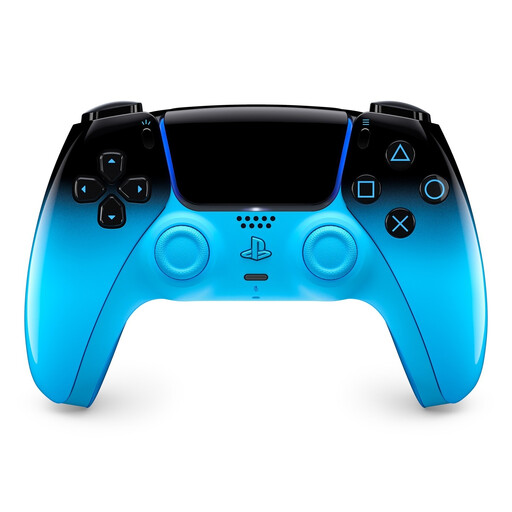
For PS5 or a supported PC, Mac or mobile device, DualSense can connect by Bluetooth or USB, according to PlayStation. If you plan to plug a headset into the controller, PlayStation says PC and Mac require a wired controller connection, while that jack is unavailable on mobile devices. Check the puzzle game’s controller support separately.
 No image available
This is an option for Xbox or a supported Windows, Android or iOS device. Microsoft lists Xbox Wireless, Bluetooth and a 3.5 mm stereo headset jack; check your game’s input support and how your device handles headset audio.
 No image available
Consider this Series 2 model only after confirming that its exact version works with your gaming device and puzzle game. Its product information gives conflicting platform details, so do not rely on the controller name alone to decide compatibility or plan a second-player setup.
No. Match the controller to your console or device, then check whether the individual game accepts controller input. Microsoft lists Xbox, Windows, Android and iOS support for the Xbox Wireless Controller; PlayStation lists supported PC, Mac and mobile connections for DualSense; Nintendo identifies Joy-Con 2 and the Switch 2 Pro Controller for Switch 2.
Yes, if your chosen controller, device and headphones provide a working audio route. Microsoft lists a 3.5 mm headset jack on the Xbox Wireless Controller, and Nintendo lists an audio jack on the Switch 2 Pro Controller. PlayStation says the DualSense jack requires a wired controller connection on PC and Mac and is unavailable on mobile devices.
An additional controller is useful only when the game supports local multiplayer and your existing controller arrangement is insufficient. Nintendo describes a Joy-Con 2 pair for compatible local multiplayer games; check the particular game’s player modes and controller requirements before adding one.
Take it to a suitable electrical-waste collection point rather than putting it in household rubbish. GOV.UK advises recycling unwanted electrical products and batteries through appropriate collection routes.