Choose a controller for the device and puzzle game you actually use: a controller made for your main console is a straightforward starting point, while laptop players should check both device compatibility and the game’s controller support. For a student-room setup, weigh directional controls and your preferred connection and battery routine against features you may rarely use.
Who is this for?
Laptop-first puzzle players
If you mainly play on a Windows laptop or desktop, check the controller’s connection options and support in each game. Valve encourages developers to support PlayStation, Xbox and Nintendo controllers on Steam, but that does not establish support for an individual title.
Nintendo Switch puzzle players
If you play on Switch or Switch 2 and prefer a full-size controller, look for the exact model’s stated compatibility and a directional pad you would be comfortable using for repeated inputs. Nintendo’s Switch Pro Controller and 8BitDo’s Ultimate 2C Bluetooth target different Switch setups.
PS5 and Xbox owners
If your console is your main device, its own controller family is a sensible starting point. Check separately before relying on the same controller with a PC or mobile game, or on features that depend on game support.
What matters when choosing?
Start with your main device and the particular puzzle game; then decide how you want to connect, manage batteries and use directional controls.
| Concern | What to check | Who this matters to |
|---|
| Device and game compatibility |
Check the exact controller variant against your device, then check the game’s controller-support information. |
If I mainly play on a laptop or move between devices, I need the controller to work with my actual games before its other features matter. Roughly 50% of consumers would put compatibility first. |
| Connection and batteries |
Check the connection available on your device, the battery type and whether you need a cable. |
When my desk is shared or I sit away from the screen, I want a connection and charging routine that fits the space. Around 30% of consumers would make that their primary concern. |
| Directional control |
Compare D-pad layout and grip shape, and consider whether the game relies on repeated directional inputs. |
For grid movement or frequent menu navigation, I care about how the directional controls feel in my hands. Approximately 20% of consumers would prioritise control feel. |
Mistakes to avoid
-
Choosing an 8BitDo Ultimate 2C by name alone
8BitDo specifies the Ultimate 2C Wireless for Windows and Android, but the Ultimate 2C Bluetooth for Switch and Switch 2. The similar names do not make their platform compatibility interchangeable.
Match the complete model name and its connection mode to your main device before ordering.
-
Assuming every DualSense feature works in every game
Sony says haptic feedback and adaptive triggers depend on game support and may require USB. They are not a reason to assume a particular PC puzzle game will use those features.
Check that game’s feature support and whether the connection you plan to use meets its requirements.
-
Overlooking batteries and cables
The standard Xbox Wireless Controller uses AA batteries, while Sony says a cable is not included with the standalone DualSense controller. Those arrangements affect what you need alongside the controller.
Check the exact listing’s battery format and included accessories against your intended wired or wireless setup.
Using a separate rechargeable solution for the standard Xbox Wireless Controller or a cable for a standalone DualSense may mean obtaining an additional accessory.
Controller brands to consider
Xbox
Microsoft’s Xbox Wireless Controller is an official route for Xbox consoles, with stated support for Windows PCs and compatible Android and iOS devices.
- The standard Xbox Wireless Controller has Xbox Wireless, Bluetooth, a hybrid D-pad and button mapping.
- It uses AA batteries as standard; a rechargeable solution is separate.
PlayStation
Sony’s DualSense is the official PS5 controller route and can also be used with compatible PC, Mac and mobile games.
- It has an integrated rechargeable battery, USB-C, a touchpad and a motion sensor.
- Sony says haptic feedback and adaptive triggers depend on game support and may require USB; the standalone controller does not include a cable.
Nintendo
Nintendo’s Switch Pro Controller offers a full-size controller route for Switch players who prefer a single directional pad.
- It has a + Control Pad, motion controls, HD rumble and amiibo functionality. Nintendo estimates battery life at approximately 40 hours, depending on use.
- It is a Switch-focused accessory rather than a general Windows or mobile controller choice.
8BitDo
8BitDo makes distinct Ultimate 2C versions for Windows and Android or for Switch and Switch 2.
- The Ultimate 2C Wireless offers 2.4G or wired connection for Windows and Bluetooth for Android, according to 8BitDo.
- The Ultimate 2C Bluetooth is the version specified for Switch and Switch 2; check the full variant name before buying.
Joybuy controllers for this setup
These controllers offer choices for Xbox, PlayStation or Windows-led puzzle-game setups, with some listings also naming Mac or mobile devices. Check support for your particular game before choosing between them.
 No image available
Microsoft Xbox Elite Wireless Controller Series 2 (Xbox One, Xbox Series X/S, PC)
Consider this Series 2 variant if you play puzzle games on Xbox or PC and want to assess its configurable directional controls. Confirm that your game supports a controller before choosing it for those controls.
View on Joybuy
 No image available
Xbox Wireless Controller – Carbon Black
This is an option for Xbox or Windows play when you want to consider a conventional Xbox controller. Its hybrid D-pad may be relevant to directional puzzle inputs; plan for its standard AA-battery arrangement and check game support.
View on Joybuy
 No image available
Turtle Beach PDP Victrix Pro BFG Wireless Controller (Xbox Series X|S, Xbox One, Windows 10/11 PC) – Black
For an Xbox or Windows setup, consider this model if interchangeable directional controls appeal to you. Check its pairing method for your device, battery arrangements and support in the puzzle games you play.
View on Joybuy
 No image available
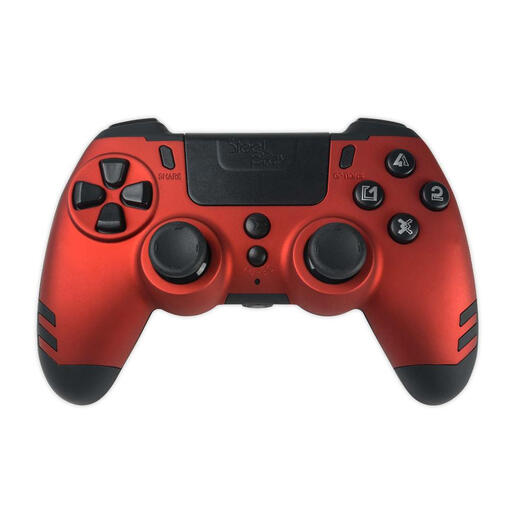
Lexip SteelPlay Slim Pack Wireless Controller – Ruby Red (PS4, PC)
Consider this PS4 and PC model if either is your main device. If repeated directional inputs matter to you, check its D-pad layout as well as support for your specific game.
View on Joybuy
 No image available
Sony DualSense Wireless Controller – HYPERPOP Remix Green (PS5, PC, Mac, mobile)
This DualSense variant is an option for PS5 play or compatible games on the other devices named in its title. Check game support before relying on haptics or adaptive triggers, and confirm cable inclusion if you plan to connect by USB.
View on Joybuy
Common questions
Do all PC puzzle games support controllers?
No. Valve encourages developers to include support for PlayStation, Xbox and Nintendo controllers on Steam, but each game determines its own support. Check the game’s store page or official support information before buying a controller specifically for it.
Will DualSense haptics and adaptive triggers work in every PC puzzle game?
No. Sony says these features depend on game support and may require USB. Check the particular game and connection before treating either feature as a reason to choose DualSense for PC.
Are the 8BitDo Ultimate 2C Wireless and Bluetooth versions interchangeable?
No. 8BitDo specifies the Ultimate 2C Wireless for Windows and Android, and the Ultimate 2C Bluetooth for Switch and Switch 2. Check the full model name against your main device.
What should I do with an old controller?
Use an appropriate electronics recycling route rather than putting the controller in ordinary household waste. UK government guidance identifies electrical and electronic equipment as subject to waste rules intended to reduce discarded equipment; check locally for a suitable collection point and how it handles batteries.


