
24/7 Customer Support

Free returns

Same-day & Next-day Delivery

Quality Guaranteed

Unlock Your Welcome Offers: FREE Delivery | Up to 80% OFF | Free 30-day JoyPlus trial
Download the APP
You have invested in a powerful graphics card or a new-generation console like the PS5 or Xbox Series X. Yet, when you load up the latest AAA title or a fast-paced shooter, something feels off. The visuals lack sharpness and motion isn't as fluid as you expected. The culprit is often an outdated monitor that simply can't keep up with your hardware.
Navigating the world of gaming monitors can be a challenge, with a dizzying array of technical specifications to decipher. As a Joybuy Product Recommendation Officer, my purpose is to cut through the clutter and provide clear, practical guidance. This article will help you understand the key features of a modern QHD gaming monitor and highlight a few carefully selected options to match your high-performance setup.
Before diving into specific models, let's clarify a few crucial specifications. Understanding these will empower you to make a more informed decision.
For years, 1080p (Full HD) was the standard. Today, the sweet spot for high-performance gaming has shifted to 1440p, also known as QHD (Quad High Definition, 2560x1440 pixels). A 1440p gaming monitor offers 77% more pixels than a 1080p screen, resulting in significantly sharper images and more detail. It provides a clear visual upgrade without the immense graphical horsepower required to run games smoothly at 4K, allowing you to enjoy both stunning visuals and a high refresh rate.
The panel is the heart of the monitor and the two dominant technologies for gaming are VA and IPS.
The size of your monitor directly impacts your gaming experience.
Based on features, performance and user needs, here are our recommendations for gamers looking to upgrade their display this year.

Why It Stands Out: This monitor is built for immersion. The large 32-inch screen combined with a subtle 1500R curvature wraps the game world around you. Its VA panel delivers deep blacks and a high contrast ratio, making atmospheric games feel more alive. With a 180Hz refresh rate and QHD resolution, it offers a smooth and detailed experience for both PC and console gaming.
Pros:
Who is it for? Gamers who prioritise an immersive experience in AAA titles, racing simulators and RPGs. It's an excellent choice for those wanting a large, curved gaming monitor that delivers both size and speed.

Why It Stands Out: This monitor is all about speed. As a dedicated esports monitor, it boasts a blistering 320Hz refresh rate and an exceptionally fast response time of 0.5ms (GtG). This combination, powered by a Rapid IPS panel, ensures motion is incredibly fluid and free of blur, giving you a distinct advantage in competitive shooters. The 27-inch QHD screen maintains excellent clarity, while features like AI Vision help illuminate dark areas to reveal hidden opponents.
Pros:
Who is it for? Serious competitive gamers playing fast-paced FPS and esports titles who demand the highest refresh rate and quickest response time to maximise their performance.
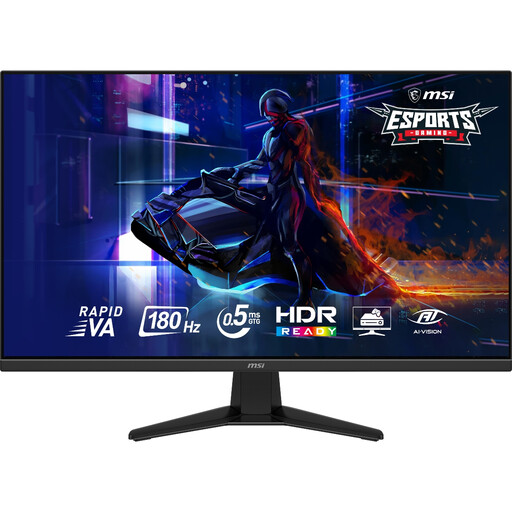
Why It Stands Out: This model offers a compelling balance of size, speed and features. It pairs a large 31.5-inch flat screen with a Rapid VA panel, delivering both the high contrast VA is known for and a quick 0.5ms (GtG) response time. The 180Hz refresh rate ensures gameplay is smooth and responsive, making it a versatile performer for any genre. It's also a great monitor for PS5 and Xbox, with excellent console mode support.
Pros:
Who is it for? All-round gamers who want a large-screen experience for immersion but are unwilling to compromise on the speed needed for competitive multiplayer games.
These three monitors represent excellent choices for different types of gamers, but the world of displays is vast. If you're looking for a different size, feature set or panel technology, there are many other models to consider.
Explore our full range of gaming peripherals and equipment to find the perfect match for your setup.
Is a 1440p gaming monitor worth it for PS5 or Xbox Series X? Absolutely. Both consoles support 1440p output at up to 120Hz. A QHD gaming monitor offers a noticeable improvement in image clarity over 1080p and makes it easier to achieve high frame rates than with a 4K display. For the smoothest experience, look for a monitor that supports VRR (Variable Refresh Rate) over HDMI.
What is a good refresh rate for a QHD gaming monitor? A high refresh rate monitor significantly improves motion clarity. 144Hz is an excellent starting point for a smooth experience. For competitive players, 165Hz, 180Hz or higher can provide a clearer picture in fast-moving scenes, potentially offering a slight competitive edge. Your choice should also be guided by your PC's ability to consistently produce high frame rates at 1440p.
Is a curved gaming monitor better for gaming? This comes down to personal preference. A curved gaming monitor, particularly at 27 inches or larger, can increase immersion by filling more of your peripheral vision. This is especially enjoyable in racing games and single-player adventures. However, some competitive players and content creators prefer flat screens for their perfect geometric accuracy.