
24/7 Customer Support

Free returns

Same-day & Next-day Delivery

Quality Guaranteed

Unlock Your Welcome Offers: FREE Delivery | Up to 80% OFF | Free 30-day JoyPlus trial
Download the APP
QHD gaming monitors offer a useful middle ground between Full HD and 4K. The 2560 × 1440 resolution provides sharper text, more workspace and clearer game detail, while remaining easier for many graphics cards to drive at a high refresh rate.
However, shopping by headline specifications alone can lead to an expensive mismatch. A monitor advertised as “1ms” may use a different measurement mode, while a high refresh rate is of limited value if your PC or console cannot output enough frames. The right choice depends on your games, hardware, desk space and whether the screen will also be used for work or content creation.
A quoted 0.03ms, 0.5ms or 1ms figure may refer to different testing modes, such as GTG or MPRT. MPRT often relies on backlight strobing, while GTG describes pixel transition performance. These figures should not be compared without checking the measurement method.
For fast games, also look for practical motion features such as Adaptive-Sync, FreeSync or G-Sync compatibility. Synchronising the display with the graphics card can help reduce tearing and stuttering when frame rates fluctuate.
“HDR Ready” and entry-level HDR support do not necessarily provide the same visual effect as a display with strong brightness, local dimming or OLED contrast. Check the stated brightness and certification, such as VESA DisplayHDR 400 or DisplayHDR True Black. HDR performance also depends on the game, operating system and connection used.
A monitor may support its highest refresh rate through DisplayPort but offer a lower limit over HDMI. This matters for laptops and consoles. For example, some screens support QHD at 180Hz through DisplayPort but up to 144Hz over HDMI, while many consoles operate at 1440p and 120Hz.
Before buying, confirm the ports on both devices, the required cable standard and whether VRR is supported by your PlayStation, Xbox or PC.
Most 27-inch gaming monitors pair naturally with 2560 × 1440. This gives a pixel density of roughly 109 pixels per inch, producing crisp text and detailed game worlds without requiring the graphics power of 4K.
A 32-inch QHD monitor offers a larger image, but the lower pixel density may look less sharp at close desk distance. Ultrawide models, such as 34-inch UWQHD displays, provide wider viewing space but require more GPU power and desk width.
For general gaming, 144Hz or 180Hz provides a noticeable improvement over 60Hz in scrolling and motion. Competitive players may prefer 240Hz gaming monitors, 280Hz or higher, provided their system can produce consistently high frame rates.
Remember that a 240Hz display refreshes up to 240 times per second, but it cannot create additional game frames. Check your graphics card, processor and typical game settings before paying for unused refresh capacity.
Ergonomics are also important. Height, tilt, swivel and pivot adjustment can make a greater everyday difference than a small increase in refresh rate. VESA compatibility is useful if you plan to use an arm or wall mount.
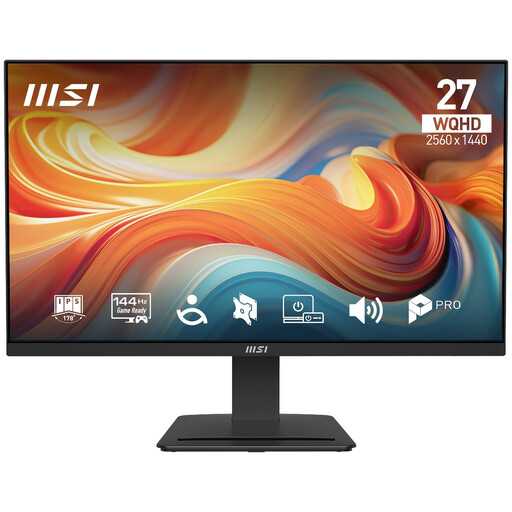
Why This Fits Their Persona: It suits a first QHD upgrade for mixed home working, browsing and casual gaming, with a familiar 27-inch flat format and support for PC, Mac, PS5 and Xbox devices.
Its specification states 144Hz through HDMI and DisplayPort, rather than leaving the maximum connection mode unclear. Adaptive-Sync is listed with a 48–144Hz range.
27-inch IPS panel, 2560 × 1440 resolution, dual HDMI 2.0b ports and integrated 2W speakers.

Why This Fits Their Persona: This is aimed at buyers who want high refresh performance alongside OLED contrast and wide colour coverage for games and multimedia.
The listing identifies QD-OLED, 240Hz, HDMI 2.1 and DisplayPort support separately. It also lists OLED Care 2.0 and a stated three-year warranty including panel burn-in.
0.03ms GTG specification, 99% DCI-P3 coverage, 10-bit colour and Adaptive-Sync from 48–240Hz.

Why This Fits Their Persona: Photographers, editors and designers who spend long hours at a desk may value calibrated colour, adjustability and workstation connectivity more than extreme gaming speed.
The listing specifies factory calibration, Delta E < 2 and sRGB/Rec.709 support, giving more useful colour information than a generic “vivid colours” claim.
27-inch IPS QHD panel, 100Hz refresh rate, USB hub and height, swivel, tilt and pivot adjustment.
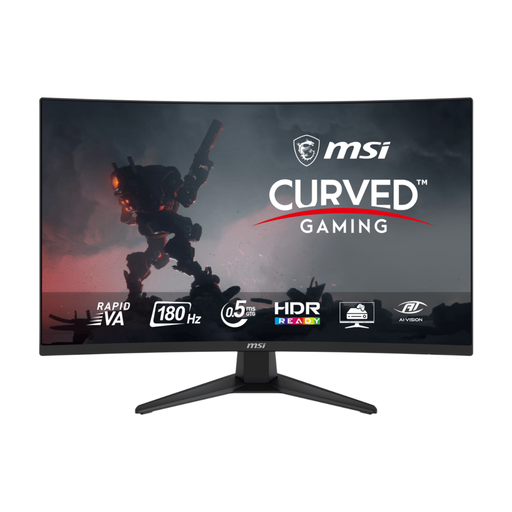
Why This Fits Their Persona: It is suited to players who want a larger screen for RPGs, racing games, simulations and everyday entertainment, with a 1500R curved Rapid VA panel.
The connection limits are stated clearly: DisplayPort supports QHD at 180Hz, while HDMI supports up to 144Hz. This helps avoid assuming every input offers the headline refresh rate.
32-inch 2560 × 1440 display, 180Hz refresh rate, 0.5ms GTG minimum response specification and 1500R curvature.
We have compiled a complete, real-time list of products that fully satisfy these strict selection criteria and UK safety regulations.
Many are, but support varies. PlayStation 5 and Xbox Series consoles commonly target 1440p at up to 120Hz when the monitor, cable and console settings are compatible. Check the product listing for explicit console resolution, VRR and HDMI details rather than assuming that every QHD screen supports the same modes.
At the same screen size, 1440p provides more pixels and typically sharper details. It also demands more graphics performance. A 1440p monitor is a sensible upgrade when your PC can maintain suitable frame rates, but a high-refresh Full HD display may still be practical for entry-level hardware or highly competitive games.
Running cost depends on brightness, refresh mode, HDR use and daily hours. To estimate it, multiply the monitor’s wattage by hours used, divide by 1,000 to obtain kilowatt-hours, then multiply by your electricity tariff. Lowering brightness and enabling standby settings can reduce consumption without changing the resolution.