Shared-space sandbox builders
If you build for long sessions in a shared room or use an open headset microphone, physical key noise and accessible volume controls may matter more to you than fast-input settings.


For long sandbox-building sessions with headphones, choose the layout and controls you will use before deciding whether specialist switches matter. A quiet TKL keyboard is worth considering in a shared room or with an open microphone, while a board retaining the numpad suits players who regularly use number keys or numpad bindings. Wireless, low-profile and adjustable-actuation designs address different needs; none replaces checking physical layout, connection and key noise.
If you build for long sessions in a shared room or use an open headset microphone, physical key noise and accessible volume controls may matter more to you than fast-input settings.
If desk space is limited and you switch between a gaming PC and another device, consider which keys you can give up and whether the keyboard offers the connections you need.
If sandbox building is only part of your play, configurable actuation and rapid-trigger functions may be relevant for other games. Check whether you would use those settings before making them a priority.
Start with the sound your keyboard makes around other people and the keys your building shortcuts require. Then consider connection options and specialised input settings.
| Concern | Buying check | Who this matters to |
|---|---|---|
| Key noise and audio controls | Look for a described quiet-switch or sound-dampened design, and check for convenient volume controls. | If I share a room or leave my headset microphone open, I want to manage key noise and adjust audio without interrupting play. Around 33% of consumers put those needs first. |
| Layout and desk space | Check whether you need a numpad, function row and arrow keys, as well as the physical key layout. | When I build with shortcuts but also need room for my mouse, I have to decide which keys I can do without; around 25% of consumers make layout their primary concern. |
| Connection and profile | Compare the available wired and wireless modes, charging arrangements and keyboard height. | If I move between devices or want fewer cables on my desk, the connection options have to fit how I play. For around 25% of consumers, that is the leading need. |
| Adjustable input | Check the available actuation settings, rapid-trigger functions and configuration requirements. | When I also play games built around quick directional inputs, I may want to tune how keys respond; around 17% of consumers prioritise that flexibility. |
Headphones change what you hear, not the sound of keys heard by someone nearby or potentially picked up by an open microphone.
If either matters in your setup, compare switch and sound-dampening descriptions rather than relying on the headset alone.
TKL and smaller layouts free desk space but omit keys you may use for number entry or game bindings.
Check your regular sandbox shortcuts and other PC tasks before deciding whether you can give up the numpad or dedicated keys.
Adjustable actuation addresses a more specialised input need than the layout, connection and sound considerations of ordinary world-building.
Prioritise it if you also play games where you expect to configure and use those settings.
Printed key legends and the active operating-system input layout can differ, making symbols and shortcuts confusing.
Confirm the keyboard’s physical layout before purchase and select the intended input layout in your operating system.
The UK Apex 3 TKL is a reference point for a compact keyboard aimed at players concerned about key noise and audio access.
The UK K70 CORE TKL represents a wired mechanical option for a compact desk with accessible media controls.
The G515 line includes a low-profile wireless TKL option and a separate wired analogue-switch TKL option.
The 80HE is relevant if analogue input and actuation tuning are priorities alongside sandbox play.
These choices include boards that retain a numpad, compact wireless layouts and smaller keyboards with specialised input features. Match the physical keys, connection and expected key noise to your headphone setup before choosing.
 No image available
Consider this layout if you use numpad keys but want to reclaim some desk space.
The name identifies a wireless UK-layout model. Check the selected switch variant and whether its sound suits a shared room or open microphone.
 No image available
This compact wireless option is worth considering if desk space and quick headset-volume adjustment matter to you.
Its name identifies a UK keyboard. If people nearby or your microphone may hear your keys, check its sound characteristics before choosing it.
 No image available
Consider this compact board if you want a choice of connection methods and can use US-printed keys.
The name specifies wired, Bluetooth and 2.4G modes, RGB backlighting and PBT keycaps. Check whether the US physical layout and the keyboard’s sound suit your setup.
 No image available
This is a specialist compact option if you also want configurable input for other games.
The name identifies a 60% analogue optical keyboard. Check how its smaller layout handles your regular shortcuts, as well as its physical key legends and sound.
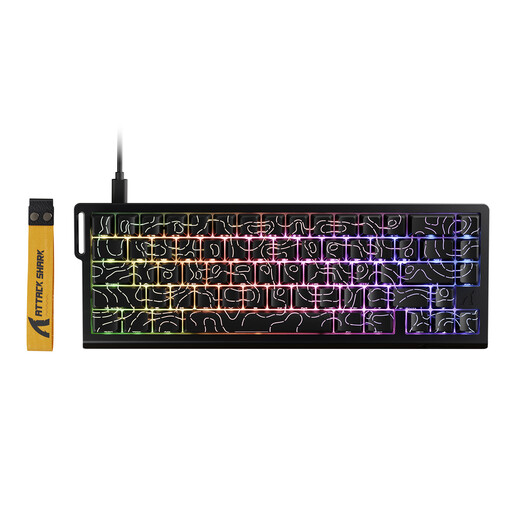 No image available
Consider this compact magnetic-switch option if input tuning for other games is a priority alongside sandbox building.
Check that its available keys and physical legends fit your shortcuts, and assess its sound if you play near others or use an open microphone.
No. Headphones do not reduce the physical key sound heard by people nearby or potentially picked up by an open microphone. If that matters, compare quiet-switch and sound-dampening descriptions, then consider your microphone position and room.
Choose TKL if you want more mouse space and can work without a numpad; it retains the function row and arrow keys. A full-size layout is more practical if you regularly use numpad bindings or enter numbers in other PC tasks.
Usually not for world-building alone. Those functions are more relevant if you also want to configure key response for games with quick directional inputs; check layout, sound and connection for your sandbox sessions first.
Check the physical key legends on the product you select and make sure your operating system uses the intended input layout. Microsoft distinguishes the Windows United Kingdom keyboard layout from the input-layout settings you can change in Windows.