For co-operative shooters in a shared bedroom, start with a linear or quiet-oriented switch and internal sound dampening, then choose a layout that leaves enough room for your mouse. A 75% board keeps arrow and utility keys in a compact footprint, while tenkeyless (TKL) offers a more spread-out layout; adjustable actuation is worth considering if you want to tune movement inputs. Neither switch choice nor dampening guarantees a silent keyboard.
Who this is for
Late-night co-op players
If someone else is sharing the bedroom, repeated keypresses during play or voice chat make switch choice and case sound worth considering. Linear or quiet-oriented switches and internal dampening are more relevant to this need than a clicky switch option.
Players who need mouse room
If broad mouse movements are part of your setup, a 75% or TKL keyboard removes the numpad while retaining more dedicated keys than a smaller compact layout.
Players who tune their inputs
If you want to adjust actuation or change switches for movement-heavy games, look at the exact board’s controls and switch compatibility. Those options do not, by themselves, make its keypresses quieter.
What to prioritise
Settle the switch and sound question first, then decide how much desk width and how many dedicated keys you need before considering adjustable inputs.
| Concern | What to check | Who this matters to |
|---|
| Keypress disturbance |
Choose the exact switch variant; check for linear or quiet-oriented switches and internal dampening. Neither feature establishes how quiet the board will be in your room. |
If someone is resting nearby, I want repeated movement keys to cause less disruption without choosing clicky feedback. Around 50% of consumers put lower keypress disturbance first. |
| Movement inputs |
Decide whether you will use adjustable actuation or Rapid Trigger, and check the exact model’s configuration requirements. |
When fine-tuning movement keys matters to my play, I want control over when those keys register. Roughly 30% of consumers make input tuning their primary concern. |
| Desk space and layout |
Compare the keys retained by 75% and TKL layouts; confirm the exact key map if UK ISO placement matters. |
On a shared desk, I need room to move the mouse but still want the keys I use outside games. About 20% of consumers prioritise the footprint and layout. |
Buying pitfalls
-
Assuming a gaming switch should be clicky
Clicky feedback works against the aim of reducing disturbance. Razer distinguishes its clicky Green switch from its quieter-oriented Yellow option, and CORSAIR’s shared-space guidance generally places linear switches below tactile switches for sound.
Check the switch fitted to the exact variant before ordering; versions of the same keyboard can use different switches.
-
Treating dampening as a promise of silence
Sound-dampening layers address internal noises such as pings and echoes, but the sound you hear also depends on the switch and how you press the keys.
Consider dampening alongside switch choice. If sound is decisive, listen to samples of the same switch configuration where available and check the seller’s return terms.
-
Choosing by keyboard size alone
Compact layouts free mouse space but can change which keys are dedicated or reached through shortcuts. A product family name does not establish the key placement of every variant.
Compare the exact key map with the keys you use in games and everyday typing, and confirm UK ISO placement if you need it.
-
Assuming magnetic replacement switches will fit
Magnetic-switch compatibility is model-specific. Keychron limits the K2 HE to Gateron Double-Rail Magnetic Switches.
Check the exact keyboard and replacement-switch compatibility before ordering switches separately.
An incompatible set would require another switch choice before you could make the planned change.
Brands to consider
CORSAIR
Its K65 PLUS WIRELESS is a 75% option for players considering linear switches, dampening and wireless connectivity.
- CORSAIR specifies pre-lubed MLX Red switches, hot-swap support and two sound-dampening layers for the UK K65 PLUS WIRELESS.
- Those construction details are not a measured noise result or a promise of silent operation.
Logitech G
Its G515 models offer TKL choices for players who want a slim layout or configurable inputs.
- The G515 LIGHTSPEED TKL has linear and tactile switch options and dampening; the separate G515 RAPID TKL offers adjustable actuation and Rapid Trigger.
- Check which G515 model and switch version you are considering: adjustable actuation and the stated sound construction do not apply interchangeably to every version.
Razer
Its BlackWidow V4 range offers different switch and layout choices rather than one shared acoustic profile.
- Razer offers a Yellow linear-switch option for the full-size BlackWidow V4; the BlackWidow V4 Tenkeyless HyperSpeed has hot-swap support and two damping layers.
- Razer describes the Green switch as clicky, while the stock Tenkeyless HyperSpeed uses tactile Orange switches. Check the fitted switch if reducing disturbance is your priority.
Keychron
The K2 HE UK ISO is a 75% route for players interested in magnetic-switch adjustment and familiar UK key placement.
- Keychron specifies adjustable actuation and acoustic foams for the K2 HE.
- Keychron states that its magnetic-switch compatibility is limited to Gateron Double-Rail Magnetic Switches.
Joybuy keyboard choices
These keyboards offer compact layouts for a shared desk. Choose among them by the exact switch, key layout and input features you need; their listed acoustic features are not comparable noise measurements.
 Image unavailable
AULA S75 Pro 75% Wireless Gaming Keyboard, Star Vektor switches
Consider this compact board if switch choice and internal padding matter in your shared-bedroom setup.
The product name specifies hot-swappable Star Vektor switches, five-layer padding and tri-mode connectivity. Check the exact key map if UK ISO placement matters, and do not treat the padding as a guarantee of quiet keypresses.
Shop on Joybuy
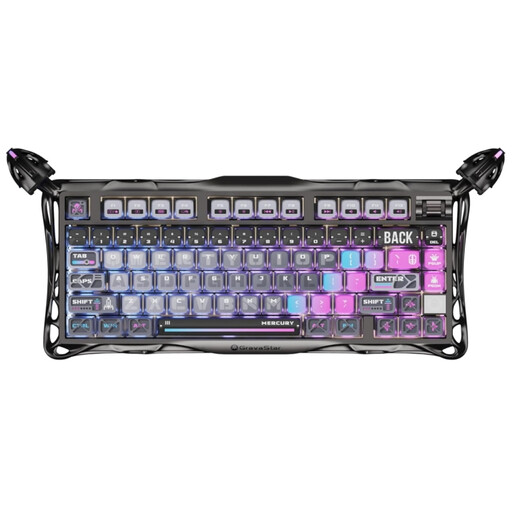 Image unavailable
GravaStar Mercury K1 Pro 75%, Chinese Retail Version, US layout, Cyberpunk Edition – Black
This compact option suits consumers willing to use the stated US key layout and interested in changing switches later.
Its product name specifies a hot-swappable mechanical design and tri-mode connectivity. Check the key placement before buying if you normally use UK ISO.
Shop on Joybuy
 Image unavailable
ASUS ROG Falchion Ace HFX 65 Analog Gaming Keyboard – UK Layout
Consider the 65% format if desk space matters more to you than having as many dedicated keys.
The product name identifies an analog gaming keyboard with a UK layout. Check its exact key arrangement against your game controls and everyday shortcuts; the layout alone says nothing about how quiet it will sound.
Shop on Joybuy
 Image unavailable
AULA F75 75% Wireless Gaming Keyboard – US Layout
This 75% option is worth considering if you want a compact board with several connection choices, provided the US key layout suits you.
The product name specifies wired, Bluetooth and 2.4 GHz modes, PBT keycaps and a US layout. Confirm the fitted switch type before choosing it primarily for lower key noise.
Shop on Joybuy
 Image unavailable
HyperX Alloy Rise 75 Wireless Keyboard UK
Consider this 75% wireless board if a compact keyboard is your starting point for keeping mouse room clear.
Confirm the exact key map if UK ISO placement matters, and assess its switch sound for your room rather than assuming a wireless 75% keyboard will be quiet.
Shop on Joybuy
Common questions
Are linear switches quiet enough for a shared bedroom?
Not necessarily. CORSAIR’s shared-space guidance describes linear mechanical switches as generally quieter than tactile ones, but the keyboard’s construction and how hard you press the keys also affect the sound. Choose the exact switch variant and consider internal dampening rather than assuming a linear label guarantees silence.
Should I choose a 75% or TKL keyboard for co-op shooters?
Choose 75% if a smaller footprint matters most while you still want arrow and utility keys; choose TKL if you prefer a more spread-out layout with a dedicated function row. Both remove the numpad, so check the exact key map if you use dedicated controls outside games.
Do I need a magnetic keyboard for shooter games?
No. Consider a magnetic model if you intend to configure actuation or use its input-tuning functions; a conventional mechanical keyboard can also suit co-operative shooters. Magnetic switches do not, on their own, establish quieter keypresses.


