Quiet-study programmers
If other people study nearby, the exact switch choice and the sound of larger keys may matter more to you than lighting or a pronounced click.


Choose a low-profile productivity keyboard if you favour lower keys and straightforward switching between work devices; consider a mechanical keyboard with an explicitly quiet switch if distinct key feedback matters more. For profiling, check the physical layout, the keys and shortcuts you use, and where the keyboard sits at your desk. Manufacturers’ quietness descriptions do not establish how complete keyboards compare for noise.
If other people study nearby, the exact switch choice and the sound of larger keys may matter more to you than lighting or a pronounced click.
If you move repeatedly between a terminal, an IDE and profiling tools, check that the physical keys you use are accessible and that any remapping feature works with your setup.
If debugging keeps you at the desk for extended periods, assess the keyboard alongside your chair, screen and mouse position. A different keyboard alone will not arrange the workstation for you.
For profiling in a quiet study, narrow the switch and layout choices around the sound you can tolerate and the commands you need. Then check whether the keyboard fits your devices and seated position.
| Concern | What to check | Who this matters to |
|---|---|---|
| Typing noise | Confirm the exact switch variant; if low disturbance is essential, assess the sound of the complete keyboard, including larger keys. | I work near other people and want my typing to cause as little disturbance as possible; around 33% of consumers put quiet operation first. |
| Profiling shortcuts | List your regularly used commands and check physical key access and remapping compatibility. | When I move between profiling tools and code, I want frequently used commands within easy reach; around 27% of consumers prioritise shortcut access. |
| Workstation fit | Check keyboard height in your seated setup. The Health and Safety Executive advises placing it just below elbow height. | During a long debugging session, I need a workable position for my hands and shoulders; around 20% of consumers put workstation fit first. |
| Layout and connections | Confirm the physical UK or US layout, required keys and connection modes for your devices. | If I switch work devices or enter numbers often, the layout and connections must suit that routine; around 20% of consumers make this their primary concern. |
Logitech offers MX Mechanical with Tactile Quiet, Clicky and Linear switches, which it describes as having different sounds and feels. A Clicky variant is a different choice from Tactile Quiet for a shared study.
Check the switch named on the exact product listing rather than relying on the keyboard family name.
Keychron describes acoustic foam in the K8 Max, while CHERRY describes damping in its MX2A Silent Red switch. Neither feature alone tells you how the complete keyboard, including larger keys, will sound at your desk.
Use the stated construction to narrow your choices, then look for sound demonstrations or a suitable retailer return policy for the exact configuration.
A tenkeyless layout such as the Keychron K8 Max omits an integrated numpad. That changes numeric entry if your profiling workflow uses one.
Write down the navigation keys, shortcuts and number-entry method you use before choosing a compact board.
The Health and Safety Executive treats keyboard position as one part of display-screen workstation posture, alongside screen placement and relaxed shoulders.
Adjust the desk, chair, screen, keyboard and mouse together; aim to position the keyboard just below elbow height.
Its MX Keys S and MX Mechanical lines offer different approaches to low-profile work keyboards.
Its K8 Max UK-ISO range is relevant if you want a tenkeyless mechanical layout with connection and configuration choices.
Its KC 200 MX is a wired mechanical office keyboard offered in different switch variants.
These keyboards and the keyboard-and-mouse set offer different physical layouts for a study desk. Check each listing’s key configuration, layout and quietness claims against the commands you use while profiling.
 No image available
If you want a split layout for extended desk work, assess this keyboard and its padded wrist rest in your seated setup.
It is a wireless model. Confirm the physical key layout and whether its typing sound suits your study before choosing it.
 No image available
This UK-labelled full-size wireless keyboard is a candidate if you prefer a work-keyboard layout for profiling rather than a compact board.
Check whether its keys provide the access you need and whether your profiling shortcuts require programmable controls.
 No image available
If you want tactile mechanical keys while profiling, consider whether this US-layout variant fits the physical key arrangement you use.
Its title specifies hot-swappable switches and tri-mode connectivity. Silent Tactile names the supplied switch option, not a measured whole-keyboard noise level; check shortcut-remapping compatibility if you need it.
 No image available
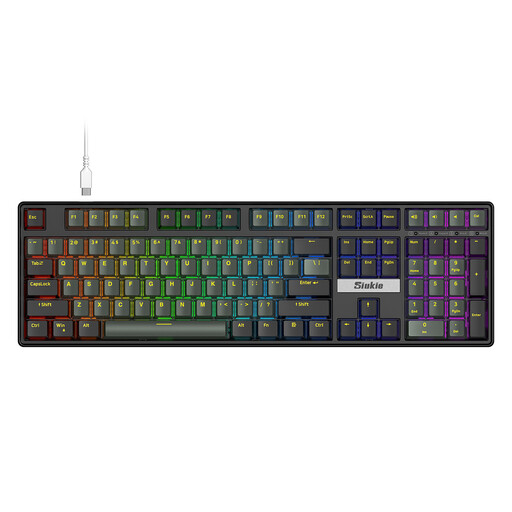
If your profiling routine calls for a larger physical key layout, compare this 108-key model with the commands and number entry you use.
The title identifies detachable switches and a wired keyboard. Confirm the physical layout, installed switch and shortcut options before deciding whether it suits a quiet study.
 No image available
If you need a keyboard and mouse together for a study desk, this set is worth comparing with your existing setup.
The title specifies a 2.4 GHz wireless connection and US layout. Check that the layout works for your typing and that the keyboard’s sound and shortcut access meet your needs.
No: the switch and complete keyboard configuration matter. Logitech offers distinct Tactile Quiet, Clicky and Linear choices for MX Mechanical, while CHERRY says its MX2A Silent Red switch uses damping. Choose the exact quiet-switch variant you intend to use rather than assuming all variants sound alike.
A compact board can work if its physical keys and remapping options cover your commands. A tenkeyless board such as the Keychron K8 Max omits an integrated numpad, so choose a layout with one if you rely on it for numeric input.
Place it just below elbow height as part of a comfortable workstation arrangement, following Health and Safety Executive guidance. Keep your shoulders relaxed and consider screen and mouse position too; for prolonged laptop use, a separate keyboard and mouse allow the screen to be raised.
Check an electrical-waste collection or take-back option rather than assuming the keyboard belongs in ordinary household waste. GOV.UK describes the UK waste electrical and electronic equipment framework as intended to reduce electrical waste sent to landfill or incineration; your local authority and retailer can tell you which practical options are available.