If typing noise is your priority at a shared desk, start with a keyboard whose exact variant is described as having quiet keys, then check that its layout and connection suit your quiz-writing setup. A mini keyboard leaves more desk space but may omit a number pad; multi-device switching matters most if you regularly move between devices. Do not assume a mechanical keyboard is quiet from its name alone.
Who needs which keyboard?
Shared-desk quiet typists
If you write quizzes beside colleagues, classmates or family, look for a quiet-key claim tied to the exact model rather than assuming every keyboard in a range sounds alike. Dell Technologies and HP Store UK describe quiet keys on specific keyboards; check the variant and connection before choosing.
Space-limited quiz creators
If notes and a mouse compete for space with your keyboard, a compact or mini layout may help. Check whether losing a dedicated number pad would slow down the way you enter marks or numbered material, and leave space in front of the keys for your hands.
Multi-device study organisers
If you draft questions on a computer and work with material on another device, check the keyboard’s stated pairing and switching options. HP Store UK describes switching between up to three devices for its 475 keyboard; confirm compatibility for the devices you actually use.
What matters when choosing?
For vocabulary-quiz writing at a shared desk, weigh typing disturbance against the space, key layout and connections your own workflow requires.
| Concern |
What to check |
Who this matters to |
| Typing disturbance |
Look for a quiet-key claim for the exact variant, then consider whether its sound will suit the person sharing your desk. Dell Technologies and HP Store UK describe quiet keys on particular models, not a common measured noise rating. |
When I write quiz questions beside someone else, I want typing to cause less disruption without making the keyboard awkward to use; around 42% of consumers put low disturbance first. |
| Desk space and layout |
Check available desk space, the keys you use for marks and the precise UK layout if familiar symbol positions matter. The Health and Safety Executive advises leaving space in front of a keyboard to rest hands and wrists when not typing. |
At a narrow desk, I need room for a mouse and notes, but I may still need familiar UK keys or a number pad; roughly 33% of consumers prioritise space and layout. |
| Device switching and longer sessions |
Confirm the stated connection methods, device compatibility and switching options. Check how the keyboard fits with the rest of your desk setup rather than judging it in isolation. |
When I move between a computer and another device while preparing quizzes, I want switching to fit my routine without making longer sessions cumbersome; about 25% of consumers put workflow and sustained use first. |
Mistakes to avoid
-
Treating every “quiet” keyboard as equally quiet
Dell Technologies and HP Store UK describe quiet keys on specific models, but those descriptions do not establish which would sound quieter at your desk.
Use the claim to narrow your choices, then check the exact model and variant, the seller’s return terms and whether the sound is acceptable to the person nearby.
-
Assuming every QWERTY keyboard has a UK layout
Dell lists both UK-QWERTY and US International versions in the KM555 family. Their key positions should not be treated as interchangeable when familiar punctuation and symbols matter.
Check the full variant name and key arrangement for English UK (QWERTY) or UK ISO rather than relying on the word “QWERTY” alone.
-
Choosing the smallest keyboard before checking the keys
A mini layout can free desk space but may not suit frequent score entry. HP Store UK describes its compact 475 keyboard as retaining a full number pad.
Think through a typical quiz-preparation session, including marks and numbered lists, before deciding how much keyboard width to give up.
-
Expecting a keyboard change to fix the whole workstation
The Health and Safety Executive considers the keyboard alongside the screen, desk, chair and immediate environment when assessing a display-screen workstation.
Make room to position the keyboard and rest your hands when not typing, and consider the rest of the setup during longer work sessions.
Relevant brands for reference
Dell
Dell’s UK-QWERTY Pro Compact Silent Keyboard and Mouse KM555 is a route to consider when shared-desk noise and a keyboard-and-mouse bundle both matter.
- Dell Technologies lists quiet keys, a compact form factor, Bluetooth/RF wireless connectivity, adjustable tilt and a numeric keypad for this UK variant.
- The KM555 is a bundle, and a US International version also exists. Confirm the full variant name before ordering.
HP
HP’s 475 Dual-Mode Wireless Keyboard is relevant if you enter quiz scores and move between devices.
- HP Store UK describes quiet concave keys, a full numeric keypad and switching between up to three devices.
- Even in a compact design, retaining a number pad takes desk width that a mini layout would leave free.
Logitech
Logitech’s MX Keys Mini is a compact Bluetooth option to consider when clearing space for notes and a mouse takes priority.
- Logitech describes a space-saving form factor, smart illumination and programmable keys.
- Check the offered variant’s UK layout and whether its typing sound suits your shared desk; the compact form alone does not settle either question.
Keychron
Keychron’s UK ISO collection is relevant if key layout and a mechanical or custom keyboard are central to your choice.
- Keychron identifies UK ISO options across compact, full-size and wireless models.
- A UK ISO layout or mechanical design does not establish how suitable a particular switch configuration will sound beside another person.
Joybuy keyboards for this setup
These keyboards offer different layouts for shared-desk quiz writing, from full-size and split designs to an 80% mechanical model. Check the precise key arrangement and typing sound against your own space and noise needs.
 Image unavailable
Targus EcoSmart™ Full Size Wireless Keyboard (UK)
For quiz writing at a shared desk, allow enough room for a mouse and notes alongside this full-size keyboard. If familiar UK punctuation positions matter, check the exact key arrangement rather than relying on “UK” in the name.
View on Joybuy
 Image unavailable
HP 960 Ergonomic Split Layout Wireless Keyboard with Padded Wrist Rest
Consider the split layout if you want to assess a different key position for longer quiz-writing sessions; it may take some adjustment from a conventional keyboard. Check the exact UK key arrangement before ordering and allow space for any number-entry setup you plan to use.
View on Joybuy
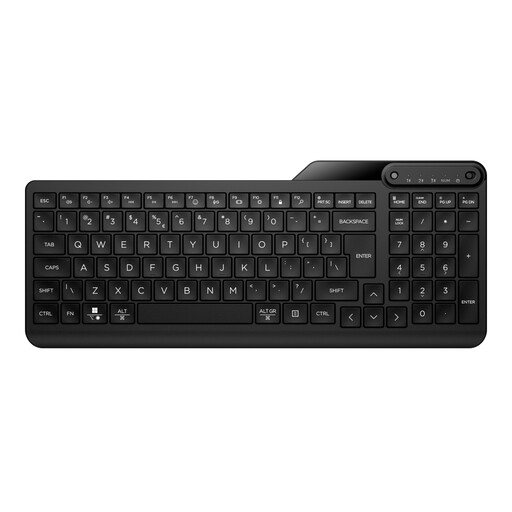 Image unavailable
HP 460 Multi-Device BT Keyboard
For quiz work that moves between devices, check how its Bluetooth pairing fits the computer and other devices you use. Confirm the key arrangement if you rely on familiar UK symbol positions, and assess its typing sound for your shared desk.
View on Joybuy
 Image unavailable
MACHENIKE KG87 80% Mechanical Tri-Mode Keyboard, US QWERTY, Gasket Mount, Latte Switch-Pink
The stated US QWERTY layout is an important trade-off if you prepare quizzes using familiar UK symbol positions. If you want this 80% mechanical design for a shared desk, check the exact switch sound rather than treating the switch name or construction as a guarantee of quiet typing.
View on Joybuy
Common questions
Do I need a UK keyboard layout for vocabulary quizzes?
Choose an English UK (QWERTY) or UK ISO variant if familiar UK symbol positions matter to your typing. Check the exact variant: Dell lists both UK-QWERTY and US International KM555 products, so a shared model-family name is not enough.
Is a compact keyboard always better for a shared desk?
No. A compact keyboard can leave room for notes and a mouse, but it must still provide the keys you use regularly. The Health and Safety Executive also advises leaving space in front of the keyboard to rest your hands and wrists when not typing.
Does UK display-screen equipment guidance apply to daily quiz preparation at work?
It can: the Health and Safety Executive says employers must assess workstations for employees who use display-screen equipment daily as part of normal work, continuously for an hour or more. That assessment covers the wider workstation, not just the keyboard; occasional personal use is a different situation.
What should I do with an old keyboard when buying a replacement?
Check how the retailer handles take-back of the old electrical item. GOV.UK describes an in-store requirement for retailers to offer take-back of waste of the same type as an item a customer buys; confirm the arrangement available for your purchase before bringing in the keyboard.


