For frequent entry of booking dates, attendee numbers and reference codes, start with a quiet full-size keyboard with a dedicated number pad, then check the exact UK layout. A compact board makes more sense when desk space or shortcuts matter more than dedicated numeric keys; for either choice, check the selected switch and connection options rather than assuming every variant sounds alike.
Who this suits
Frequent booking-data entrants
If you repeatedly enter dates, attendee numbers or booking references, a dedicated number pad and a familiar UK layout may matter more than a narrow keyboard. Logitech specifies an integrated number pad on MX Keys for Business.
Quiet-study typists
If you type near people who need minimal distraction, pay attention to the exact switch variant and any quiet-key or sound-damping description. A mechanical model offered with a quiet switch may also be sold with a different switch.
Small-desk, multi-device organisers
If bookings move between devices or your desk has limited room, device switching and a compact footprint are useful checks. Keychron’s K1 Version 6 has an 80% layout, which omits the integrated number pad.
What matters when choosing
For a quiet study, check the selected keys or switches first. Then weigh the space taken by a dedicated number pad against how often you enter numbers, and confirm that the keyboard connects to the devices you use.
| Concern |
What to check |
Who this matters to |
| Typing noise |
Check quiet-key, sound-damping or switch descriptions for the exact variant; do not treat “mechanical” or “low-profile” as a sound rating. |
If I enter bookings beside someone reading, I want the keys to cause as little distraction as possible. Around 31% of consumers put quiet typing first. |
| Numeric entry |
Confirm whether the selected layout has a dedicated number pad, especially if it is compact or tenkeyless. |
When I repeatedly enter attendee counts and reference numbers, reaching dedicated number keys matters more to me than saving desk width. Roughly 31% of consumers prioritise numeric entry. |
| Devices and shortcuts |
Check the available connections and whether switching or key remapping works with your devices and operating system. |
If I check bookings on more than one device, I want to move between them without disrupting the task. About 23% of consumers make device switching or repeatable shortcuts their primary concern. |
| Desk space |
Measure the usable space for both keyboard and mouse, and decide which dedicated keys you can do without. |
On a crowded study desk, I would rather leave room for booking paperwork than keep a wider keyboard. Around 15% of consumers put desk footprint first. |
Buying pitfalls
-
Assuming full-size means UK layout
A keyboard can have a number pad yet use different printed symbols or key shapes from the UK layout you expect. That can be awkward when entering booking details containing £, @ or quotation marks.
Check the exact variant label and key photographs for English UK, UK QWERTY or UK-ISO rather than relying on the keyboard’s size.
-
Choosing compact keys before considering the number pad
A tenkeyless keyboard leaves more desk space but removes the integrated numeric area that may be useful for repeated booking entry.
Think through the fields you enter most often. If numbers dominate, consider a full-size layout or check whether a separate compatible number pad would suit your desk.
Using a separate number pad also means finding space for another device.
-
Assuming every mechanical variant is quiet
Switch options can change the typing sound within one product family. Logitech offers MX Mechanical with a Tactile Quiet option as well as other switch variants; Keychron’s silent switches are intended for specified compatible hot-swappable boards.
Check the switch named on the exact listing, and avoid selecting a clicky option if low distraction is a priority.
-
Judging wireless runtime by one headline figure
Backlighting and usage conditions can affect how long a wireless keyboard runs between charges or battery changes.
Check the runtime conditions for the selected model, its power source and whether you can keep working while it charges.
Brands to consider
These brands offer model lines with features relevant to quiet typing, booking entry or work across devices; the exact layout and switch still need checking by model.
Logitech
Wireless productivity keyboards include full-size MX Keys models and MX Mechanical variants.
- Logitech specifies quiet keys, an English UK layout, an integrated number pad and switching for up to three computers on MX Keys for Business.
- MX Mechanical’s switch variants differ; programmable functions also depend on supported devices and software.
Keychron
The K1 Version 6 offers a UK-ISO option for buyers considering a low-profile mechanical keyboard and key remapping.
- Keychron describes an 80% layout, acoustic foam, wired and Bluetooth use, and QMK remapping for K1 Version 6.
- The 80% layout has no integrated number pad. Check model and variant compatibility before planning to fit silent switches.
CHERRY
Its keyboard range includes mechanical options for buyers considering different connection methods.
- CHERRY specifies Bluetooth, 2.4 GHz radio and USB connections for the KW X ULP.
- The KW X ULP’s mechanical design alone does not establish that its typing sound will suit a quiet study.
Joybuy keyboard choices
These keyboards offer different ways to approach booking work: full-size wireless options, a narrower UK-layout option and a multi-device model. Check the selected layout and typing sound against your study before choosing.
 No image available
Targus EcoSmart™ Full Size Wireless Keyboard (UK)
For regular booking entry in a quiet study, its described quiet keys and numeric pad are worth considering. Check the printed layout of the selected UK-designated variant.
View on Joybuy
 No image available
ASUS ROG Strix Scope II 96 Wireless Gaming Keyboard, Black, UK Layout
Its 96% layout may suit booking entry where desk width is limited and a number pad is still wanted. Check the exact switch option before using it in a quiet study: the listed options include a clicky switch.
View on Joybuy
 No image available
Hyper® HyperSpace Next Bluetooth Wireless Keyboard (UK), White
Consider this for booking work across devices if its described numeric keypad meets your needs. Check the selected variant’s printed UK layout and typing sound for a quiet study.
View on Joybuy
 No image available
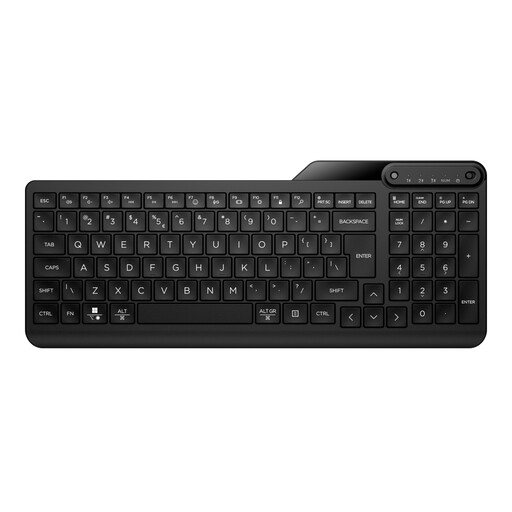
HP 460 Multi-Device BT Keyboard
If you move between devices while typing near others, its described quiet keys and device switching are relevant. Confirm the printed UK layout and whether the selected keyboard has a number pad if you enter many booking numbers.
View on Joybuy
Common questions
Is a number pad worth having for workshop bookings?
A dedicated number pad is useful if you repeatedly enter attendee counts, dates or reference numbers. A full-size keyboard keeps those keys available, while an 80% tenkeyless model such as Keychron K1 Version 6 gives up the integrated pad to save desk space.
How do I choose a keyboard that will not distract others in a quiet study?
Check the quiet-key or switch description for the exact version and avoid a clicky switch if noise is a concern. Logitech’s Tactile Quiet MX Mechanical option and Keychron’s description of acoustic foam on K1 Version 6 provide starting points, not a like-for-like sound measurement.
Which connection should I choose for booking work across devices?
Choose a connection method that works with every device you actually use. If you regularly move between computers or a tablet, check how device switching works; if you use one fixed computer, check its available USB ports or Bluetooth support before deciding.
Do I need to check the UK keyboard layout separately?
Yes: check the exact selected variant’s label and key photographs, even if the product family is sold in the UK. Printed symbols and key shapes can differ between UK and US layouts, which matters when you regularly type £, @ or quotation marks into booking records.


