What matters when choosing?
Check the switch variant first for a quiet study, then decide how much direct access you need to punctuation and editing keys. Device switching and future switch changes matter most if they are part of your writing routine.
| Concern |
What to check |
Who this matters to |
| Typing sound |
Confirm the installed switch variant and avoid a clicky option if low noise is essential. A quiet-sounding product label is not a comparable sound measurement. |
If I edit near others, I want to avoid keys that interrupt the room while keeping a feel I can write with. Around 50% of consumers put typing sound first. |
| Layout and desk fit |
Check the physical UK-ISO layout and access to arrows and navigation keys. Assess keyboard position as part of the whole workstation. |
When I revise long passages, familiar punctuation and readily available editing keys help me keep working without adapting to a new key map. Around 30% of consumers make layout and desk fit their primary concern. |
| Device and switch flexibility |
Confirm connection modes, supported devices and whether the exact configuration is hot-swappable. |
If I move between drafting devices or may change switch feel later, I want those options on the keyboard I actually order. For around 20% of consumers, that flexibility comes first. |
Brands to consider
These brands illustrate different approaches to switch choice, layout and portability; the relevant features depend on the particular model and variant.
Logitech
Its MX Mechanical Mini is a compact, low-profile option for writers who value a stated switch choice and multi-device switching.
- Logitech specifies Tactile Quiet, Clicky and Linear variants and switching between up to three devices.
- The Mini has no dedicated number pad. “Tactile Quiet” names a variant, not a measured comparison with other keyboards.
Keychron
Its K8 Pro ISO collection suits writers considering a UK-ISO, tenkeyless layout and later switch changes.
- Keychron specifies an 80% tenkeyless ISO layout, a UK-ISO option, Bluetooth for up to three devices and hot-swappable switches.
- Check the selected configuration and compatible switches; hot-swap support does not establish quiet typing.
NuPhy
Its office range includes low-profile wireless designs for writers who prioritise a portable format.
- NuPhy describes low-profile and normal-profile office models with wireless use and Mac and Windows compatibility.
- Its cited office collection shows ANSI layout filtering. Confirm the physical layout of any specific model before choosing it for UK typing, and treat quiet-typing descriptions as brand claims.
Mechanical keyboards on Joybuy
These mechanical keyboards offer different combinations of switch options, layouts and connections for a writing desk. Check the exact switch and physical key arrangement against your quiet-study and UK-typing needs.
 No image available
Ticktype DP104 Gecha Gray, Silent Tactile, US layout
Consider this desk-sized option if you want a named Silent Tactile switch variant and a number pad; check whether its sound suits your study.
- Full-size, 108-key layout with hot-swappable switches and tri-mode connectivity.
- The stated US layout may differ from familiar UK key positions.
View on Joybuy
 No image available
MACHENIKE KG87 80%, Latte Switch-Pink, US layout
This 80% model is worth considering if you want a smaller keyboard for desk editing and can work with its stated US layout.
- Tri-mode keyboard with a gasket mount and Latte Switch-Pink variant.
- Check the switch sound and physical key positions before choosing it for a quiet UK study.
View on Joybuy
 No image available
AULA F99 Light Blue, Reaper Switch, US layout
Consider the F99 if you want wireless connection options and a compact arrangement that retains a number pad, provided its key positions work for you.
- Tri-mode wired, Bluetooth and 2.4G connections are stated in the product name.
- Confirm the supplied switch before ordering: the product information uses different switch names. Check its sound and stated US layout for your study.
View on Joybuy
 No image available
HyperX Alloy Rise 75 Wireless Keyboard UK
Consider this wireless model if a 75% keyboard appeals to you, but inspect the actual key arrangement before relying on it for UK-layout editing.
- Confirm whether this exact variant has a UK-ISO physical layout and suitable key legends.
- Check its switch sound for quiet-study use rather than assuming a switch type establishes quietness.
View on Joybuy
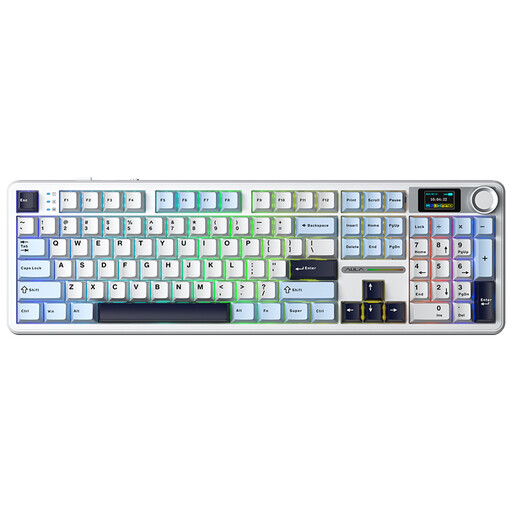 No image available
AULA F108 Pro Light Blue, Reaper Linear
This model offers connection and switch-changing options if you want flexibility at a writing desk; assess the exact layout and sound before choosing it for memoir editing.
- Tri-mode Bluetooth, 2.4G and USB-C connections, hot-swappable support and pre-lubed Reaper Linear switches are stated in the product name.
- Check the physical key arrangement and legends if familiar UK positions are important.
View on Joybuy
Frequently asked questions
Are clicky switches suitable for a quiet study?
Avoid a clicky variant if keeping typing noise down is your priority. Logitech offers Clicky separately from Tactile Quiet and Linear on MX Mechanical Mini, so check the precise version rather than relying on the model name.
Do I need a UK-ISO keyboard to edit a memoir?
Choose UK ISO if you rely on familiar UK key positions and symbols; it is a usability preference, not a legal requirement. Logitech describes ISO as standard across the UK and Europe, with a tall Enter key, shorter left Shift and an additional key. Confirm the selected keyboard’s physical layout and legends.
What matters for long editing sessions at a desk?
Assess the keyboard as part of your whole workstation. The Health and Safety Executive advises placing the keyboard centrally and just below elbow height, with the screen positioned to avoid twisting; also check whether your regular editing keys are directly accessible.
Can I cancel an online keyboard order in the UK?
For most UK distance sales, GOV.UK says customers can cancel without giving a reason up to 14 days after delivery. Check the seller’s cancellation instructions and any applicable exceptions; remedies for faulty, damaged or misdescribed goods are a separate question from changing your mind.
What should I do with an old keyboard?
Use an appropriate electrical-recycling route rather than general household waste. GOV.UK describes UK waste electrical and electronic equipment rules as intended to support recovery, reuse and recycling.


