Quiet-study family historian
If you work near other people or find repeated clicks distracting, check exactly which buttons a quiet-click claim covers. Wheel noise deserves a separate look when you regularly scroll through records.


For family-history research in a quiet study, start with a mouse whose quiet-click claim covers the buttons you use most, then choose a shape and connection that suit your hand and computer. A wired mouse can keep a fixed-desk setup simple; wireless models offer a cable-free desk but need a compatible receiver port or Bluetooth connection. If you spend long periods moving through records, check the wheel separately: quiet clicks do not necessarily mean quiet or versatile scrolling.
If you work near other people or find repeated clicks distracting, check exactly which buttons a quiet-click claim covers. Wheel noise deserves a separate look when you regularly scroll through records.
If you move between detailed family-tree entries, scanned registers and lengthy archive pages, a wheel offering both controlled and faster scrolling may be useful.
For extended sessions at one computer, consider hand size, handedness and where a cable or wireless receiver would fit on your desk.
Start with the sound you want to reduce, then consider how you navigate records and whether the mouse will fit your hand and computer. Treat the percentages below as approximate shares of consumers placing each need first, not as a measure of how often a feature matters to everyone.
| Concern | What to check | Who this matters to |
|---|---|---|
| Click noise | Check which buttons the quiet claim covers. If wheel sound matters, look for a separate statement about scrolling. | I open records repeatedly in a quiet room and want the main clicks to be less distracting. Around 42% of consumers put reducing click disturbance first. |
| Long-page navigation | Look for controllable line-by-line scrolling and, if useful, a faster mode for lengthy pages. | When I move through long indexes but still need to inspect individual entries, wheel control takes priority. For roughly 33% of consumers, navigation is the primary need. |
| Fit and connection | Check hand-size and handedness guidance, available ports, connection type and operating-system compatibility. | I expect long sessions at my desk and need a mouse that fits my hand and connects to my computer. About 25% of consumers place fit and compatibility first. |
A button-noise claim may say nothing about the wheel, which you may use frequently on digitised record pages.
Read the exact claim for the model. If wheel sound is important, look for an explicit quiet-scrolling description; Logitech describes quiet wheel and gliding behaviour for its M110 Silent.
A receiver-based mouse and a Bluetooth mouse have different device requirements. HP describes its 280 Silent as using a 2.4 GHz receiver, while Logitech lists Bluetooth Low Energy and Logi Bolt receiver options for the Signature M550.
Check your computer’s ports, Bluetooth capability and the exact model’s operating-system requirements before ordering.
If your computer has only USB-C ports, using a USB-A receiver may require an adapter.
A feature list cannot tell you whether a particular shape suits your hand. Logitech offers separate M550 hand-size variants and describes the wired M110 Silent as ambidextrous.
Use the stated size guidance, and consider an ambidextrous shape for left-handed or shared-desk use.
Extra navigation and customisation features matter most when your records, surfaces or workflow call for them. Logitech’s stated glass-tracking condition for the MX Master 3S, for example, specifies glass at least 4 mm thick.
Decide whether faster scrolling or software-adjustable controls would help with your usual archive work before prioritising them over a simpler setup.
Its documented options span the wired M110 Silent, size-specific Signature M550 wireless variants and the more feature-rich MX Master 3S.
The HP 280 Silent Wireless Mouse is a receiver-based option with a thumb rest for a conventional study setup.
The Lenovo Go Wireless Multi-Device Mouse is relevant if you move between a study computer and other devices.
These wired and wireless mice offer different starting points for a family-history study desk. Compare each model’s stated click behaviour with its wheel, fit and connection requirements; a mouse suited to the desk setup is not automatically quiet in every action.
 No image available
Consider this model if navigating lengthy records makes wheel control a priority alongside quieter clicks. Logitech describes MagSpeed scrolling and Quiet Clicks for the MX Master 3S; check that its connection and any software-based controls suit your computer.
 No image available
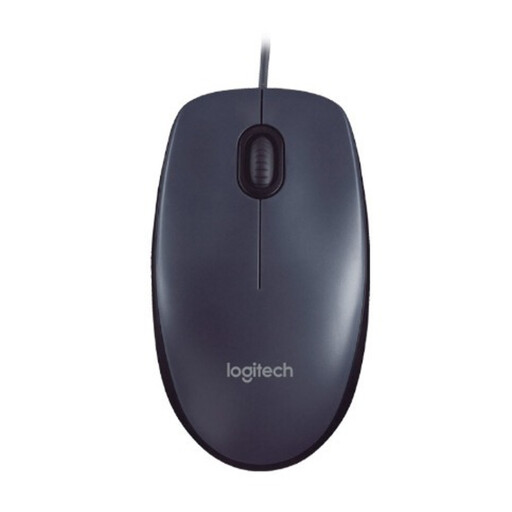
A wired option to consider for one fixed study computer. Check its exact button- and wheel-noise claims if reduced disturbance is essential, and make sure the cable connection suits your available ports.
 No image available
For a cable-free desk, this model’s title specifies silent clicks, a 2.4 GHz USB receiver and a 1600 DPI optical sensor. Check that you have a suitable receiver port, and assess wheel sound separately if scrolling noise would disturb your study.
 No image available
Consider this model if you want to assess both receiver and Bluetooth connection options for your study devices. Its title lists adjustable DPI settings and a 1xAA battery; check the intended connection and wheel sound before relying on it for quiet record navigation.
 No image available
Its title lists five adjustable DPI settings, which may be worth considering if you want cursor-speed choices while working through records. Check that its USB connection suits your computer, and confirm which clicks and wheel actions meet your quiet-study needs.
Not necessarily: check which controls the claim names. HP’s stated noise reduction for the 280 Silent concerns its left and right buttons, whereas Logitech also describes quiet wheel and gliding behaviour for the M110 Silent. Neither description means every sound from the mouse disappears.
Choose by the connection your computer supports and how often you move the mouse. Wired USB can suit one fixed desk; Bluetooth needs a compatible device, while a receiver needs a suitable free port. Check the exact mouse model’s operating-system requirements too.
A controllable wheel is worth prioritising if you alternate between scanning pages and reading individual entries. Logitech describes line-by-line and faster scrolling for the Signature M550’s SmartWheel, while the MX Master 3S offers MagSpeed scrolling; assess those controls alongside fit, connection and quiet-operation claims rather than choosing by DPI alone.
Look for an appropriate reuse or electrical-equipment recycling route. GOV.UK explains that UK waste electrical and electronic equipment rules aim to reduce such waste sent to landfill or incineration; check local collection options and any take-back arrangements offered by the retailer.