For photo-gallery work at a shared desk, start with quiet primary clicks, then choose the shape, scrolling controls and connections that suit your workflow. A full-size productivity mouse is worth considering for frequent gallery navigation, a compact multi-device mouse for moving between desks, and a vertical mouse if its grip fits your hand; none of those shapes settles every need on its own.
Who this choice affects
Quiet shared-desk workers
If someone works or studies beside you, repeated button clicks may matter as much as pointer control. Logitech, HP and Lenovo describe quiet-click options, but their claims apply to particular models rather than every mouse in their ranges.
Photo-gallery organisers
Repeatedly selecting photos and moving through a large gallery makes predictable pointer movement, scrolling and accessible controls worth checking. Consider whether any configurable buttons work with the software you use.
Hot-desk and multi-device users
If you alternate between a work computer, laptop or tablet, check how the exact mouse switches devices. Confirm the supported operating systems, connection methods and package contents before relying on a receiver.
What to check before buying
Decide whether desk noise or gallery control is your first constraint, then check hand fit and connections against the equipment you actually use.
| Concern |
What to check |
Who this matters to |
| Click noise |
Confirm quiet primary clicks on the exact model; check the wheel separately if scrolling noise matters. |
If I share a desk, I want repeated selections to disturb the person beside me as little as possible. Roughly 33% of consumers put quieter primary clicks first. |
| Gallery control |
Check adjustable pointer sensitivity, wheel behaviour and whether any button shortcuts work with your software. |
When I sort many images, I need to move between careful selections and longer stretches of scrolling without losing control. Around 27% of consumers make navigation their primary concern. |
| Hand and desk fit |
Check hand-size and handedness guidance, grip shape and space to position the mouse comfortably. |
During a long session, I care most about a grip that fits and room to use it without reaching awkwardly. About 20% of consumers put comfort first. |
| Device switching |
Confirm supported devices, Bluetooth or receiver requirements, available ports and what comes in the box. |
If I move between a computer and a tablet or change desks, I want the same mouse to connect to each device I use. Roughly 20% of consumers prioritise that flexibility. |
Buying pitfalls
-
Treating “silent” as a cross-brand measurement
A quiet-click claim may cover the main buttons but not the wheel, and figures from different manufacturers need not use comparable tests.
Read the exact model’s claim and test conditions. If noise is decisive, check the retailer’s applicable return terms before ordering.
-
Assuming every connection accessory is included
Logitech says the Logi Bolt receiver compatible with MX Anywhere 3S is not included. A receiver-based connection also needs a suitable port.
List your devices, operating systems and available ports, then check the connection options and box contents for the exact mouse.
A separate receiver or adapter may be needed if your devices cannot use the supplied connection method.
-
Choosing a vertical shape without checking fit
Logitech positions Lift for small-to-medium hands and offers left- and right-handed versions. An upright grip is a personal preference, not a substitute for arranging the whole workstation comfortably.
Check sizing and handedness, and try the grip where possible. The Health and Safety Executive advises positioning the mouse in line with the elbow.
-
Assuming glass tracking works on every glass desk
Logitech’s glass-tracking specification for MX Master 3S has a minimum glass-thickness condition of 4 mm.
Check the desktop material and thickness before relying on that feature; if you are unsure, plan to use a mouse mat.
Brands to consider
Logitech
Its relevant lines range from compact multi-device mice to full-size productivity and vertical models.
- Logitech specifies three-device switching for Pebble Mouse 2 M350s and offers quiet-click options on selected models.
- Body size, receiver inclusion and glass-tracking conditions differ by model; check the exact variant.
HP
The HP 710 is a compact, rechargeable option for consumers considering quiet clicks and device switching.
- HP specifies silent clicks, configurable buttons and connections for up to three saved devices on the 710.
- Confirm that the 710’s connection methods and controls suit your devices and gallery software.
Lenovo
The Lenovo 700 is a full-size ambidextrous option with silent buttons and multiple connection methods.
- Lenovo specifies Bluetooth and a 2.4 GHz receiver for switching among up to three devices on the 700.
- Check whether its full-size shape suits your hand and the space available at the shared desk.
Razer
Pro Click V2 is a sculpted wireless option for consumers interested in configurable controls and device switching.
- Razer specifies multi-device connectivity and tactile and free-spin scrolling for Pro Click V2.
- Check its primary-click noise before choosing it for a noise-sensitive desk; Razer does not describe this model as quiet-click.
Joybuy mice for different needs
These mice cover quiet-click, gallery-navigation, vertical-grip and wired setups. Check the stated limits of each option against your shared desk rather than assuming every mouse offers all four.
 No image available
Logitech MX Master 3S Mouse, Black
Consider this sculpted mouse if quiet clicks and scrolling controls matter during longer gallery sessions; check that its shape fits your hand and desk.
If you plan to use a Logi Bolt receiver, confirm whether one comes with this package.
View on Joybuy
 No image available
HOFOTEK M311 2.4G+BT Silent Mouse, White-Grey
Consider this compact mouse if quiet clicks and moving between desks matter to you; check its scrolling behaviour if you navigate long galleries.
The product name specifies 2.4G+BT connections and one AA battery.
View on Joybuy
 No image available
RAPOO Mice-MT760L-LG
Consider this mouse if horizontal gallery navigation is important. Check its primary-click noise before using it at a noise-sensitive shared desk.
Cross-computer cursor control requires driver installation and computers on the same Wi-Fi or Ethernet network.
View on Joybuy
 No image available
HP 920 Ergonomic Wireless Mouse, Black, with Detachable Wrist Rest
Consider this vertical-grip mouse if that hand position suits you during longer sessions; try the grip if possible and check primary-click noise for a shared desk.
The product name specifies a detachable wrist rest.
View on Joybuy
 No image available
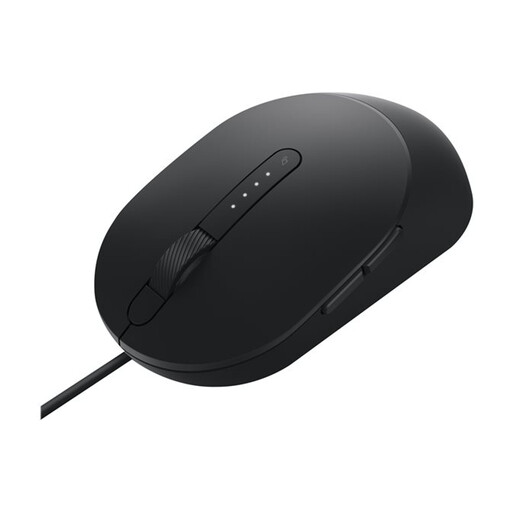
Dell MS3220 Laser Mouse
Consider this wired mouse if its navigation controls suit your gallery work and the desk has a suitable USB connection; check primary-click noise if quiet operation is essential.
Its listed cable length is 1.8 m, so check the distance to your computer and the cable’s route across the desk.
View on Joybuy
Common questions
Should I prioritise quiet clicks or a quiet scroll wheel?
Start with quiet primary clicks if repeated photo selection is your main source of desk noise. If you spend much of the session scrolling through galleries, check the wheel separately: a silent-click description does not necessarily cover scrolling.
Do I need high DPI to organise a photo gallery?
No particular DPI figure guarantees easier gallery work. Adjustable pointer sensitivity lets you tune movement to your screen and preference; also check whether the wheel and controls suit the way you select and browse photos.
Can one mouse work with my laptop, desktop and tablet?
It can if the exact model supports each device’s operating system and connection method. Logitech specifies switching among three devices for Pebble Mouse 2 M350s, while HP and Lenovo describe multi-device options on selected models; check Bluetooth support, ports and receiver contents for your own setup.
Is a vertical mouse worth choosing for a long gallery session?
A vertical mouse is worth considering if its upright grip, size and handedness suit you, but the shape alone cannot settle workstation comfort. The Health and Safety Executive advises looking at the whole workstation and keeping the mouse in line with the elbow.


