Shared-room transcript editors
If you edit near a flatmate or study late, repeated clicking may matter as much as ordinary pointer control. Look at quiet-click models, then check whether their connection works with your laptop.


Choose a mouse with quieter clicks if repeated editing in a shared room is your main concern, but check its connection type before buying. For longer desk sessions, give hand fit and your workstation more weight; if moving through lengthy transcripts slows you down, look more closely at scrolling controls. No shape suits every hand, and a quiet-click description does not tell you how the mouse will feel at your desk.
If you edit near a flatmate or study late, repeated clicking may matter as much as ordinary pointer control. Look at quiet-click models, then check whether their connection works with your laptop.
If you spend extended periods selecting and correcting text, hand fit and mouse position deserve attention alongside the mouse itself. The Health and Safety Executive advises keeping the mouse in line with your elbow and taking short, frequent breaks.
If you carry your laptop between rooms, consider the mouse’s size, connection and scrolling controls. Check compatibility with each device you intend to use rather than assuming that a wireless mouse will switch between them.
Start with the constraint that most affects your editing: disturbance from clicking, comfort during sustained desk work or movement through long documents.
| Concern | What to check | Who this matters to |
|---|---|---|
| Click noise | Check the exact model’s quiet-click description and whether it connects by Bluetooth, a USB receiver or a cable. | If repeated clicks might disturb someone nearby, I want quieter buttons without complicating my laptop setup. Roughly 42% of consumers put quieter clicking first. |
| Comfort at a desk | Check hand size, handedness and grip shape; leave room to position the mouse in line with your elbow. | During long corrections at my desk, I need a shape that fits my hand rather than one chosen only for portability. Around 33% of consumers prioritise sustained hand comfort. |
| Navigation and portability | Check scrolling modes and size; confirm device compatibility if you plan to switch between computers. | When I move between study spaces and lengthy documents, I want manageable scrolling and a mouse I can carry with my laptop. About 25% of consumers make navigation and portability their main concern. |
A receiver-only mouse uses a USB port, which may be awkward on a laptop with few available ports. Quiet-click models do not all connect in the same way.
Check the exact variant and your laptop’s ports. Logitech describes the M240 Silent as a Bluetooth mouse, while the Signature M650 can connect by Bluetooth Low Energy or a Logi Bolt receiver.
A contoured or vertical body can put buttons out of easy reach if its size or handedness does not suit you.
Use the maker’s fit guidance: Logitech positions Lift for small to medium hands and offers a left-handed option, while Signature M650 has separate size and left-handed variants.
Mouse shape alone cannot address a poorly positioned screen, an awkward reach or uninterrupted editing. The NHS identifies repeated use as a factor associated with repetitive strain injury.
For sustained laptop work, follow Health and Safety Executive guidance on a separate keyboard and mouse, an elevated screen where practical, mouse position and short, frequent breaks.
A mouse with electrical parts or a battery needs an appropriate disposal route. Oxfordshire County Council classifies such equipment as waste electrical and electronic equipment.
Check your local council’s electrical recycling instructions and its arrangements for removable batteries.
Its relevant mice span compact Bluetooth, hand-size-specific, vertical and scrolling-focused designs.
The HP 920 is a vertical, right-handed option for desk-based editing.
STREAM MOUSE COMFORT is a quiet-button office mouse aimed at right-handed users.
Nito Silent Wireless Mouse is a straightforward quiet-button option.
Precision Mouse provides a reference point for editing controls across multiple computers.
These mice cover different starting points for student-room transcript editing, from listed quiet-click wired and wireless options to a vertical desk mouse. Check the exact model’s fit, connection and click noise against the need that matters most to you.
 No image available
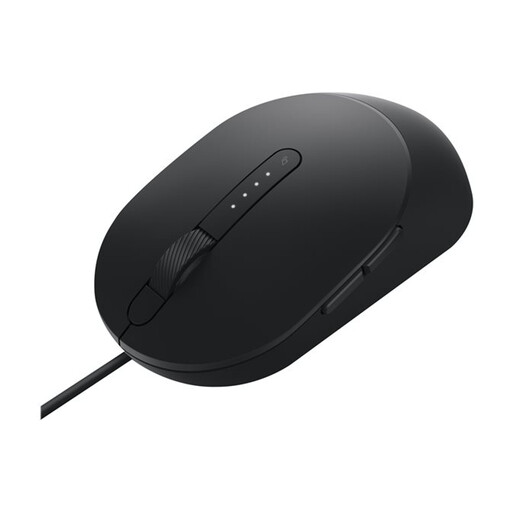
Consider this for desk editing if a cable suits your setup and the listed silent-click buttons are important in a shared room. Its name specifies a USB connection, four buttons and adjustable 1000/1200/1600 DPI, with Windows and Mac compatibility stated. Confirm that you have a suitable port and that the mouse fits your hand; the quiet-click description is not a measured noise comparison.
 No image available
This is an option to check if you want listed quiet clicks and a choice of wireless connection for laptop editing. The product name states 2.4G+BT connectivity, adjustable multi-level DPI and one AA battery. Check how each connection works with your devices and whether its scrolling and hand fit suit longer transcripts.
 No image available
Consider this model for pointing and text selection only after checking that its connection, buttons and hand fit suit your editing setup. If disturbing someone nearby is your main concern, confirm its click noise before choosing it.
 No image available
The HP 920 is worth considering for a right-handed desk editor who wants a vertical shape and customisable controls. HP specifies a detachable wrist rest, five programmable buttons and Bluetooth or HP Unifying Dongle connectivity. Check the fit and whether its controls work with your editing software; confirm click noise separately if the room is shared.
 No image available
Consider this for basic laptop editing if its listed silent clicks address your shared-room concern and you can use a USB receiver. The product name specifies a 2.4 GHz wireless connection and 1600 DPI, with Windows and Mac compatibility stated. Check your available port, hand fit and scrolling requirements before buying.
Do not rely on a vertical mouse to prevent repetitive strain injury (RSI). The NHS associates RSI with repeated use of a body part; assess hand fit and your workstation together, and seek clinical advice if symptoms persist or worsen.
For prolonged laptop work, use a separate keyboard and mouse so you can elevate the screen where practical. The Health and Safety Executive also advises positioning the mouse in line with your elbow; a different mouse alone will not correct an awkward reach.
Yes: the Health and Safety Executive recommends short, frequent breaks rather than saving them up for less frequent, longer breaks. Change activity when you can instead of treating a different mouse as a substitute for breaks.
Check your local council’s electrical recycling instructions rather than putting the mouse straight in ordinary rubbish. Oxfordshire County Council classifies equipment with electrical parts or a battery as waste electrical and electronic equipment; follow local instructions for any removable battery too.