Choose a vertical mouse that fits your hand and keeps the clicks and scrolling you use most unobtrusive; then consider the navigation controls you need for moving between records. For longer sessions, keep the mouse within easy reach so you can use it with a straight wrist, as the Health and Safety Executive advises. A vertical shape alone is not a substitute for a workable desk setup.
Who is this for?
Quiet-study researchers
If you repeatedly open records and scroll through family trees near other people, look for model-specific claims about both click and scroll-wheel noise. Logitech makes both claims for Lift; TECKNET describes its researched vertical model as quiet.
Long-session comfort seekers
If you compare records for extended periods, start with a mouse suited to your hand size and handedness. The Health and Safety Executive also advises keeping the mouse within easy reach so you can use it with a straight wrist.
Archive-navigation users
If you move frequently between record pages, trees and notes, consider whether forward and back buttons or adjustable controls fit your workflow. Check that the controls work with your computer before relying on them.
What matters when choosing?
For family-history research in a quiet study, check hand fit first, then the noise claims for the controls you use repeatedly, and finally navigation and computer compatibility.
| Concern |
What to check |
Who this matters to |
| Hand fit and positioning |
Check the stated hand-size range and handedness, and whether the mouse can sit within easy reach. |
If I spend long sessions comparing records, I need a shape that suits my hand without making me stretch my arm. Around 46% of consumers put fit and positioning first. |
| Clicking and scrolling noise |
Look for separate quiet-click and quiet-scroll claims; one does not establish the other. |
Repeated clicks and scrolling matter more when I research beside someone else in a quiet room. Roughly 27% of consumers prioritise unobtrusive operation. |
| Navigation and compatibility |
Confirm forward and back controls, connection type, and support for your operating system. |
When I move between archive pages and notes, I want the controls I use often to work on my computer. About 27% of consumers put navigation and compatibility first. |
Buying pitfalls
-
Treating a vertical mouse as a complete workstation fix
A suitable grip may still leave you reaching awkwardly if the mouse sits too far away. The Health and Safety Executive advises positioning it within easy reach for use with a straight wrist.
Check your mouse position alongside your chair, desk, keyboard and screen placement.
-
Choosing by vertical angle without checking fit
Logitech positions Lift for small to medium hands and offers a left-handed option; Kensington positions its Pro Fit Ergo Vertical model for average to larger hands. An angle alone does not tell you which size or handedness will suit you.
Use the maker's fit guidance as a starting point, and confirm the exact handed version before ordering.
-
Assuming every vertical mouse is quiet
Quiet-operation claims differ by model. Logitech specifies quiet clicks and a quiet scroll wheel for Lift, while TECKNET describes its researched vertical mouse as quiet.
For a quiet study, check the claims for both clicking and scrolling on the particular model you are considering.
-
Overlooking connections and side-button support
A receiver connection needs a suitable USB port. TECKNET states that the side buttons on its researched vertical model are not compatible with macOS.
Match the connection and controls to your computer, and check the power requirements before ordering.
The researched TECKNET model requires two AAA batteries, which are not included.
Brands to consider for these needs
Logitech
Its Lift and MX Vertical models address different priorities within this purchase: hand fit and quiet operation on Lift, and adjustable controls on MX Vertical.
- Logitech states that Lift suits small to medium hands, offers a left-handed version, and has quiet clicks and a quiet scroll wheel.
- Logitech specifies cursor-speed and button customisation for MX Vertical.
- Check quiet-operation claims and handedness for the exact model; Lift's stated features should not be assumed for every Logitech vertical mouse.
Kensington
Its Pro Fit Ergo Vertical Wireless Mouse is positioned for average to larger hands and browser-led navigation.
- The specified controls include forward, back and DPI adjustment, and the model uses a nano receiver.
- If low noise or a left-handed version is essential, confirm those requirements for the exact model before ordering.
TECKNET
Its researched vertical model is an option to examine when quiet clicking and a 2.4G receiver connection suit your study setup.
- TECKNET describes the model as quiet and specifies five DPI levels.
- It requires a USB receiver and two AAA batteries that are not included; TECKNET states that its side buttons are not compatible with macOS.
Vertical mice on Joybuy
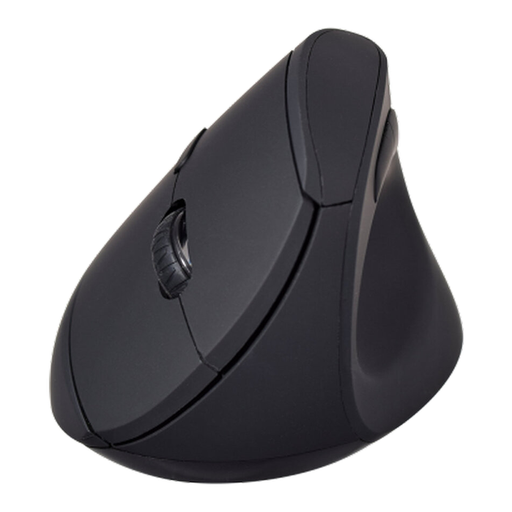
The V7 model below offers forward and back controls for moving through archive pages. If your study needs to stay quiet, check its click and scroll-wheel noise before choosing it.
 No image available
V7 MW500BT Bluetooth vertical mouse, 2.4GHz dual-mode
Forward and back buttons may suit repeated moves between archive pages; check whether the grip fits your hand and whether clicking and scrolling are quiet enough for your study.
The product name specifies a six-button design and an adjustable sensor up to 1600 DPI.
View on Joybuy
Frequently asked questions
Where should I place a vertical mouse for a long research session?
Keep it within easy reach so you can use it with a straight wrist, as the Health and Safety Executive advises. Check that you can reach it without stretching away from your usual keyboard position.
Are quiet clicks enough for a quiet study?
Check the scroll wheel as well as the main buttons if you scroll through records frequently. Logitech explicitly describes both quiet clicks and a quiet scroll wheel for Lift; do not assume the same claims apply to another model.
Will a vertical mouse's side buttons work on a Mac?
Support depends on the model and how its controls are configured. TECKNET states that the side buttons on its researched vertical model are not compatible with macOS, while Logitech specifies MX Vertical customisation through Logi Options+ on macOS; check the exact model and your operating-system version.


