
24/7 Customer Support

Free returns

Same-day & Next-day Delivery

Quality Guaranteed

Unlock Your Welcome Offers: FREE Delivery | Up to 80% OFF | Free 30-day JoyPlus trial
Download the APP
The constant click-clack of a standard mouse can be one of the most persistent distractions in a shared environment. Whether you are in an open-plan office, a quiet library or working from home while others are asleep, that sharp sound can break concentration and disrupt the peace. A quiet wireless mouse is a simple but effective solution, designed to give you the control you need without the noise.
As the Joybuy Product Recommendation Officer, my role is to help you find practical products that genuinely solve problems. This guide cuts through the clutter—both literally and figuratively—to help you choose a noiseless mouse that fits your workspace and workflow. We will look at what makes a good quiet mouse and highlight a few options that stand out for different needs.
Finding the right quiet office mouse involves more than just picking one that does not click loudly. Here are a few practical points to consider before you buy.
The term "quiet" can mean different things. Some models use dampened mechanical switches that produce a soft, low-pitched thud instead of a sharp click. Others use optical switches that register clicks with a beam of light, which can result in a much quieter, almost non-clicking mouse experience. Consider what level of silence you need. For a bustling office, a dampened click might be enough, while a silent library may call for the quietest option available.
A wireless mouse for a shared workspace needs a stable connection. Most models use a 2.4GHz USB receiver, which provides a reliable, low-latency link that is ideal for busy environments with many wireless signals. For all-day use, ergonomics are key. Look for a shape that fits your hand comfortably to avoid strain during long work sessions.
Are you mainly working on documents and spreadsheets or do you need a mouse for more demanding tasks like graphic design or gaming? A standard silent click mouse is perfect for general office productivity. However, if you require higher precision, faster response times or programmable buttons, you might consider a high-performance model that also happens to feature quieter click technology.
Here are a few recommendations that cater to different priorities, from pure silence to high performance and value.
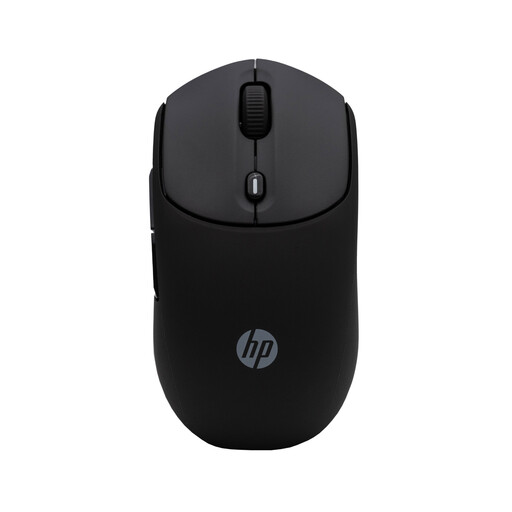
Why It Stands Out: The HP 400 is purpose-built for quiet productivity. Its main feature is the significant reduction in click noise, making it an excellent choice for those whose top priority is maintaining a peaceful environment. It does one job and does it very well.
Pros:
Who is it for? This mouse is ideal for professionals in open-plan offices, students studying in quiet zones and remote workers sharing a home space. If your goal is to eliminate distracting clicks for yourself and others, this is a straightforward and effective choice.
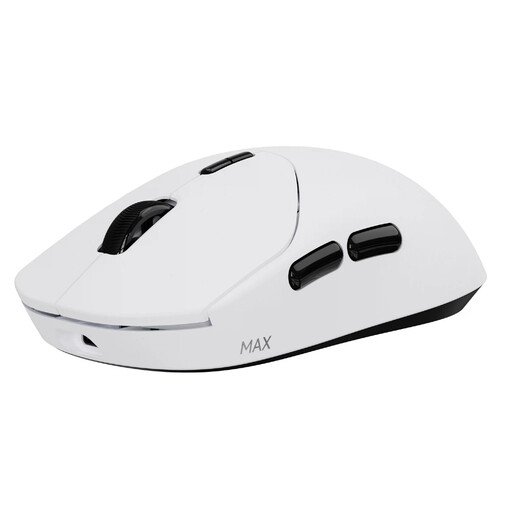
Why It Stands Out: While marketed for gaming, the RAPOO VT2 MAX features advanced 120-million optical switches. These register clicks using infrared light, which can provide a quieter and faster response than many traditional mechanical switches. It pairs this with exceptional performance and an incredibly long battery life.
Pros:
Who is it for? This is for the power user. Gamers, designers and tech enthusiasts who demand top-tier responsiveness and precision but also appreciate a quieter click will find the VT2 MAX to be a compelling option. It’s a premium tool that blends performance with a more subtle auditory profile.
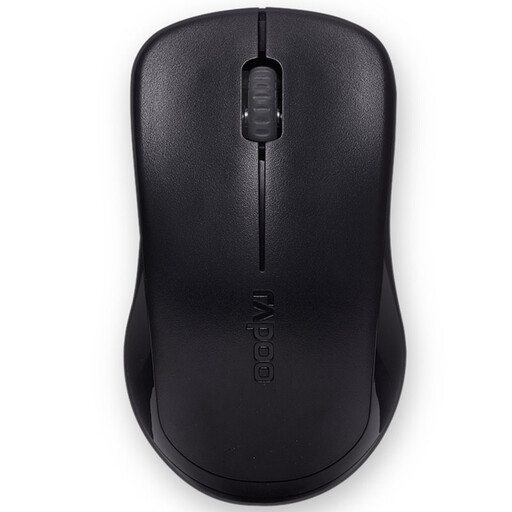
Why It Stands Out: The RAPOO 1620’s strength lies in its simplicity and value. It offers the core benefits of a wireless mouse—freedom from cables and a reliable connection—at a very accessible price point. While not specifically marketed as a silent mouse, it provides a standard click that is suitable for general use where absolute silence is not the primary requirement.
Pros:
Who is it for? This mouse is perfect for budget-conscious users, as a reliable backup for a laptop bag or for setting up a secondary workstation. It’s a no-frills workhorse for those who prioritise reliability and cost-effectiveness.
If these specific models do not quite match what you are looking for, there are many other choices available. From different ergonomic shapes to advanced features, the right mouse for you is out there.
Explore our full range of wireless optical mice to find your perfect fit.
1. How does a quiet wireless mouse work? A quiet or silent mouse typically replaces the standard mechanical micro-switch with a different mechanism. This is often a switch with a rubber or silicone dampener that absorbs the impact and sound of the click. Some high-end models use optical switches, which use a light beam to register a click, eliminating the physical contact that causes the noise.
2. Are silent mice as durable as regular mice? Yes, the durability of a silent mouse is comparable to that of a standard one. The internal components, whether dampened or optical, are designed for longevity. For instance, the optical switches in the RAPOO VT2 MAX are rated for 120 million clicks, which is often higher than the rating for many standard mechanical switches.
3. Can a non-clicking mouse be used for tasks requiring precision? Absolutely. The click mechanism is separate from the mouse's tracking sensor. A noiseless mouse for office work or even design tasks will still have a high-quality optical or laser sensor that ensures smooth and accurate cursor movement. The quietness of the click has no impact on the mouse's precision.