A wireless keyboard can remove a permanent cable to the PC, but it will not necessarily free a wall socket or a USB port: a 2.4 GHz receiver uses USB, and rechargeable models still need charging. Choose analogue input for racing only if your game and platform accept the keyboard's controller-style output. Otherwise, decide whether a compact wired or wireless layout fits your available ports, desk space and preferred key feel.
Who these choices suit
Gamers with few sockets or crowded desks
If your main aim is fewer permanent cables, distinguish the wall sockets powering your setup from the USB ports used by the keyboard. Logitech G's G515 LIGHTSPEED TKL illustrates the choice between Bluetooth, 2.4 GHz wireless and wired data.
Keyboard-only racers seeking gradual control
If you would rather steer or accelerate with key travel than an on/off press, investigate true analogue output and support in your particular game. Wooting describes analogue input for vehicle control, while its gamepad-mode guidance shows why platform settings matter.
Racers who want a smaller conventional keyboard
If digital keys already meet your racing needs, a tenkeyless (TKL) layout removes the number pad while retaining a more familiar set of controls than some smaller layouts. Check your racing bindings and other uses before giving up dedicated keys.
What to check before buying
Count wall sockets and USB ports separately before choosing a connection. Then decide whether your game calls for analogue input and which keys your desk layout can afford to lose.
| Concern |
Buying checks |
Who this matters to |
| Sockets and connections |
Count free wall sockets and USB ports; check Bluetooth support, receiver use and charging arrangements for the mode you intend to use. |
If I want fewer permanent desk cables, I need a connection that fits the ports I actually have. Around 36% of consumers put connection and socket management first. |
| Gradual racing input |
Confirm that the exact game and operating system accept the keyboard's analogue controller-output mode, including alongside a wheel or gamepad. |
When I race using keys alone, gradual steering or acceleration matters more to me than a different switch setting. Roughly 29% of consumers prioritise analogue driving control. |
| Desk space and keys |
Compare the layout with your current bindings, particularly the number pad, navigation keys and UK or US key arrangement. |
I need room on the desk but still want the keys I use for racing and other tasks. Around 21% of consumers make compact layout their primary concern. |
| Noise and resilience |
Check the chosen model's switch description and the precise scope of any water- or dust-resistance claim. |
In a shared room, I care most about typing noise and everyday spills rather than specialised racing inputs. About 14% of consumers place quietness and resilience first. |
Buying pitfalls
-
Assuming wireless means no ports or cables
A 2.4 GHz connection uses a USB receiver, while charging or wired-data use still involves a cable. Neither demand is the same as occupying another wall socket permanently.
List your available wall sockets, USB ports and Bluetooth capability separately, then choose the connection mode that fits.
-
Confusing adjustable actuation with analogue steering
An adjustable trigger point does not, by itself, mean a game receives gradual steering or acceleration. Controller-style output also depends on game and platform compatibility.
Check the exact keyboard output mode, racing game and operating system, especially if you also connect a wheel or gamepad.
-
Choosing TKL without checking the missing keys
TKL removes the dedicated number pad. That may matter if you use it for racing bindings, spreadsheets or other tasks.
Review your current key assignments before choosing a smaller layout; retain a number pad if those dedicated keys are essential.
-
Treating water resistance as waterproofing
The water- and dust-resistance description for the SteelSeries Apex 3 TKL does not mean the keyboard can be immersed or washed under running water.
Keep drinks away from the board and follow the instructions for the exact model if a spill occurs.
Brands to consider
Logitech G
A reference point for a low-profile wireless TKL keyboard with several connection modes.
- Logitech G specifies Bluetooth, LIGHTSPEED wireless and wired data for the G515 LIGHTSPEED TKL, plus receiver pairing with compatible mice.
- Check compatibility with your existing mouse and the selected variant's charging arrangement before relying on one receiver.
SteelSeries
A reference point for a compact conventional wired keyboard where noise and everyday durability matter.
- SteelSeries describes the Apex 3 TKL with quieter switches, media controls and water- and dust-resistance.
- Its wired setup retains a desk cable, and its conventional keys do not provide controller-style analogue vehicle input.
Razer
A reference point for TKL input customisation rather than an assumed substitute for analogue racing controls.
- Razer specifies 0.1–4.0 mm adjustable actuation and Rapid Trigger for the Huntsman V3 Pro Tenkeyless.
- Those settings alone do not establish controller-style analogue steering in a particular racing game.
Wooting
A reference point for keyboard-only racers investigating analogue key travel.
- Wooting explains how varying key travel can produce analogue input for vehicle control.
- Check the gamepad output mode against your game and operating system; Wooting's guidance says its XInput controller type is not supported on macOS.
Joybuy keyboard choices
These choices cover compact wireless keyboards for reducing permanent cabling, layouts that retain a number pad and a compact wired option. If gradual steering is your priority, confirm controller-style analogue output and support in your racing game before choosing any keyboard here.
 No image available
AULA F75 75% Wireless Gaming Keyboard, US layout
Consider this if you want a compact board without a permanently connected keyboard cable. The title specifies wired, Bluetooth and 2.4 GHz modes, PBT keycaps and a US layout; check receiver and charging needs, and confirm game support if analogue control matters.
View on Joybuy
 No image available
ASUS ROG Strix Scope II 96 Wireless, white, UK layout
This 96% layout is worth considering if you want wireless use while keeping a number pad. The title specifies a UK layout; check which connection mode your PC can use, its receiver and charging requirements, and whether your racing game needs analogue output.
View on Joybuy
 No image available
AULA F99 Wireless, light blue, Reaper Switch, US layout
Consider this if you want wireless connection choices but still use a number pad. The title specifies wired, Bluetooth and 2.4 GHz modes, Reaper Switch and a US layout; check the key arrangement, receiver and charging needs against your setup.
View on Joybuy
 No image available
HyperX Alloy Rise 75 Wireless, UK version
This wireless 75% board suits a setup where desk space and avoiding a permanent keyboard cable matter. Check that your PC supports your intended wireless mode and confirm its receiver, charging and racing-game input requirements.
View on Joybuy
 No image available
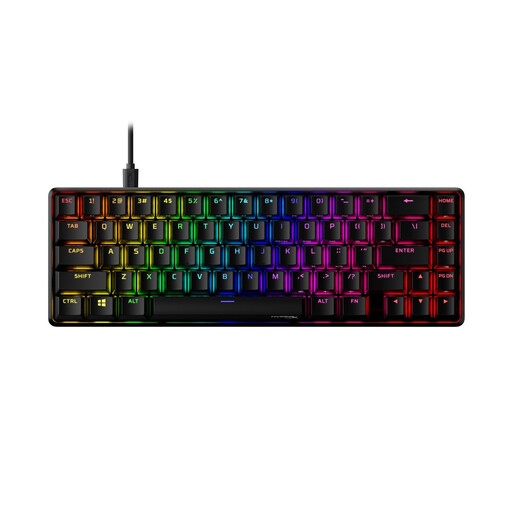
HyperX Alloy Origins 65, HX Red, US layout
Choose this compact wired option if a USB connection is available and you do not need wireless use. The title identifies HX Red switches and a US layout; review your key bindings on a 65% board and check analogue-output requirements separately.
View on Joybuy
Frequently asked questions
Will a wireless gaming keyboard free up a wall socket?
Wireless use can remove a permanent keyboard cable, but it does not guarantee that your setup needs fewer wall sockets or USB ports. For example, Logitech G offers Bluetooth, 2.4 GHz wireless and wired data on the G515 LIGHTSPEED TKL; check receiver use and charging alongside the sockets already powering your PC.
Can analogue keys give me gradual steering in a racing game?
They can provide a gradual signal if the keyboard has true analogue output and the game accepts its selected controller mode. Wooting describes analogue key travel for controlling a car, but you should check your exact game, operating system and any wheel or gamepad connected at the same time.
Is a TKL keyboard too small for racing games?
A TKL keyboard can work for racing if your controls do not require a dedicated number pad. It removes that pad to save desk space; check the exact model's layout and your existing game bindings before switching.


