Handheld-style racing players
You want a tablet that is easier to hold than an 11-inch model while playing as a passenger or when the vehicle is safely parked. A compact screen matters more to you than a larger view for films.


For passenger play, consider a compact gaming-focused Android tablet if holding comfort and a high-refresh display matter most; choose a larger tablet if racing games will share space with films and other travel entertainment. An iPad makes more sense when the games or controller setup you intend to use are already on iPadOS. Check the exact game’s compatibility, offline options and connection requirements before choosing a model.
You want a tablet that is easier to hold than an 11-inch model while playing as a passenger or when the vehicle is safely parked. A compact screen matters more to you than a larger view for films.
You want one larger tablet for racing games, video, browsing and locally stored media. Screen size and storage flexibility matter alongside gaming features.
You plan to use iPadOS games, compatible controller-supported titles or PS Remote Play. Your choice is between the viewing area of an 11-inch iPad Air and the smaller, lighter iPad mini.
Start with the racing game you intend to play, then decide how much screen you want to hold and how you will connect away from Wi-Fi. A display’s refresh rate describes the panel, not the frame rate a particular game will deliver.
| Concern | What to check | Who this matters to |
|---|---|---|
| Responsive racing play | Confirm the game runs on the tablet and check its graphics and controller options; do not equate panel refresh rate with game frame rate. | If I mainly play racing games for long stretches, I want hardware that suits handheld sessions more than a large screen. Around 36% of consumers put gaming responsiveness first. |
| Screen and local storage | Compare the screen size you can comfortably hold with the listed storage and any supported storage expansion. | I want a bigger view for racing and films, with room for media when a connection is unreliable. For around 29% of consumers, screen and storage flexibility are the primary concern. |
| Apple games and controllers | Check the specific game’s iPadOS listing and controller support; distinguish games installed on the tablet from remote play. | If my planned games and controller are part of my Apple setup, keeping that setup matters more than choosing Android gaming hardware. Around 21% of consumers prioritise that continuity. |
| Carrying size and connectivity | Compare the exact model’s size and Wi-Fi or cellular configuration, then check offline play and mobile coverage where relevant. | I need something small to pack and a workable way to play when Wi-Fi is unavailable. That is the leading need for around 14% of consumers. |
Lenovo UK lists a 165Hz display for the Legion Tab Gen 3, but a game’s settings and software support also affect its frame rate.
Check your intended racing game’s device requirements, graphics options and controller support before choosing a tablet for its display specification.
A Wi-Fi-only tablet needs an available Wi-Fi network or another connection, such as a phone hotspot, for games that require internet access.
Check whether your game works offline. If you need the tablet to connect independently, compare cellular versions and the mobile-data plan they require.
GOV.UK states that drivers must not hold and use a tablet while driving and must remain in full control of the vehicle.
Keep racing games for passengers or for when the vehicle is safely parked.
Samsung UK says the Galaxy Tab S10 FE and S10 FE+ do not include a travel adapter.
Check the box contents and have a compatible charging setup ready before leaving.
A compatible travel adapter may need to be obtained separately.
Lenovo’s Legion Tab Gen 3 is a compact Android option for players who put handheld racing sessions ahead of a large entertainment screen.
Samsung’s Galaxy Tab S10 FE suits consideration when a larger Android screen and expandable storage matter alongside racing games.
Apple offers two different sizes to consider if your intended racing games or controller-supported activities are on iPadOS.
These larger-screen Android tablets offer different screen sizes and storage configurations for passenger gaming and travel entertainment. Some list 4G LTE; check the exact game and the connection you will use before choosing.
 No image available
Consider this configuration if storage for games and travel media is a priority. The listing names 12G RAM and 512G ROM; check your racing game’s requirements and offline options before travelling.
 No image available
Consider the larger screen if you also want to watch media on the trip, but assess whether 13.4 inches is comfortable to hold as a passenger. The listing specifies 256GB storage and dual SIM 4G LTE; the 120Hz display does not guarantee a matching game frame rate.
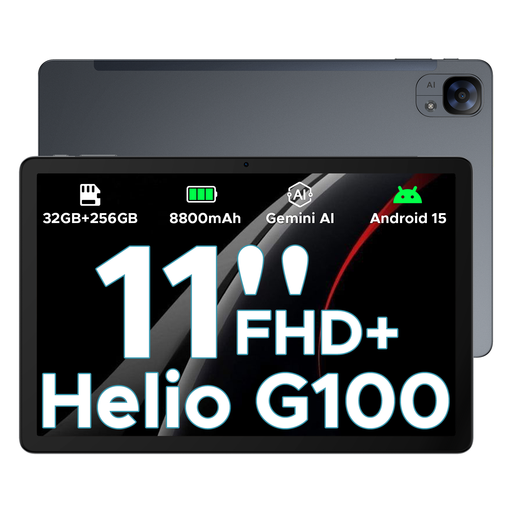 No image available
Consider this 11-inch format if you want screen space for racing controls and locally stored media. The title lists a Helio G100 processor and storage expansion up to 2TB; confirm game support and do not mistake Wi-Fi wording for cellular-data capability.
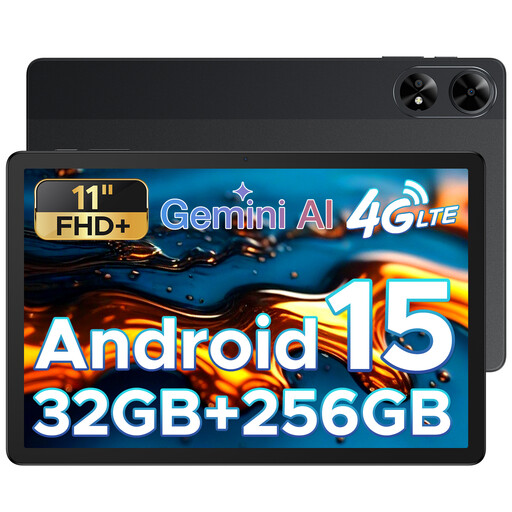 No image available
Consider this model if an 11-inch display and expandable local storage meet your travel needs. Its title lists an FHD+ display and expansion up to 2TB; confirm the processor and refresh rate if those specifications will decide your gaming choice.
 No image available
Consider this model only if you have room for a 14-inch tablet and want the listed mobile-data capability. The title specifies a 1920 × 1200 display, Helio G99 processor and 256GB storage. Confirm the Android version for this configuration before buying, as the listed version differs between its product details.
Not while driving. GOV.UK says it is illegal to hold and use a tablet while driving, including when stopped in traffic or at lights, and that drivers must remain in full control of the vehicle. Leave gameplay to passengers or wait until the vehicle is safely parked.
Wi-Fi can suit games you can play offline or where you have a dependable hotspot. Choose a cellular-capable tablet if it needs to connect independently away from Wi-Fi, then check the required data plan, route coverage and the game’s connection requirements.
No. Apple’s DualSense information limits play to controller-supported games on compatible iPads. Check the particular game and controller before making either one central to your tablet choice; PS Remote Play also requires an internet connection and a PlayStation Network account.
No. Lenovo UK lists a 165Hz panel for the Legion Tab Gen 3, but a game’s software support, settings and workload affect its actual frame rate. Check the title you intend to play rather than treating display refresh as a promised game result.
Check that you have a compatible charger before the trip. Samsung UK says the Galaxy Tab S10 FE and S10 FE+ do not include a travel adapter, so do not assume one will be in the box.