Players choosing by platform
If you know which bus simulator and device you will use, you can check the exact wheel version against both. This matters particularly when a wheel family has separate PlayStation and Xbox versions.


For bus simulation on one monitor, choose a wheel that fits your device, your game’s controls and your available desk space before comparing force-feedback features. A wheel-and-pedal set keeps the initial setup contained; a direct-drive bundle is another option for PC players who want that type of system, but neither route establishes support for a particular bus game.
If you know which bus simulator and device you will use, you can check the exact wheel version against both. This matters particularly when a wheel family has separate PlayStation and Xbox versions.
You need room to mount the wheel, position the pedals and reach the controls you use while driving, without assuming that an included clamp will fit your desk.
You may want a direct-drive wheel system, provided you can mount it securely and confirm that your bus game recognises the selected model and lets you map its controls.
Start with the exact game and playing device, then assess mounting space and the controls you need within reach of a single-monitor driving position.
| Concern | Buying checks | Who this matters to |
|---|---|---|
| Game and platform compatibility | Match the full wheel variant to your PC or console; check current support and control bindings for your exact bus game. | If my game cannot recognise the wheel or assign the controls I need, its other features will not settle my choice. Roughly 40% of consumers put exact game and platform compatibility first. |
| Desk fit and package contents | Measure the desk edge and pedal space; check the exact package for a suitable mounting method and included pedals. | I need the wheel to sit securely at my desk and the pedals to fit where I drive. Around 30% of consumers prioritise a workable desk setup and a sufficiently complete package. |
| Reachable controls and feedback | Check which wheel inputs the game can map and whether any feedback feature requires game integration. | When driving from one screen, I want the bus functions I use to be accessible without assuming every wheel button will work in-game. Approximately 30% of consumers put control access and feedback adjustment first. |
Logitech G specifies G29 for PlayStation and PC and G920 for Xbox and PC. Thrustmaster likewise offers separate T248 PlayStation/PC and Xbox/PC versions, so a familiar model name does not identify the console version.
Compare the full variant name on the product page with your playing device before ordering.
Logitech G says the fullest TRUEFORCE effects require in-game integration. Hardware features alone do not establish that a bus simulator will recognise the wheel or accept the button assignments you need.
Check the exact game’s current wheel-support information and its available bindings before prioritising feedback features.
A clamp does not establish whether your desk edge, monitor stand, chair position and pedal area leave enough usable space.
Measure the mounting area and plan pedal and cable positions before choosing a desk-mounted setup.
GOV.UK describes cancellation rights for eligible UK distance purchases, but cancellation is a different question from whether a wheel works with your game. Remedies for faulty or misdescribed goods are separate.
Check compatibility before purchase, and review the retailer’s return instructions if you may need to cancel.
Relevant if you are comparing G29/G920 or G923 wheel-and-pedal versions, or considering the PRO Racing Wheel system.
Relevant if you want to compare T248 wheel-and-pedal versions with wheel-side controls.
Relevant to PC players considering an R3 direct-drive bundle, with a separate Xbox-and-PC variant for those who need Xbox compatibility.
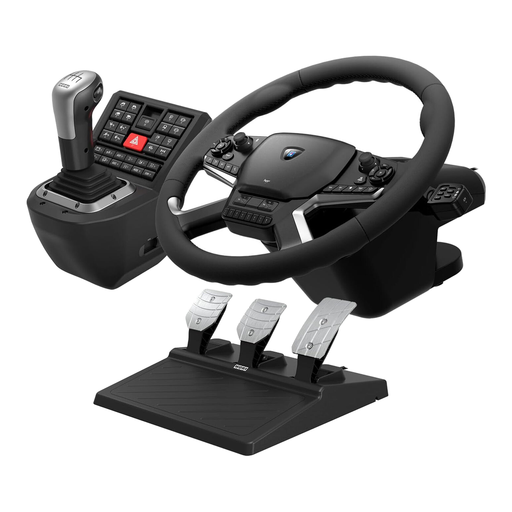
These choices include PlayStation/PC and Xbox/PC wheel-and-pedal variants and a Windows truck-control system. Match the version to your device, then check support for your bus game and the space needed at your desk.
 No image available
Consider this version for an Xbox or PC setup if your bus game supports it. Check the controls you can assign and whether the mounting method fits your desk.
 No image available
This Windows option may interest players looking at truck-style driving controls. Confirm support for your particular bus game, the inputs you can map and the mounting space required.
 No image available
Consider the PlayStation/PC version if it matches your device and bus game. Thrustmaster specifies 25 action buttons for this T248 version; check which inputs your game lets you assign and how you would mount the wheel.
 No image available
This PlayStation/PC wheel-and-pedal version is a choice to assess for a compatible bus game. Confirm the game’s bindings and the mounting method before ordering.
 No image available
Choose this Xbox/PC variant to assess rather than the PlayStation/PC version if you play on Xbox. Check recognition and control mapping in your bus game, along with desk-mounting requirements.
One monitor does not determine the wheel version to buy. Use your screen and desk arrangement to judge mounting space and whether essential controls are reachable, then check game and device compatibility separately.
Match the full wheel variant to your console, not just the wheel-family name. Logitech G specifies G29 for PlayStation/PC and G920 for Xbox/PC; Thrustmaster offers separate T248 PlayStation/PC and Xbox/PC versions.
No; check current support for your exact game, platform and wheel model, including the controls you need to assign. An official Bus Simulator 21 update from astragon Entertainment described steering-wheel issues and a diagnostic tool, showing why a general support label does not settle model-specific questions.
For eligible UK distance purchases, GOV.UK says consumers can normally cancel within 14 days of receiving the item. Check the applicable return procedure and distinguish a change-of-mind cancellation from separate statutory remedies if goods are faulty or misdescribed.