Compact-PC drifters
If you use a Windows PC but have no room for a full-size rig, a wheel-and-pedal bundle with a suitable desk clamp or cockpit mount is a starting point. The desk, mount and pedals still need to stay secure during steering.


Choose a wheel that supports your PC or console and intended game, then check whether its mount and pedals will fit securely in your cockpit. MOZA’s R5 offers a Windows-only direct-drive bundle with a desk clamp, while console players need an edition explicitly made for their system; extra controls should wait until you know they fit your game and space.
If you use a Windows PC but have no room for a full-size rig, a wheel-and-pedal bundle with a suitable desk clamp or cockpit mount is a starting point. The desk, mount and pedals still need to stay secure during steering.
If you play on PlayStation or Xbox, select the edition stated for your exact console. Logitech G lists distinct G923 platform variants, Thrustmaster lists PlayStation support for the T300RS GT Edition, and MOZA says its R5 bundle is PC-only.
If you want to start with a wheel and pedals, then consider another rim or a shifter, check accessory compatibility and mounting space before choosing an ecosystem. Thrustmaster documents a swappable wheel for the T300RS GT Edition; Logitech G documents an optional shifter compatible with the G923.
Start with the exact platform edition and game, then measure the mounting position. Once both checks are settled, compare the feedback system and any controls you would actually use for drifting.
| Concern | What to check | Who this matters to |
|---|---|---|
| Platform and game compatibility | Match the exact wheel edition to your PC or console; confirm wheel support and control setup in your intended game. | If I play on a particular console or drift title, the wheel has to work there before its other features matter. Compatibility is the primary concern for around 37% of consumers. |
| Secure fit in limited space | Measure the desk edge or compare cockpit mounting points, and plan how to keep the pedals in place. MOZA says the included R5 clamp supports desks up to 50 mm thick. | With little room around my seat, I need the wheel and pedals to stay put without taking over the space. Around 36% of consumers put secure mounting first. |
| Feedback and later controls | Compare the documented feedback system and settings for the exact model; check compatibility and space before adding a rim, shifter or handbrake. | If I want to adjust steering feedback or change controls as I learn, I need a route that accommodates those plans. Feedback and upgrades come first for around 27% of consumers. |
A familiar name does not establish support for every console. Logitech G lists separate G923 platform variants, while the Thrustmaster T300RS GT Edition and MOZA R5 bundle have different platform limits.
Check the exact edition against your device, then confirm that your intended game supports the wheel and its controls.
MOZA specifies a desk-thickness limit of 50 mm for the R5 bundle’s included clamp. A clamp that fits the edge is only part of the decision: the desk and pedals must also remain stable.
Measure the desktop and clamp clearance, or compare your wheel stand or cockpit mounting points before choosing the R5.
A separate stand also needs floor space and may need mounting hardware suited to your setup.
A handbrake or shifter takes mounting space and may not be needed for the controls you intend to use in your game.
Begin with the wheel-and-pedal layout, then check game support, accessory compatibility and available space before adding controls.
Wheel support in a game does not remove the need to check steering settings and button assignments. MOZA’s support guidance includes force-feedback configuration for supported PC games.
Check the instructions for your exact wheel and game, set steering rotation as needed, and bind the controls you plan to use.
The R5 Racing Bundle is a Windows PC route with a wheel, pedals, desk clamp and 5.5 Nm direct-drive wheelbase, according to MOZA Racing.
The G923 provides a wheel-and-pedal route with separately identified PlayStation/PC and Xbox/PC variants, according to Logitech G.
The T300RS GT Edition is a PC and PlayStation belt-drive option with a swappable-wheel system, according to Thrustmaster.
These Xbox-and-PC wheel choices address two different compact setups: a wheel-and-pedal arrangement, or a wireless wheel for which you should check the control layout before deciding whether it suits your drift game.
 No image available
Consider this wheel-and-pedal setup if you play on Xbox or PC and have room to position both components. Confirm support in your drift game, then check clamp clearance and how you will keep the pedals secure.
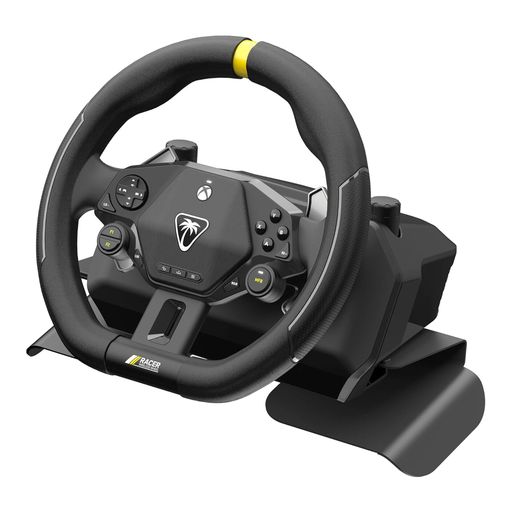 No image available
Consider this wireless wheel if you need an Xbox or PC setup and are assessing a compact control layout. Before choosing it for drifting, check how its steering, throttle and brake controls work in your game, whether it provides the feedback you want, and where you will position it.
No. MOZA support says the R5 bundle is for Windows 10/11 PCs and is not compatible with PlayStation or Xbox. Check the exact product edition when comparing other wheels.
The included R5 clamp supports desks up to 50 mm thick, according to MOZA support. Measure the desktop and available edge clearance, and consider whether the desk and pedals will stay stable during steering.
Not necessarily: check the controls your intended game accepts and the space available before adding either one. Logitech G’s compatible six-speed shifter, for example, is an optional accessory for the G923, G29 and G920.
Check an appropriate electrical-equipment recycling or take-back option rather than placing it with ordinary rubbish. UK guidance published by GOV.UK explains that waste electrical and electronic equipment rules aim to increase recovery, reuse and recycling.