Choose a racing wheel around repeatable braking, your simulator and platform, and a mounting position that will hold the controls securely. A wheel-and-pedal bundle is a practical starting route for a desk or wheel stand; a modular wheelbase with separately chosen pedals calls for more compatibility and mounting checks. Multiple monitors change the display setup, not the wheel’s platform compatibility.
Who this setup suits
Multi-monitor PC drivers refining pit entries
If you use several screens, you need to set up the displays and controls separately: a wider view will not make braking inputs more repeatable. iRacing Support documents windowed spanning and graphics-card display modes for three-monitor setups.
Desk-based drivers starting structured practice
A wheel-and-pedal bundle gives you steering and a brake pedal without choosing each component separately. Check that the platform version matches your system and that its mounting method fits your desk or wheel stand.
Rig owners building a modular PC setup
If you have a secure rig, you can select a wheelbase, rim and pedals separately. MOZA Racing’s R12 material describes a PC-only wheelbase, while Fanatec’s ClubSport DD guidance makes the attached rim part of the Xbox compatibility decision.
What to check before choosing
Settle the simulator, platform and screen arrangement before choosing controls; then decide whether a pedal bundle or separately selected components suit the way you intend to practise braking.
Wheel-and-pedal bundle
Consider it when: You want supplied controls for a desk or wheel stand and a version listed for your platform.
Check: Logitech G sells distinct G923 platform variants, so the bundle name alone does not establish compatibility with every console.
Direct-drive bundle
Consider it when: You want a direct-drive wheel with supplied pedals rather than selecting those components separately.
Check: The cited Thrustmaster T598 PlayStation/PC configuration is listed for PS5, PS4 and Windows PC; confirm the exact version and mounting method for your setup.
Modular wheelbase and pedals
Consider it when: You have a secure rig and want to select the rim and pedals independently.
Check: MOZA Racing lists the R12 as PC-only and as a wheelbase rather than a complete wheel-and-pedal package.
| Concern |
What to check |
Who this matters to |
| Multi-monitor setup |
Confirm the simulator’s display mode and the graphics outputs, resolution and physical alignment of the screens. |
If the screens do not form a usable view, changing the wheel will not solve the display problem. For around 33% of consumers, getting the multi-monitor setup working is the primary concern. |
| Repeatable braking |
Check the pedal type, mounting and calibration options for the simulator you use. |
I want to apply the brake consistently as I approach the pit entry, rather than rely on wheel feedback alone; roughly 25% of consumers put braking control first. |
| Modular setup |
Check platform support and whether the chosen wheelbase requires a separate compatible rim, pedals and mount. |
With a rig in place, I would rather choose each control to suit my setup. About 25% of consumers primarily want that modular route. |
| Platform and space |
Choose the exact PC or console variant and measure the desk, stand or cockpit for its mounting method. |
A straightforward package matters more if I have limited mounting space or want fewer components to match; for around 17% of consumers, that practical fit comes first. |
Pitfalls to avoid
-
Treating a screen problem as a wheel problem
A wheel does not create the three-screen image. iRacing Support describes simulator and graphics-card methods for arranging three monitors.
Confirm your simulator’s display mode, graphics connections and monitor layout before choosing a wheelbase on the assumption that it will fix the view.
Changing the display arrangement may also call for different cables or monitor mounts.
-
Choosing a wheelbase before checking the platform
Platform support can depend on the exact base and rim: MOZA Racing lists the cited R12 as PC-only, while Fanatec says ClubSport DD needs an Xbox-licensed steering wheel for Xbox use.
Write down your simulator and PC or console platform, then check the complete base, rim and pedal combination before buying.
-
Expecting wheel torque to fix inconsistent braking
Steering feedback and pedal input are separate setup decisions. iRacing Support’s calibration guidance distinguishes pedal types when configuring Brake Force Factor.
Choose pedals you can mount and calibrate for your simulator, and assess braking consistency before treating a wheelbase change as the answer.
-
Overlooking the mounting surface
Fanatec advises securely mounting ClubSport DD, and MOZA Racing specifies mounting points for the R12. The base still has to fit the desk, stand or cockpit you will use.
Measure the available space and check the exact clamp or mounting-hole requirements before selecting a modular base.
A suitable clamp, stand or mounting hardware may be needed as well as the wheelbase.
Relevant brands for reference
Logitech G
A reference point for bundled wheels and pedals, with platform-specific G923 versions.
- Logitech G lists the G923 system at 2.3 Nm and describes a pressure-sensitive brake.
- Check whether the exact G923 version is intended for your PC, PlayStation or Xbox setup.
Thrustmaster
Offers a cited direct-drive bundle for buyers who want a supplied rim and pedals.
- Thrustmaster specifies a 5 Nm constant-torque base and Raceline Pedals LTE for the cited T598 bundle.
- That T598 PlayStation/PC configuration is listed for PS5, PS4 and Windows PC; check the exact version for any other platform.
MOZA Racing
A modular wheelbase route for a PC setup with separately selected controls.
- MOZA Racing specifies 12 N·m peak torque and a four-hole bottom mount for the R12; its V2 material also describes optional front mounting.
- The cited R12 is PC-only and is a wheelbase, not a complete rim-and-pedal bundle.
Fanatec
A modular direct-drive route in which the selected base and rim affect platform fit.
- Fanatec specifies 12 Nm consistent torque for ClubSport DD and lists Windows PC compatibility.
- Fanatec says Xbox use requires an Xbox-licensed steering wheel; confirm the complete combination and mount the base securely.
Joybuy products for this setup
These wheel options cover bundled pedal controls for Xbox or PC and for PlayStation or PC, plus a wheel with integrated brake controls. For pit-entry practice, decide whether you need a separate brake pedal before comparing them.
 No image available
Thrustmaster T-248X Wheel and Pedals for Xbox and PC
A bundled pedal route for Xbox or PC pit-entry practice. Check the exact pedal variant and sensing type, simulator compatibility and clamp fit before buying.
View on Joybuy
 No image available
Thrustmaster T128 Force Feedback Wheel and Pedal Set for PS5, PS4 and PC
Consider this bundled wheel if you want a brake pedal for practice on one of its named platforms. Check the pedal type, mounting fit and compatibility with your simulator.
View on Joybuy
 No image available
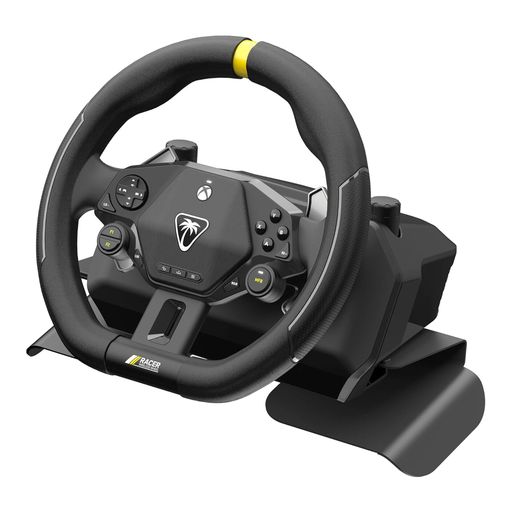
Turtle Beach Racer Wireless Wheel for Xbox and PC
Its brake and throttle controls are integrated into the wheel, so it does not provide the separate-pedal practice route offered by the bundles here. Check simulator compatibility and whether this control arrangement suits your braking practice.
View on Joybuy
 No image available
Thrustmaster T98-P Ferrari 296 GTB Wheel and Pedal Set for PS5, PS4 and PC
This bundled pedal option is for the named PlayStation and PC platforms. Check its mounting fit, simulator compatibility and steering-feedback operation against the controls you want for practice.
View on Joybuy
Common questions
Do three monitors mean I need a more powerful racing wheel?
No. A three-monitor view depends on the simulator and graphics setup, not wheelbase output. iRacing Support describes windowed spanning and a graphics-card-created display mode; choose the wheel for its controls, platform fit and mounting instead.
Do I need load-cell pedals to practise pit entries?
Not necessarily: the immediate requirement is a brake input you can mount, calibrate and use consistently. iRacing Support distinguishes pedal types in its Brake Force Factor guidance, so identify your pedals and configure the simulator for them.
How do I set up a wheel with a multi-monitor PC simulator?
Set up the screens using your simulator’s supported display method, then connect and calibrate the wheel and pedals. iRacing Support advises connecting the monitors to the dedicated graphics card and recalibrating a controller if you move it to another USB port.
Can a PC wheelbase also work on a console?
Only when the exact base and attached controls support that console. MOZA Racing lists the cited R12 as PC-only; Fanatec says ClubSport DD requires an Xbox-licensed steering wheel for Xbox use.


